
Fingerprint Spoofer
Helps to spoof browser fingerprinting
As of May 2026, Fingerprint Spoofer has 10,000 users and a 4.00/5 rating from 13 reviews in the Developer Tools category.
Usersdown 50.0 percent−50.0%
10.0K
10,000
Ratingdown 4.3 percent−4.3%
4.00
13 reviews
Reviewsup 18.2 percent+18.2%
13
Version
1.1
Manifest V3
90-day change · In the last 90 days this extension lost 10.0K users.
History
2 snapshotsTracking since Apr 21, 2026.
View as table
| Date | Users | Rating | Reviews | Version |
|---|---|---|---|---|
| Apr 21, 2026 | 20.0K | 4.18 | 11 | 1.1 |
| May 6, 2026 | 10.0K | 3.92 | 12 | 1.1 |
| Now | 10.0K | 4.00 | 13 | 1.1 |
Permissions & access
- Permissions
- storagescriptingcontentSettingsdeclarativeNetRequestWithHostAccess
- Host access
- <all_urls>
Screenshots


About
Browser fingerprinting refers to the practice of collecting information about a user's web browser and using it to create a unique digital profile that can be used to track the user's online activities across different websites. This can include information about the user's device, operating system, browser version, installed plugins, screen resolution, and more.
A combination of these attributes can be used to identify the user.

We want to safeguard the user against this profiling. Here is a Chrome extension that anonymizes the user.

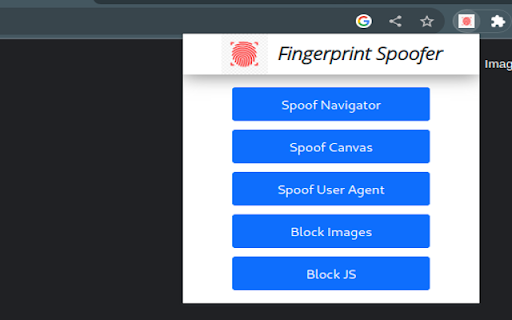
-It can spoof the navigator values. It replaces real value with dummy values.
-It can protect against Canvas fingerprinting. It replaces canvas elements with a dynamically generated image, which is unique every time.
-It can spoof the User Agent to a random device
-Block Images
-Block Javascript from running on pages
try out our Chrome extension here:
-https://amiunique.org/
-https://coveryourtracks.eff.org/
-https://browserleaks.com/canvas - for canvas fingerprinting

Note:
- that only one spoofing feature works at a time. you can try multiple but they are not guaranteed to work
- if you spoof the canvas element it causes a gray-scale/ gibberish/ garbage screen to appear. Commonly spotted while playing YouTube videos above the progress bar. just disabling canvas spoofing will make it go away. This is due to creating a unique canvas element every time fooling the fingerprinters.
Technical
- Version
- 1.1
- Manifest
- V3
- Size
- 15.62MiB
- Min Chrome
- 88
- Languages
- 1
- Featured
- Yes
Metadata
- ID
- facgnnelgcipeopfbjcajpaibhhdjgcp
- Developer ID
- ua3c4edcedadef3f23287375a2a478be5
- Developer Email
- [email protected]
- Created
- Apr 11, 2023
- Last Updated (Store)
- Jun 26, 2025
- Last Scraped
- May 31, 2026
- Website
- —
- Privacy Policy
- —
Similar extensions
Alternatives to Fingerprint Spoofer, ranked by description similarity.
Canvas Blocker - Fingerprint Protect
Prevent HTML canvas element from generating a unique identification key to protect user's privacy
60.0K
★ 3.9

BrowserSpoof - User Agent Switcher
BrowserSpoof allows users to change their browser's user agent to disguise their browser identity.
480
★ 3.0

CthulhuJs (Anti-Fingerprint)
Your browser, your rules — your digital fingerprint, in your control.
7.0K
★ 4.3

User-Agent Switcher: Device Identity Simulator
Simulate different device fingerprints for testing purposes
96
★ 4.0

Digital Mask: User-Agent Switcher
Extension for changing User-Agent, Client Hints, JS fingerprint, and Privacy protection
86
★ 5.0

User-Agent Switcher and Manager
Spoof websites trying to gather information about your web navigation to deliver distinct content you may not want
300.0K
★ 4.3

Easel UI
An extension that allows you to easily QA the design parity of your Figma Components on a web page.
23
★ 5.0

User-Agent Switcher Pro
Spoof websites tracking your browser to control or personalize web content
998
Data sourced from the Chrome Web Store · last verified May 31, 2026.