
Bookmarks Ai testing
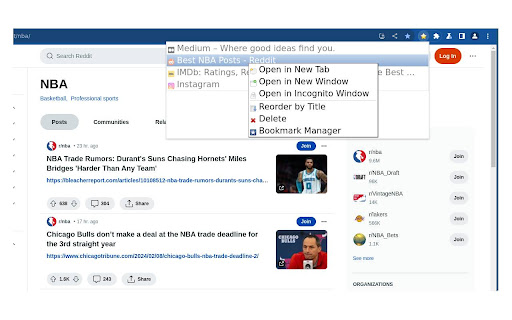
Shows smarts bookmarks menu.
As of May 2026, Bookmarks Ai testing has 169 users in the Workflow & Planning category.
Usersup 1.2 percent+1.2%
169
169
Ratingno change0%
—
— reviews
Reviewsno change0%
—
Version
3.4
Manifest V3
History
2 snapshotsTracking since Apr 25, 2026.
View as table
| Date | Users | Rating | Reviews | Version |
|---|---|---|---|---|
| Apr 25, 2026 | 167 | — | — | 3.4 |
| May 21, 2026 | 165 | — | — | 3.4 |
| Now | 169 | — | — | 3.4 |
Permissions & access
- Permissions
- bookmarkswebNavigationfaviconfontSettingsstorage
- Host access
- None declared
Screenshots


About
This extension provides access to a bookmarks menu.

How to use:

- Click with the left mouse button to open a bookmark in the current tab.
- Use the middle mouse button or the left mouse button while holding down the Ctrl key to open a bookmark in a new tab.
- To instantly switch to a newly opened tab with a bookmark, press the middle mouse button while holding down the Shift key.
- Press the left mouse button with the Shift key held down to launch a bookmark in a new window.
- Click the middle button on a folder to open all its bookmarks in separate tabs.
- Right-click to bring up the context menu.

In the settings panel, you can choose to conceal certain bookmarks or folders, which is particularly handy if you're syncing bookmarks across various computers.
Technical
- Version
- 3.4
- Manifest
- V3
- Size
- 184KiB
- Min Chrome
- 110
- Languages
- 55
- Featured
- Yes
Metadata
- ID
- nokpmbaohdmciecbdcklmjmdlklpnfjh
- Developer ID
- u28df335122221a43e8426e390f75f611
- Developer Email
- [email protected]
- Created
- Feb 12, 2024
- Last Updated (Store)
- Feb 29, 2024
- Last Scraped
- May 21, 2026
- Website
- —
- Support URL
- —
- Privacy Policy
- —
Similar extensions
Alternatives to Bookmarks Ai testing, ranked by description similarity.

HyperJump 2 Bookmarks
A bookmarking extension by PequaSoft.
9
Bookmark Sidebar
Adds a toggleable sidebar with all your bookmarks at the edge of your browser window.
300.0K
★ 4.5

Save Multiple Bookmarks
Save multiple bookmarks effortlessly in Chrome
236
★ 4.3

Bookmark Commander
Dual-panel Bookmark Manager
360
★ 4.0

AnotherTab - New Tab page
Uses New Tab page to show bookmarks folder (Bookmarks Bar by default) for quick access to its items and allows to manage it
289
★ 4.7

Easy Bookmarks
Now makes all your hidden bookmarks visual
9
★ 5.0

Bookmarks Commander
A dual-pane Norton Commander liked bookmarks manager that supports sorting, dark theme, search, and duplicate detection
7.0K
★ 4.5

Recent Bookmarks
Easily access your recent bookmarks or search for them
1.0K
★ 4.0
Data sourced from the Chrome Web Store · last verified May 21, 2026.