
Bookmarks Commander
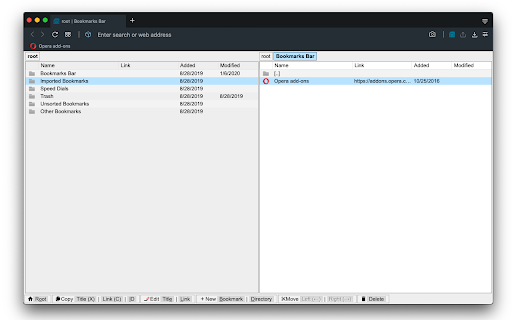
A dual-pane Norton Commander liked bookmarks manager that supports sorting, dark theme, search, and duplicate detection
As of May 2026, Bookmarks Commander has 7,000 users and a 4.46/5 rating from 68 reviews in the Workflow & Planning category.
Usersup 16.7 percent+16.7%
7.0K
7,000
Ratingup 0.2 percent+0.2%
4.46
68 reviews
Reviewsup 3.0 percent+3.0%
68
Version
0.5.0
Manifest V3
90-day change · In the last 90 days this extension gained 1.0K users.
History
2 snapshotsTracking since Apr 26, 2026.
View as table
| Date | Users | Rating | Reviews | Version |
|---|---|---|---|---|
| Apr 26, 2026 | 6.0K | 4.45 | 66 | 0.5.0 |
| May 24, 2026 | 7.0K | 4.46 | 67 | 0.5.0 |
| Now | 7.0K | 4.46 | 68 | 0.5.0 |
Permissions & access
- Permissions
- bookmarkscontextMenusfaviconstorage
- Host access
- None declared
Screenshots

About
This is a two-panel bookmarks manager for your browser. It works similar to the famous Total Commander. You can move items between the panels or view two different directories simultaneously.

Instruction:
Click on the toolbar button once to open the commander in a new browser tab. By default the left panel has focus. Use arrow up and arrow down keys to navigate. Use Enter to move to a directory. To move the other panel simply press The left or right arrow key.

Shortcuts:
[open links]: Press Enter key to open on the same tab. Press Ctrl + Enter or Command + Enter to open in a background tab or use double-click to open on the same tab. Press Ctrl/Command while double-clicking to open in a background tab.
[select multiple bookmarks]: Ctrl/Command with left-click to select more items.
[copy links to the clipboard]: Ctrl + C or Command + C to copy selected links to the clipboard.
[copy titles to the clipboard]: Ctrl + X or Command + X to copy selected titles to the clipboard.
[directly navigate to a bookmark]: Press the first character of the title multiple times to navigate between items starting with this particular character
[move one step up]: Use backspace to navigate to the parent directory
[move between left and right panels]: use Tab key to toggle between panels. Use Ctrl + 1 or Command + 1 to move to the left tab. Use Ctrl + 2 or Command + 2 to move to the right tab. You can alternatively use arrow-left and right to move between panels.
[move selected bookmarks and folders to the other panel]: Use Ctrl/Command + right arrow key to move selected items to the right panel when the left panel is focused. Use Ctrl/Command + left arrow key to move selected items to the left panel when the right panel is focused.
[sort items]: Ctrl/Command + J for A-Z and Ctrl/Command + Shift + J for Z-A
[find duplicated bookmarks]: Ctrl/Command + Shift + F; use the "duplicates" keyword on the search bar to find all duplicated bookmarks in the current directory and subdirectories.
[move bookmarks between different browsers]: Ctrl/Command + Y to export selected bookmarks to the clipboard, then use Ctrl/Command + P to import them to the new machine. This way you can transfer bookmarks between two browsers.
[configurations]: Use Ctrl/Command + S to access configuration panel. You can change the font size and font family of the interface or change the color scheme (theme) of the interface (dark, light, or based on your OS color scheme) or toolbar icon's color. It is also possible to use the new "VIM" mode to support VIM-compatible navigation (still in progress).

Notes:
1. When an operation is not allowed, the button is disabled.
2. You can see all the shortcuts by placing your mouse over the buttons.
3. You can drag and drop bookmarks between panes
4. You can use right-click context menu to open links in new windows
Technical
- Version
- 0.5.0
- Manifest
- V3
- Size
- 98.41KiB
- Min Chrome
- 88
- Languages
- 12
- Featured
- Yes
Metadata
- ID
- knfpajocfeohpaipkfpdbfhgibajfmcf
- Developer ID
- ud5508f939bc9b6cceaeb493519261502
- Developer Email
- [email protected]
- Created
- Jan 6, 2020
- Last Updated (Store)
- Apr 29, 2024
- Last Scraped
- May 24, 2026
- Website
- —
- Support URL
- —
- Privacy Policy
- —
Similar extensions
Alternatives to Bookmarks Commander, ranked by description similarity.

Bookmark Commander
Dual-panel Bookmark Manager
360
★ 4.0

Compact Bookmark Commander
Show 2 independent bookmark folders side by side. Hot Keys for: move, delete, create folder, edit item, sort current folder.
51
★ 4.0

Bookmark Manager and Viewer
An elegant bookmark manager with fuzzy search and more
10.0K
★ 3.9

Bookmarks Ai testing
Shows smarts bookmarks menu.
169

Pretty Bookmarks
A pretty Google Chrome bookmark manager created with productivity with mind.
40
★ 3.0

BKMRK Bookmark Manager
A better and faster version
—

EZ Tabs: Tabs & Bookmarks Manager
Easy tabs and bookmarks manager with intuitive hotkeys.
You can
- see a list of tabs opened in current window
- open or close a…
18
★ 5.0

Quick Bookmarks Menu
Quick access to bookmarks or favorites.
10.0K
★ 4.5
Data sourced from the Chrome Web Store · last verified May 24, 2026.