
Kaptr.me - Web Dashboards with Live Snapshots
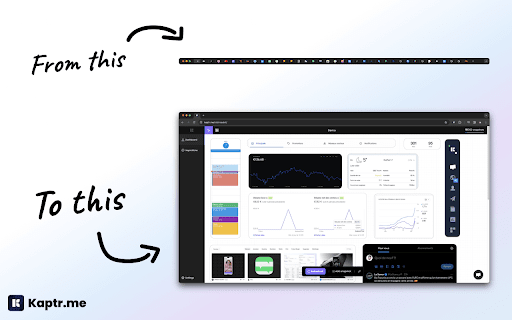
Capture live snapshots of any app or website - centralize them on a single dashboard.
As of June 2026, Kaptr.me - Web Dashboards with Live Snapshots has 1,000 users and a 4.50/5 rating from 16 reviews in the Productivity category.
Usersno change0%
1.0K
1,000
Ratingno change0%
4.50
16 reviews
Reviewsno change0%
16
Version
4.3.0
Manifest V3
90-day change · In the last 90 days this extension 1 version update, changed permissions.
History
1 snapshotsTracking since Apr 24, 2026.
View as table
| Date | Users | Rating | Reviews | Version |
|---|---|---|---|---|
| Apr 24, 2026 | 1.0K | 4.50 | 16 | 4.2.0 |
| Now | 1.0K | 4.50 | 16 | 4.3.0 |
Changelog
- Apr 24, 2026permissions
storage, tabs, offscreen, scripting, windows, alarms
storage, tabs, offscreen, scripting, windows, alarms, downloads, clipboardWrite
Permissions & access
- Permissions
- storagetabsoffscreenscriptingwindowsalarmsdownloadsclipboardWrite
- Host access
- <all_urls>
Screenshots


About
Kaptr.me - #1 Chrome Extension for Live Screenshot Dashboards 2025 Eliminate tab chaos: Kaptr.me consolidates all your data into intelligent dashboards with auto-refreshing snapshots. Instant access to key info, no dispersion. Outperform FireShot, GoFullPage, Awesome Screenshot with personalized dynamic dashboards. _________________ How It Works _________________ 1. Visit any app/site 2. Activate Kaptr.me 3. Capture snapshots of sites/apps/dashboards to track 4. Select your target dashboard 5. Refresh everything via "Refresh All" or auto-refresh 6. Share with team/clients or keep private. _________________ Key Advantages ________________ Dashboards dynamically customized: Freely place snapshots for a command center reflecting your priorities. Always fresh info: Live auto-refreshed captures for immediate data-driven decisions. Secure collaborative sharing: Dashboards shared without sensitive logins; real-time view for all. No-code centralization: Drag & drop varied sources into responsive layouts, no tech skills needed. ================ All Features ================ - Create snapshot - Auto-refresh & manual refresh data - Snapshot duplication + moving - Snapshot history - Edit snapshot - Draw & annotate directly on snapshots - Quick annotation and editing tools - Multiple dashboard - Fully responsive dashboards - Customizable themes + custom folder icons - Custom URL slugs - Public or private dashboard sharing - Embed snapshots & dashboards anywhere - PDF export (captures + dashboards) _________________ Powerful Use Cases _________________ Personal Dashboard: Google Calendar, Stripe payments, analytics, HubSpot marketing, Gmail, weather/news in auto-update. Weekly Meeting Dashboard: Microsoft Teams/Slack agendas/notes + Asana/Trello live, no login sharing. Team Data Library: Auto snapshots of Salesforce forecasts, marketing analytics for total transparency. Client Reports: Google Analytics/social/finance/project metrics in secure environment. ______________ Absolute Security & Support ______________ Kaptr.me stores ZERO logins/sensitive credentials; reopens URLs via existing browser session for seamless access. Data confidential, authorized views only. Responsive support team for quick assistance. °°°°°°°°°°°°°°°°°°°°° Join Us or Contact Us °°°°°°°°°°°°°°°°°°°°° Website: https://kaptr.me/ Twitter: https://x.com/KaptrMe Linkedin: https://www.linkedin.com/company/kaptr-me/ Facebook : https://www.facebook.com/groups/1660909351400714/ Instagram : https://www.instagram.com/kaptr.me/ Youtube : https://www.youtube.com/@KaptrMe TikTok : https://www.tiktok.com/@kaptr.me Medium : https://medium.com/@kaptr.me
Technical
- Version
- 4.3.0
- Manifest
- V3
- Size
- 274KiB
- Min Chrome
- 121
- Languages
- 2
- Featured
- No
Metadata
- ID
- noemdebebhkgjpkgbcnpieklilcjhccn
- Developer ID
- u10b27047cba7801fc31c943c25099951
- Developer Email
- [email protected]
- Created
- Oct 11, 2023
- Last Updated (Store)
- Apr 23, 2026
- Last Scraped
- Jun 6, 2026
- Website
- kaptr.me
- Support URL
- https://kaptr.me/
- Privacy Policy
- https://kaptr.me/privacy-policy/
Similar extensions
Alternatives to Kaptr.me - Web Dashboards with Live Snapshots, ranked by description similarity.

Chrome Screenshot
Use Chrome Screenshot: smart screenshot chrome extension! Capture, edit, save any page. Explore how to screenshot on chrome browser
2.0K
★ 4.6

Dashy New Tab Dashboard and Side Panel
New Tab Dashboard and Side Panel that integrates widgets and productivity tools.
20.0K
★ 4.7

ScreenTrail
Professional screenshot tool with floating capture bar, annotation editor, and PDF reports.
25
★ 5.0

PixelPerfect Capture
Capture ultra high-resolution screenshots
15

Scrsht Screen Recorder
Screen Recorder is a software that allows you to capture and record your computer screen right in the browser!
189
★ 4.6

SuperBoard
Capture and organize parts of webpages on a customizable board
5

Advanced Screenshot Capture
Take advanced screenshots of windows and tabs with customizable options.
9
★ 5.0

Fast Chrome Screen Capture
Chrome screen capture made easy: a fast snipping tool to copy selected area and page URL to clipboard. No files, direct to buffer!
843
Data sourced from the Chrome Web Store · last verified Jun 6, 2026.