
Calendar Selector for Google Calendar
Save and restore groups of calendars selected
As of May 2026, Calendar Selector for Google Calendar has 40,000 users and a 4.53/5 rating from 34 reviews in the Workflow & Planning category.
Usersno change0%
40.0K
40,000
Ratingno change0%
4.53
34 reviews
Reviewsup 6.3 percent+6.3%
34
Version
0.1.7
Manifest V3
History
3 snapshotsTracking since Apr 21, 2026.
View as table
| Date | Users | Rating | Reviews | Version |
|---|---|---|---|---|
| Apr 21, 2026 | 40.0K | 4.53 | 32 | 0.1.7 |
| May 6, 2026 | 50.0K | 4.55 | 33 | 0.1.7 |
| May 18, 2026 | 40.0K | 4.55 | 33 | 0.1.7 |
| Now | 40.0K | 4.53 | 34 | 0.1.7 |
Permissions & access
- Permissions
- storage
- Host access
- https://calendar.google.com/*
Screenshots
About
CHANGELOG:

Version 0.1.7
   - Bug fix: More resilient finding of calendar in the left panel, will skip list items that do not appear to be built-in Google calendar entries

Version 0.1.6
   - Enhancement: quick fix for Chrome deprecating Manifest v2, upgraded to v3. Some keyboard shortcuts for preset management don't work, but functionality is available in the UI.

Version 0.1.5
   - Bug fix: Breakage introduced by Google Calendar changing the page HTML structure

Version 0.1.4
   - Bug fix: Agenda view displays items correctly
   - Enhancement: Added a license file to the repository (MIT), and provided privacy policy and data practices in the store listing (no data is ever shared or leaves the user's browser).

See https://gitlab.com/bluenexa/google-calendar-selector for all version updates


DESCRIPTION:

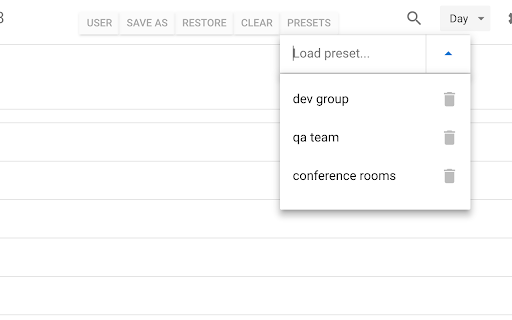
This extension creates a set of buttons in the Google Chrome UI that allow you to easily create, save, and display groups of calendar presets. If you have many calendars and often need to switch between which calendars are shown (such as colleagues and teams), this extension is for you.

Your presets are stored in your local browser storage and sync across devices automatically (using Chrome's built in syncing mechanism).

Keyboard Shortcuts:
Press Ctrl+Alt and the highlighted key for the main functions (highlighted key is one of e, s, r, c, i, x, or p).


PRIVACY & SECURITY

Except Chrome's built-in sync mechanism, the extension functions completely offline in the browser and no data leaves the user's computer. Local storage in the browser is used to persist saved calendar groups and to sync saved groups across computers via Chrome's built-in sync mechanism (tied to the logged in Chrome user). All software is fully open source and available at https://gitlab.com/bluenexa/google-calendar-selector.


Built by the team at Bluenexa.
Technical
- Version
- 0.1.7
- Manifest
- V3
- Size
- 884KiB
- Min Chrome
- 88
- Languages
- 1
- Featured
- Yes
Metadata
- ID
- nmliklikilkjommabacojbijjimlgjck
- Developer ID
- u7b0f823bf9a096684597f62c174e6b35
- Developer Email
- [email protected]
- Created
- Nov 27, 2017
- Last Updated (Store)
- Aug 16, 2025
- Last Scraped
- May 31, 2026
- Website
- —
- Support URL
- —
- Privacy Policy
- —
Similar extensions
Alternatives to Calendar Selector for Google Calendar, ranked by description similarity.

Multiple Calendars Selector for Google Cal
Allows you to quickly display just the group of calendars that you want (on Google Calendar).
4.0K
★ 3.9

Scheduling Calendar
This Scheduling Calendar: Manage events, calendar reminders & sync calendars. Join video meetings in a shared calendar app.
5.0K
★ 4.5

GCalPlus
Extra Options for Google Calendar
60.0K
★ 3.9

Checker Plus for Google Calendar™
See your next events, get meeting notifications and snooze events without opening the Google Calendar page!
300.0K
★ 4.4

GroupCal - Calendar Groups Manager
Toggle multiple Google Calendar subscriptions on/off with one click for easier calendar management.
3

Simple Work Shift Calendar
Manage your work shifts with an intuitive calendar interface
16
★ 1.0

Google Calendar Grouping
Create groups of Google Calendars and switch between them instantly—see only the calendars you want without re-clicking each one.
30

Calendar Check
Find optimal meeting times by checking calendar availability
3
Data sourced from the Chrome Web Store · last verified May 31, 2026.