
ConstEdit Word Processor
ConstEdit word processor is an html document editor. It supports voice typing, html5 sections and external stylesheets.
As of May 2026, ConstEdit Word Processor has 272 users and a 3.00/5 rating from 3 reviews in the Workflow & Planning category.
Usersno change0%
272
272
Ratingno change0%
3.00
3 reviews
Reviewsno change0%
3
Version
4.2.0
Manifest V3
History
3 snapshotsTracking since Apr 1, 2026.
View as table
| Date | Users | Rating | Reviews | Version |
|---|---|---|---|---|
| Apr 1, 2026 | 272 | 3.00 | 3 | 4.2.0 |
| May 2, 2026 | 279 | 3.00 | 3 | 4.2.0 |
| May 31, 2026 | 280 | 3.00 | 3 | 4.2.0 |
| Now | 272 | 3.00 | 3 | 4.2.0 |
Permissions & access
- Permissions
- clipboardReadclipboardWritedeclarativeContentdownloadsfontSettingsstorage
- Host access
- file://*/*
Screenshots


About
Changes of the current version since the last update :

- Fixed. The validation on the link url is now performed properly, when a link is added or changed. Previously the validation was simply skipped.
- Changed. The number of Auto-Convert mapping items is increased from 50 to 99.

ConstEdit is a word processor that writes documents in the html format. No coding skill on html is required. Numerous popup tool-tips are set into the user interface extensively to help you get familiarized quickly.

It is not an online html editor that relies on connecting to an internet service. It works locally in your device for more data security and performance.

It provides all the editing functionality that you would expect from a regular word processor, such as rich text editing, spell-checking, auto-capitalization, and auto-correction. The features mentioned below however make ConstEdit stand out from other editors.

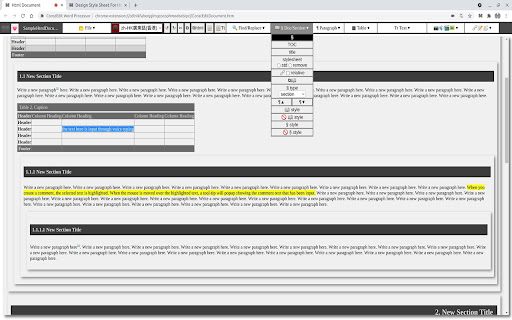
1. Document Sections Structure. You can visualize and manage your doc sections structure conveniently with drag-and-drop.

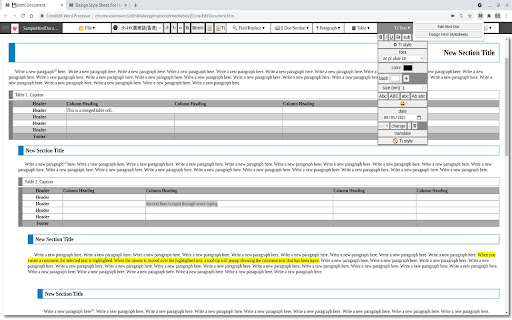
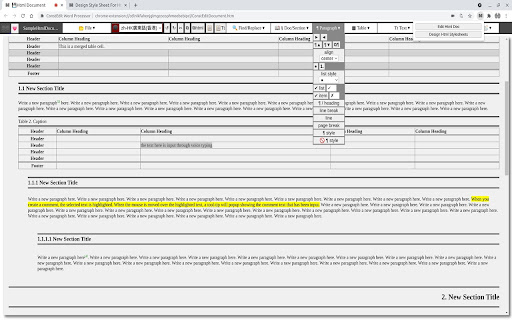
2. Separation of formatting from authoring. Formatting of document is done automatically by assigning an external stylesheet to your doc. You can now concentrate on your authoring. Elements in your doc is formatted automatically on-the-fly as you type, according to the stylesheet. Writing a doc is just as simple as using the plain text format.

3. Design Html Stylesheets. With ConstEdit, you can design and generate your own custom stylesheets for use with your documents. ConstEdit comes with 4 ready-to-use stylesheets.

4. Voice Typing. ConstEdit supports text input through voice typing with Speech Recognition.

5. Footnotes. You can set footnotes conveniently and you can switch quickly between the locations of the legs of the footnotes.

6. Html Code Editor. If you are a developer, you may use the ConstEdit + Developer Tools combo as a simple and handy html source code editor.

7. Copy Html for Bloggers. You can make use of "Copy Html" to copy your content as Html code to paste into your blog authoring tool, if your tool accepts Html code (such as Google Blogger). This way you can prepare complicated formats such as Table for your blogs conveniently.

8. Other features. Common capabilities of regular word processors are of course also supported by ConstEdit : e.g. auto-numbering of sections / tables / figures / footnote, auto-capitalization, auto-convert, spell-check, etc.
Technical
- Version
- 4.2.0
- Manifest
- V3
- Size
- 3.2MiB
- Min Chrome
- 91.0
- Languages
- 1
- Featured
- No
Metadata
- ID
- nmedmnaifobfgcamlonhoaejnklcapdi
- Developer ID
- uc4edac0fe8e2d412a7a2ffdfbfc4f785
- Developer Email
- [email protected]
- Created
- Oct 30, 2017
- Last Updated (Store)
- Aug 26, 2023
- Last Scraped
- May 31, 2026
- Website
- http://www.constedit.com/
- Support URL
- https://www.constedit.com/p/report-bug.html
- Privacy Policy
- https://www.constedit.com/p/privacy-policy.html
Similar extensions
Alternatives to ConstEdit Word Processor, ranked by description similarity.

Text Editor
A free, highly customizable text and code editor app for your browser.
195
★ 5.0

Staktekst
A simple note-taking tool with search engines and text-clip features for English Learners
1
★ 5.0

Swift Notes
A notepad extension that allows you to swiftly capture all your tasks and ideas while browsing the web.
46
★ 4.9

DocsWork Editor for documents DOC & DOCX
Create and edit DOC & DOCX documents with an editor online
30.0K
★ 3.7

Convert Case
Convert text in your browser between UPPER CASE, lower case and more
10.0K
★ 4.3

Notepad Online
A simple online notepad that can sync between devices, edit notes as text and HTML, save notes to your computer and more.
8.0K
★ 4.0

Text Tools
Collection of small & convenient TEXT tools.
322
★ 5.0

Toolbox
Chrome Toolbox, Useful tool set. Commonly used text processing tools. ps:sorting, de-emphasis, trimming, md5, sha1, Code format
3.0K
★ 3.2
Data sourced from the Chrome Web Store · last verified May 31, 2026.