
ChatGPT Download For PC, Mac, Windows - Free
A simple extension for use ChatGPT in your PC, Mac, and Windows.
As of May 2026, ChatGPT Download For PC, Mac, Windows - Free has 40,000 users and a 4.23/5 rating from 13 reviews in the Workflow & Planning category.
Usersno change0%
40.0K
40,000
Ratingno change0%
4.23
13 reviews
Reviewsno change0%
13
Version
1.4.3
Manifest V3
Permissions & access
- Permissions
- storage
- Host access
- https://api.openai.com/v1/completions
Screenshots


About
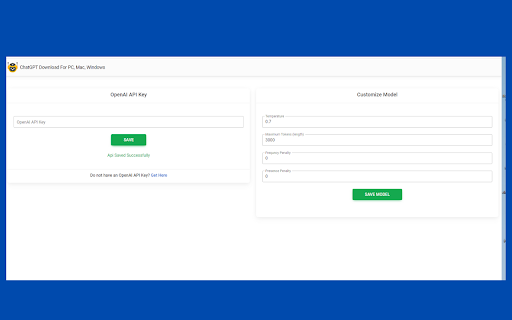
The 'Download ChatGPT for PC, Mac, and Windows' extension is a simple Google Chrome extension that enables users to easily utilize ChatGPT 3.5 from their Windows or Mac computer. Users can also access the ChatGPT website directly from their browser. How to Use? 📭 Step 1: Firstly, click on the extension icon after installing it. Then click the 'API Key Setting' button. Add your OpenAI API key and adjust the OpenAI Temperature, Maximum Tokens, Frequency Penalty, and Presence Penalty settings. Finally, click the 'Save' button. 🧑🎨 Step 2: After saving the settings, click the extension icon again. Add your prompt and click the 'GENERATE' button. Please wait a few moments for the content to be generated. The response will appear in the 'Response' text area. 🧑🎓 Step 3: Copy the text and enjoy! You can also access the official ChatGPT site by clicking the 'Go to ChatGPT' button. Additionally, you can download the ChatGPT app by clicking the 'ChatGPT DOWNLOAD' button. Features: 👍 Content generated by ChatGPT 3.5. 👍 Easy integration of ChatGPT API and token control. 👍 Simple and lightweight. ⭐️ Compatible with Google Chrome browser on PC, Windows, and Mac. 🔐 Respects user privacy 100%. 🆓 Forever free to use. 👍 Easily accessible with just one click from any tab. First, install this extension. Then, click on "API Key Settings." You will see a field to add your OpenAI API key. Simply add it here and click the "Save" button. After that, you will be able to generate a response by adding any prompt within this extension. How to get chatGPT API key? - Go to OpenAI's Platform website at platform.openai.com and sign in with an OpenAI account. - Click your profile icon at the top-right corner of the page and select "View API Keys." - Click "Create New Secret Key" to generate a new API key. With the ChatGPT for PC extension, you can save at least 30 minutes daily on various communication and writing tasks. Try it out now for free and experience how it boosts your productivity! The ChatGPT for Windows extension works seamlessly with all your favorite websites!
Technical
- Version
- 1.4.3
- Manifest
- V3
- Size
- 124KiB
- Min Chrome
- 88
- Languages
- 1
- Featured
- No
Metadata
- ID
- nllgcmmepbpamdcbmikmlflnljifghlg
- Developer ID
- ucdc55265ce6221aaac3a1205b35668d5
- Developer Email
- [email protected]
- Created
- Jun 11, 2023
- Last Updated (Store)
- Jul 12, 2023
- Last Scraped
- May 31, 2026
- Website
- chatgptfreedownload.blogspot.com
- Support URL
- https://chatgptfreedownload.blogspot.com/
Similar extensions
Alternatives to ChatGPT Download For PC, Mac, Windows - Free, ranked by description similarity.

ChatGPT Assistant For Reddit™
This is an Open-AI ChatGPT powerful tool to give you the AI magic on Reddit™ for marketing promotion.
3.0K
★ 4.2

ChatGPT in Side Panel
Access ChatGPT directly in Chrome's side panel with seamless login and chat history synchronization.
165
★ 5.0

ChatGPT Helper. Quick Access & Download
Boost your productivity with AI-powered ChatGPT chatbot & easily download chat history. Get quick access with ChatGPT Helper!
329
★ 5.0

aiPromptPal
aiPromptPal makes using ChatGPT easy in search engines, to write emails, and on any website
122
★ 5.0

ChatGPT Assistant For Quora™
This is an Open-AI ChatGPT powerful tool to give you the AI magic on Quora for marketing promotion.
632
★ 5.0

ChatGPT-The Future - Your AI assistant that can help you anytime, anywhere.
Your personal AI assistant, super powerful, super awesome. Can handle any request.
2.0K
★ 3.3

FrogGPT
Connect to your openai.com account and use ChatGPT on any webpage.
26

ChatGenie for Chatgpt
The ultimate browser extension for accessing Chatgpt
70.0K
★ 4.1
Data sourced from the Chrome Web Store · last verified May 31, 2026.