
Trustifi
This extension will allow you to easily use the Trustifi services
As of June 2026, Trustifi has 5,000 users and a 4.96/5 rating from 23 reviews in the Workflow & Planning category.
Usersdown 28.6 percent−28.6%
5.0K
5,000
Ratingno change0%
4.96
23 reviews
Reviewsno change0%
23
Version
1.2.421
Manifest V3
90-day change · In the last 90 days this extension lost 2.0K users, 2 version updates.
History
6 snapshotsTracking since Apr 16, 2026.
View as table
| Date | Users | Rating | Reviews | Version |
|---|---|---|---|---|
| Apr 16, 2026 | 7.0K | 4.96 | 23 | 1.2.418 |
| Apr 26, 2026 | 7.0K | 4.96 | 23 | 1.2.418 |
| May 7, 2026 | 7.0K | 4.96 | 23 | 1.2.418 |
| May 18, 2026 | 7.0K | 4.96 | 23 | 1.2.420 |
| May 23, 2026 | 6.0K | 4.96 | 23 | 1.2.420 |
| May 27, 2026 | 6.0K | 4.96 | 23 | 1.2.421 |
| Now | 5.0K | 4.96 | 23 | 1.2.421 |
Permissions & access
- Permissions
- tabsbackgroundstoragedownloadsidentity
- Host access
- https://*.google.com/, https://*.googleusercontent.com/
Screenshots


About
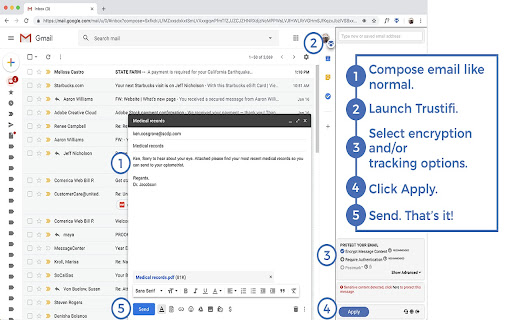
Trustifi makes it easy for you to get the email protection and control you need with the ultimate add-in for Gmail, including alerts, traceability, monitoring and awareness, while being straightforward, transparent and simple enough to apply all this security at the click of a button.

---

Encryption
• NSA-grade email encryption, plus full DLP with sophisticated rules engine to support any use case
• Secure mobile relay for full protection on any device
• Recall, block, modify and set expirations for already sent and delivered emails

Data Loss Prevention
• 100% compliant with HIPAA/ HITECH, PII, GDPR, FSA, FINRA, LGPD, CCPA and more
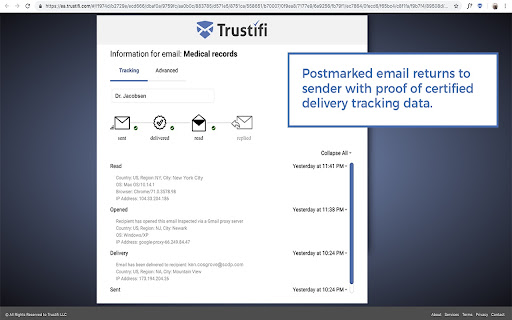
• Real-time knowledge about when emails have been received, opened and read with certified delivery and tracking
• Two-factor authentication on the recipient (even without registering)

Advanced Threat Protection
• Malware, ransomware, virus detection, BEC attack prevention
• Spoofing, phishing, fraud detection and spam filtering
• Whitelisting, blacklisting and many other configuration options

Productivity Focused Email Security Features
• Block emails for everyone or specific recipients
• Edit content after an encrypted email has been sent
• Add, edit, or delete attachments after an encrypted email has been sent
• Postmarked proof, track and see where emails are opened
• Provides visibility and rapid response into all email-based threats and attacks

---

How to get started:
1. Install the Trustifi add-in on your Gmail and Login
2. Sign up directly from the Addon or at https://app.trustifi.com to get your free plan
3. Verify your email address (by clicking on the link within the email we'll send you)
4. When composing a new mail, open the Trustifi task pane (look for the Trustifi icon)
6. Add/Select recipients, choose protection methods from the task pane and click Apply.
7. Write your email, add any attachments (for extra privacy - add the attachments directly to the task pane), and send!
8. Comeback to a previously sent email, open the Trustifi task pane to view the email's reports for Tracking, Controlling, Recall, Postmark, Encrypted Reply and more.
Technical
- Version
- 1.2.421
- Manifest
- V3
- Size
- 3.47MiB
- Min Chrome
- 88
- Languages
- 1
- Featured
- No
Metadata
- ID
- nkjiffgankhjcemjlikehngfajkdgfgd
- Developer ID
- u94b64f5b20029798de77649e4c91b1d4
- Developer Email
- [email protected]
- Created
- Feb 21, 2018
- Last Updated (Store)
- May 19, 2026
- Last Scraped
- Jun 21, 2026
- Website
- trustifi.com
- Support URL
- https://trustifi.com/contact/
- Privacy Policy
- https://www.trustifi.com/privacy
Similar extensions
Alternatives to Trustifi, ranked by description similarity.

Digify for Gmail: Encrypt, track, and unsend
Automatically encrypt messages & attachments, track file views & opens and revoke access even after sending.
3.0K
★ 4.3
Simplify Gmail
Make Gmail simpler, more capable, and more respectful
30.0K
★ 4.5
Document GPS
Tokenize, control, track, and recall your attachments and files — even after they’ve been sent
1.0K
★ 5.0

PreVeil for Gmail
PreVeil browser extension for Gmail
3.0K
★ 4.8
Email Tracker, Email Tracking w/ AI - Mailtag
Email Tracking 2.0 for Gmail. Don't settle for a Email Tracker - Get more Responses. Free e-mail tracking, Signatures and Campaigns.
10.0K
★ 3.9

Mixmax: AI-Powered Sales Engagement, Email Tracking and Meeting Scheduling
Make sales outreach feel effortless—not endless—with the only sales engagement tool that lives in Gmail.
70.0K
★ 4.5

Gmail Unsubscribe Tool by Trimbox
Unsubscribe from email lists in just 1 click with Trimbox for Gmail. The fastest way to stop spam emails and clean your inbox.
60.0K
★ 4.5

SimplyMail - AI Email Assistant for Gmail
AI-powered Gmail assistant. Get instant email summaries, smart categories, task extraction, and AI replies. Save hours on email.
38
★ 5.0
Data sourced from the Chrome Web Store · last verified Jun 21, 2026.