
Customizer
Add custom CSS to one or many sites
As of June 2026, Customizer has 179 users and a 5.00/5 rating from 1 reviews in the Functionality & UI category.
Usersdown 1.1 percent−1.1%
179
179
Ratingno change0%
5.00
1 reviews
Reviewsno change0%
1
Version
4.0
Manifest V3
90-day change · In the last 90 days this extension 1 version update.
History
8 snapshotsTracking since Apr 1, 2026.
View as table
| Date | Users | Rating | Reviews | Version |
|---|---|---|---|---|
| Apr 1, 2026 | 181 | 5.00 | 1 | 3.5 |
| Apr 18, 2026 | 179 | 5.00 | 1 | 3.5 |
| Apr 28, 2026 | 181 | 5.00 | 1 | 3.5 |
| May 15, 2026 | 185 | 5.00 | 1 | 3.5 |
| May 24, 2026 | 193 | 5.00 | 1 | 3.5 |
| May 29, 2026 | 182 | 5.00 | 1 | 4.0 |
| Jun 7, 2026 | 177 | 5.00 | 1 | 4.0 |
| Jun 13, 2026 | 172 | 5.00 | 1 | 4.0 |
| Now | 179 | 5.00 | 1 | 4.0 |
Permissions & access
- Permissions
- tabsstorage
- Host access
- None declared
Screenshots


About
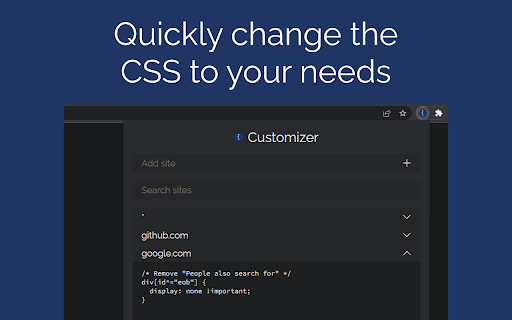
Sometimes websites don't look the way you want them to. Simplify or change them with Cascading Style Sheets. CSS can be applied to many pages with the * wildcard. It is applied before the HTML loads. The CSS is edited in a popup window or the big options page, not in a sidebar of the page; you are not hindered by the page.

Features:
 • Edit CSS: View & edit styling for one page or many
 • Storage Sync: Options saved for use on any computer

Instructions: Configure Keyboard Shortcut:
1. Click the icon for this extension
2. Click "Keyboard shortcuts"
3. Make a keyboard shortcut for "Big options page: edit site"
4. In the future, use this shortcut so you can use "Inspect Element"

Instructions: Add Site:
1. Open the popup or big options page
2. Go to the field "Add site"
3. Type in a URL like the following
 • Normal: en.wikipedia.org
 • Wildcard: *.wikipedia.org or *
4. Hit enter or click the plus button

Instructions: Edit CSS
1. Open the popup or big options page
2. Add rules and change properties
3. Refresh the site
Technical
- Version
- 4.0
- Manifest
- V3
- Size
- 166KiB
- Min Chrome
- 88
- Languages
- 1
- Featured
- Yes
Metadata
- ID
- nkhdafpofippbfhihgnpbnmmgcflegdf
- Developer ID
- u3c9c1a7c240bfdc7d1d6a70283bbfa92
- Developer Email
- contact-project+robustus-customizer-82422976-issue-@incoming.gitlab.com
- Created
- Dec 21, 2022
- Last Updated (Store)
- May 21, 2026
- Last Scraped
- Jun 13, 2026
- Website
- —
- Support URL
- —
- Privacy Policy
- https://gitlab.com/-/snippets/5994420
Similar extensions
Alternatives to Customizer, ranked by description similarity.

Custom CSS Injector – custom styles per domain
Inject custom CSS per domain. A minimalist, ultra-efficient extension to style any website without bloat or heavy features.
110
★ 5.0

Custom Styles
Inserts per-site stylesheets
14
★ 5.0

100xStyler
100xStyler is a Chrome extension that allows you to apply custom CSS styles to any website.
4

Shortcut Navigator
Navigate through websites using customizable shortcuts, boosting efficiency and minimizing clicks.
23
★ 5.0

Stylx: Theme the Web, Your Way
Web Styling Made Simple — Shift the Look, Not the Page.
8

Custom CSS Injector
Custom CSS Injector: Customize website styles
9

KeyWord BookMarks
Quickly open a bookmark from the keyboard based on a keyword in the bookmark title.
4
★ 4.0

Wikipedia+
Improves the aesthetics of Wikipedia, with a focus on usability and customisability.
36
★ 5.0
Data sourced from the Chrome Web Store · last verified Jun 13, 2026.