
Shortcut Navigator
Navigate through websites using customizable shortcuts, boosting efficiency and minimizing clicks.
As of June 2026, Shortcut Navigator has 23 users and a 5.00/5 rating from 2 reviews in the Functionality & UI category.
Usersup 9.5 percent+9.5%
23
23
Ratingno change0%
5.00
2 reviews
Reviewsno change0%
2
Version
1.4.1
Manifest V3
History
3 snapshotsTracking since Apr 23, 2026.
View as table
| Date | Users | Rating | Reviews | Version |
|---|---|---|---|---|
| Apr 23, 2026 | 21 | 5.00 | 2 | 1.4.1 |
| May 12, 2026 | 20 | 5.00 | 2 | 1.4.1 |
| Jun 7, 2026 | 20 | 5.00 | 2 | 1.4.1 |
| Now | 23 | 5.00 | 2 | 1.4.1 |
Permissions & access
- Permissions
- storagecontextMenusactiveTab
- Host access
- None declared
Screenshots
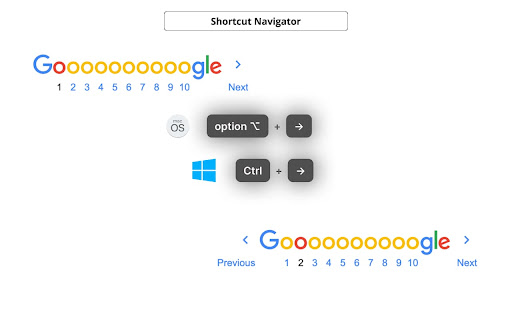
About
Tired of endless clicking and scrolling while navigating through your favorite websites? Our browser extension revolutionizes the way you interact with websites by providing lightning-fast navigation using customizable shortcuts.

Available Shortcuts:

💡 Customizable in extension settings.

• Go to previous page: `⌥ + ←` / `Ctrl + ←` (macOS / Windows)
• Go to next page: `⌥ + →` / `Ctrl + →` (macOS / Windows)
• Go to previous page in a new tab: `⌥ + ⇧ + ←` / `Ctrl + Shift + ←` (macOS / Windows)
• Go to next page in a new tab: `⌥ + ⇧ + →` / `Ctrl + Shift + →` (macOS / Windows)

✨ Key Features:

1. **Effortless Navigation**: Navigating through the pages of a website becomes as easy as a keystroke. Effortlessly jump from one page to another without lifting a finger from your keyboard.
2. **Customizable Shortcuts**: Tailor your browsing experience to your preferences by assigning your own shortcuts to specific actions.
3. **Enhanced Productivity**: By reducing the time spent on navigating, you can focus more on the content that matters. Whether you're researching, shopping, or simply reading articles, extension enhances your productivity.
4. **Multi-Site Support**: Use the same extension to navigate across multiple websites. Save different shortcut configurations for each site you frequent, optimizing your experience everywhere you go.
5. **Security and Privacy**: Extension is designed with your security in mind. Rest assured that your data and browsing history are kept private and never shared.

———————————————————

Source code and bug tracker:
https://github.com/NekitCorp/shortcut-navigator/issues
Technical
- Version
- 1.4.1
- Manifest
- V3
- Size
- 28.5KiB
- Min Chrome
- 88
- Languages
- 1
- Featured
- No
Metadata
- ID
- jogbieljjfngmlfllepobdfdmhgbflki
- Developer ID
- u2c3670d538868c5995662526097a08e5
- Developer Email
- [email protected]
- Created
- Sep 4, 2023
- Last Updated (Store)
- Oct 24, 2024
- Last Scraped
- Jun 7, 2026
- Website
- —
- Privacy Policy
- —
Similar extensions
Alternatives to Shortcut Navigator, ranked by description similarity.

Keyboard Navigator
Navigate web pages using keyboard hints. Tap 'Shift' to activate.
12

URL Shortcuts
Quickly navigate to websites using shortcuts.
9

SpeedLink
Innovative Chrome extension designed to streamline web browsing experience with custom shortcuts
14

Website Hotkey
Quickly open websites with custom keyboard shortcuts
52

Cloud Shortcuts Pro - Shortcuts for Anythings
Cloud Shortcuts Pro - allows to save any webpage as a shortcut. Various keyboard shortcuts for managing tabs, links and more.
6
★ 5.0

GOshorts!
GOshorts! turns URLs into shortcuts. Use: go [space/tab] your-shortcut → Enter
4

Tab History Navigator
✅Navigate Your Tabs with Ease – Tab History Navigation Made Simple!
Tired of losing track of your browsing journey? This powerful…
11

BackTab
Cycle back and forward through your last 10 active tabs.
641
★ 4.4
Data sourced from the Chrome Web Store · last verified Jun 7, 2026.