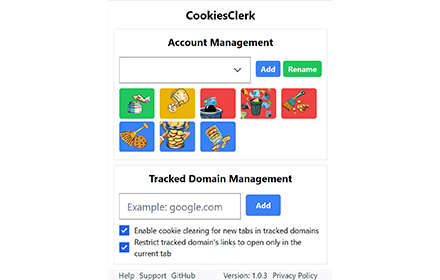
CookiesClerk
A plugin that helps you manage multiple accounts on the same site
As of May 2026, CookiesClerk has 732 users and a 3.40/5 rating from 5 reviews in the Productivity category.
Usersdown 6.4 percent−6.4%
732
732
Ratingno change0%
3.40
5 reviews
Reviewsno change0%
5
Version
1.1.0
Manifest V3
History
3 snapshotsTracking since Apr 1, 2026.
View as table
| Date | Users | Rating | Reviews | Version |
|---|---|---|---|---|
| Apr 1, 2026 | 782 | 3.40 | 5 | 1.1.0 |
| Apr 30, 2026 | 738 | 3.40 | 5 | 1.1.0 |
| May 27, 2026 | 729 | 3.40 | 5 | 1.1.0 |
| Now | 732 | 3.40 | 5 | 1.1.0 |
Permissions & access
- Permissions
- cookiesstorageactiveTabtabsscriptingbrowsingData
- Host access
- *://*/*
Screenshots
About
Function

- Easily manage cookies for multiple accounts on the same website .
- Save, load and delete cookies for individual accounts .
- Clear cookies for closed accounts or all accounts .
- Add and track domains for efficient cookie management .

How to use

1. Click the CookiesClerk icon in the toolbar of your browser to open a pop-up window.
2. Use the buttons in the popup window to manage cookies for different accounts and domains.
3. Add new accounts and domains to automatically switch cookies for tracking domains.
4. right-click CookiesClerk icon , click options, to graphically save and load the desired account.

This project is open source and absolutely safe , github: https://github.com/14790897/CookiesClerk
Technical
- Version
- 1.1.0
- Manifest
- V3
- Size
- 282KiB
- Min Chrome
- 88
- Languages
- 2
- Featured
- No
Metadata
- ID
- njmcgckgojpcificfmkicgnlbocgdhke
- Developer ID
- u25407927f55f550bc4e4f8ac9dd7850b
- Developer Email
- [email protected]
- Created
- Sep 6, 2023
- Last Updated (Store)
- Dec 11, 2023
- Last Scraped
- May 27, 2026
- Support URL
- https://github.com/14790897/CookiesClerk
- Privacy Policy
- —
Similar extensions
Alternatives to CookiesClerk, ranked by description similarity.

cookie-manager
manifest.json description
4
★ 5.0

Easy Cookie
Universal cookie manager for any website - Quick login/logout, format conversion, and real-time status detection
250
★ 5.0

Cookie Editor
Simple yet powerful Cookie Editor that allow you to quickly create, edit and delete cookies without leaving your tab.
100.0K
★ 4.3

modifyCookie - advanced cookie editor
Create,edit and delete Cookies for all domains. Import/export cookies in json,csv, netscape, header string format. Open source
821
★ 3.9

Cookie Manager
Quickly manage cookies on the current webpage with viewing, editing, deletion, import/export.
69

EditAnyCookie - Edit any cookies
Advanced cookie manager. Add, delete, edit, search, protect and block cookies!
1.0K
★ 4.0

Easy Cookies Manager
Manage browser cookies with our user-friendly Easy Cookie Manager. Quickly copy, paste, and delete cookies with just a few clicks.
218
★ 5.0

Cookie Cleaner – One-Click Cookie Remover
Delete all cookies from the current site in one click. Improve privacy and fix login issues fast.
55
Data sourced from the Chrome Web Store · last verified May 27, 2026.