
EditAnyCookie - Edit any cookies
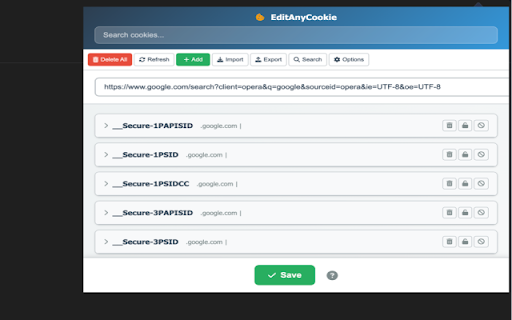
Advanced cookie manager. Add, delete, edit, search, protect and block cookies!
As of June 2026, EditAnyCookie - Edit any cookies has 1,000 users and a 4.00/5 rating from 4 reviews in the Productivity category.
Usersno change0%
1.0K
1,000
Ratingno change0%
4.00
4 reviews
Reviewsno change0%
4
Version
6
Manifest V3
90-day change · In the last 90 days this extension 1 version update.
History
2 snapshotsTracking since Apr 16, 2026.
View as table
| Date | Users | Rating | Reviews | Version |
|---|---|---|---|---|
| Apr 16, 2026 | 1.0K | 4.00 | 4 | 5.0.0 |
| May 28, 2026 | 1.0K | 4.00 | 4 | 5.0.0 |
| Now | 1.0K | 4.00 | 4 | 6 |
Permissions & access
- Permissions
- tabscookiescontextMenusstoragenotificationsclipboardWrite
- Host access
- <all_urls>
Screenshots

About
🍪 EditAnyCookie - Advanced Cookie Manager Take full control of your browser cookies with EditAnyCookie EditAnyCookie is a cookie manager for Chrome. View, edit, create, delete, and manage cookies with a simple interface. ✨ Features 🔧 Cookie management 👁️ View cookies for any website ✏️ Edit values, domains, paths, and expiration dates ➕ Create new cookies 🗑️ Delete individual cookies or all cookies for a site 🔍 Search and filter cookies 🛡️ Security and protection 🔒 Set cookies as read-only 🚫 Block cookies with custom filters 🛡️ Protect important cookies from accidental changes 🔐 Manage secure and HTTP-only cookies 📁 Import and export 📤 Export cookies to JSON, Netscape, or Perl formats 📥 Import cookies from JSON files 💾 Backup and restore cookie data 🔄 Share cookie configurations 🛠️ Developer tools 🔧 DevTools panel 📋 Context menu integration ⚡ Bulk operations 🎯 Advanced filtering 🎨 User experience 🌙 Dark theme 📋 Expandable cookie details 📱 Responsive layout ⌨️ Keyboard shortcuts 🚀 Why choose EditAnyCookie? 🎯 Simple interface ⚙️ Full control over cookie properties 🔒 Security features to protect important cookies 👨💻 Developer-friendly tools 🔄 Regular updates 💡 Use cases 👨💻 Web developers testing cookie behavior 🔒 Privacy-conscious users managing tracking cookies 🧪 QA teams testing authentication flows 👤 Users managing session data 🎯 Anyone who needs precise cookie control 🔐 Privacy and security EditAnyCookie runs locally in your browser. No data is sent to external servers. You control your cookie data. 🎯 Getting started 📥 Install EditAnyCookie from the Chrome Web Store 🖱️ Click the extension icon on any website 👁️ View and manage cookies ⚙️ Use the options page to customize settings Perfect for developers, privacy enthusiasts, and anyone who needs precise cookie management. Install EditAnyCookie and take control of your browser cookies.
Technical
- Version
- 6
- Manifest
- V3
- Size
- 1.04MiB
- Min Chrome
- 88
- Languages
- 1
- Featured
- Yes
Metadata
- ID
- dokhapgdoekmhhncfdbngojghcdgkmmk
- Developer ID
- u6074348c789b1b1bfe35856a1c3052ef
- Developer Email
- [email protected]
- Created
- Sep 30, 2025
- Last Updated (Store)
- May 26, 2026
- Last Scraped
- Jun 22, 2026
- Website
- —
- Support URL
- —
- Privacy Policy
- https://sites.google.com/view/ext-privacypolicy77/
Similar extensions
Alternatives to EditAnyCookie - Edit any cookies, ranked by description similarity.

Cookie Editor for Chrome
Professional cookie editor for developers. Create, edit, delete, import, and export cookies with ease.
16

Cookie Editor
Simple yet powerful Cookie Editor that allow you to quickly create, edit and delete cookies without leaving your tab.
100.0K
★ 4.3

Cookie Exporter
Export cookies from the current site
293
★ 5.0

Cookie Manager
Quickly manage cookies on the current webpage with viewing, editing, deletion, import/export.
69

cookie-manager
manifest.json description
4
★ 5.0

Edit Cookie
Edit, add, delete, search, protect, and export cookies
247

Cookie Editor Pro - Cookie Manager Advance
Cookie Editor Pro is a powerful tool to add, edit, delete, import, export, and manage cookies. Clean, advanced and easy to use.
353
★ 5.0

EditThisCookie (V3)
EditThisCookie is a cookie manager. You can add, delete, edit, search, protect and block cookies!
400.0K
★ 4.2
Data sourced from the Chrome Web Store · last verified Jun 22, 2026.