
Gyde: AI Documentation in Video & Screenshots
Save hours daily by instantly auto-generating & sharing step-by-step guides, ensuring everyone masters any process quickly & easily.
As of May 2026, Gyde: AI Documentation in Video & Screenshots has 464 users and a 5.00/5 rating from 28 reviews in the Workflow & Planning category.
Usersdown 1.7 percent−1.7%
464
464
Ratingno change0%
5.00
28 reviews
Reviewsno change0%
28
Version
1.7.5
Manifest V3
History
3 snapshotsTracking since Apr 1, 2026.
View as table
| Date | Users | Rating | Reviews | Version |
|---|---|---|---|---|
| Apr 1, 2026 | 472 | 5.00 | 28 | 1.7.5 |
| Apr 30, 2026 | 471 | 5.00 | 28 | 1.7.5 |
| May 27, 2026 | 483 | 5.00 | 28 | 1.7.5 |
| Now | 464 | 5.00 | 28 | 1.7.5 |
Permissions & access
- Permissions
- scriptingstorageactiveTabtabsdownloads
- Host access
- <all_urls>
Screenshots



About
▶ Why waste hours on creating text documentation & guides manually?

Save hours daily creating video and screenshot documentation by utilizing Gyde – a #productivityhack extension that automatically turns any process into a step-by-step guide in both video and screenshot format in SECONDS - You heard it right - blink, and you'll have a guide ready. It's that fast!

Give it a shot!⚡

▶ Where can you use Gyde?

Showing a teammate how a particular workflow goes about
Assisting customers in solving their queries
Helping employees train on any software application
Answering any questions that require step-by-step explanation

OR in creating

▶ How-to guides
▶ Standard Operating Procedures (SOPs)
▶ Software documentation
▶ Training manuals
▶ Walkthroughs
▶ Product updates
▶ Knowledge base
▶ New employee onboarding

And much more!

▶ How to use this extension in 3 easy steps?

Step 1 - Capture

Open the process for which you want to create a guide on your browser.

Perform the steps you want to include in the guide.

Gyde will automatically generate step titles & screenshots for each step performed and simultaneously record a video.

💪BONUS Benefits:
You can blur the confidential details in the screenshot while capturing.
Video guide will also have the voice auto-generated


Step 2 - Customize

You can customize the guide by adding/deleting steps and editing text/screenshots.

💪BONUS Benefits:
With just a click, you can refine step titles with the AI Text-Enhancer feature.
You can also gray out the rest of the area except the step to focus on it more.


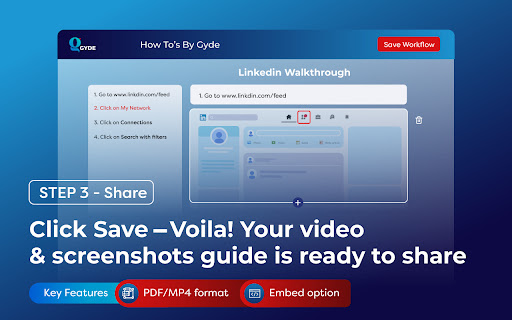
Step 3 - Share

Click Save, and your video & screenshots guide URL is ready to share!!


💪BONUS Benefits:
You can download the guide in PDF or MP4 format for offline usage.
You can also embed it in a knowledge base.


▶  What do users love about Gyde?

"Previously, my team used to spend a lot of time explaining to customers how to complete a process in my application. If I had found Gyde earlier, it would have saved my team 1000s of hours. Gyde is incredibly user-friendly and has become a lifesaver!!"
Pritesh Baviskar, Co-founder Storeplum

"I really enjoy using Gyde to quickly send clear and easy-to-follow instructions to my clients. Highly recommended for anyone tired of manual documentation!"
Nachiket Dhavalikar, CEO, Studio Albatross

"Biggest game changer for my company! Gyde has helped me train my whole team on various application process faster than any other method and effortless"
Tanmay Dighe, Founder, HackXSecurity

Ready to see Gyde in action?

Download the extension now!
And leave guidance to us - You achieve your business goals🚀
Technical
- Version
- 1.7.5
- Manifest
- V3
- Size
- 208KiB
- Min Chrome
- 88
- Languages
- 1
- Featured
- Yes
Metadata
- ID
- nijhhcoccbcbkhjihfongicomflmflkk
- Developer ID
- u2e8df61375636a77ac7719cd2cd0fc1e
- Developer Email
- [email protected]
- Created
- Apr 25, 2023
- Last Updated (Store)
- Oct 8, 2024
- Last Scraped
- May 27, 2026
- Website
- https://www.gyde.ai/
- Support URL
- https://gyde.ai/support
- Privacy Policy
- https://gyde.ai/privacy-policy
Similar extensions
Alternatives to Gyde: AI Documentation in Video & Screenshots, ranked by description similarity.

Gyde Walkthrough Creator
Create step by step walkthroughs easily for your Application.
131
★ 5.0

Quick Guides by Desk.Help - Free Step-by-Step How-to Guide Maker
Create step-by-step guides on the fly! Quick Guides turns your on-screen actions into a written guide with Highlights + Screenshots.
7
★ 5.0

Guidde - Magically create video documentation
Magically create video documentation with AI
100.0K
★ 4.7

ClickGuide - Smart Web Documentation & Capture Tool
Capture and document user actions on web pages. Ideal for walkthroughs, SOPs, and support docs.
7

Guidiety
Guidiety automagically captures your steps and organizes them into a detailed guide.
3

Stepsy: create step-by-step guide with screenshots
Step-by-Step Guide Creator, SOP Documentation
4.0K
★ 4.5

WorkStreamer Guide: Craft Screenshot Training Guides Incredibly Fast
Create beautiful training guides in minutes with this automated screenshot tool.
84
★ 5.0

StepDoc - Easy Documents
Capture any workflow automatically and create, edit, share professional step-by-step guides/demos instantly.
10
★ 5.0
Data sourced from the Chrome Web Store · last verified May 27, 2026.