
Instant Mirror
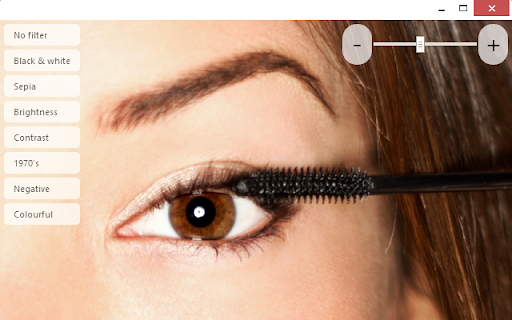
Use your device as an instant mirror. The mirror is resizable, has filters and a zoom function.
As of May 2026, Instant Mirror has 4,000 users and a 3.63/5 rating from 48 reviews.
Usersno change0%
4.0K
4,000
Ratingno change0%
3.63
48 reviews
Reviewsno change0%
48
Version
1.5.1
Manifest V2
History
1 snapshotsTracking since Apr 26, 2026.
View as table
| Date | Users | Rating | Reviews | Version |
|---|---|---|---|---|
| Apr 26, 2026 | 4.0K | 3.63 | 48 | 1.5.1 |
| Now | 4.0K | 3.63 | 48 | 1.5.1 |
Permissions & access
- Permissions
- storageunlimitedStoragevideoCapture
- Host access
- None declared
Screenshots



About
Use your camera as a mirror. This is a real Chrome web app that runs in its own window and that also works offline (it doesn't require internet connection). The mirror app has a zoom function and various predefined mirror (video) color filters, such as 1970s, Colorful, Black & White, Negative or Sepia. This app also allows take picture of current video state and save it as an image to the local file system.

WHY THIS APP?
• the Instant Mirror app is easier to find and launch than the default camera app (see the tips below)
• colour style filters you can choose from
• this app launches faster
• the app has a zoom function
• this is a real standalone HTML5 Chrome web app that behaves like a native app, no matter whether you run it on Chrome OS, Windows or Mac; it sits in its own window that can be resized, maximized to full screen, minimized to the task bar, just like any other app

TIPS
• create a shortcut to this app in your operating system's menu
• find a link to this app in the Chrome Apps launcher

REQUIREMENTS
Requires a build-in web camera or an external web camera connected. Video quality and resolution depends on your web camera.

TROUBLESHOOTING TIPS
If you are not getting video, please try the following steps:
• make sure the camera is not used by another app or program
• make sure the camera is set up correctly in your Chrome browser by navigating to: chrome://settings/content
• make sure the camera is plugged in and switched on
Technical
- Version
- 1.5.1
- Manifest
- V2
- Size
- 173KiB
- Min Chrome
- 23
- Languages
- 5
- Featured
- No
Metadata
- ID
- nfojfpgdlapjkpehegmfpcpbfnddpbab
- Developer ID
- u91770a66cd6a3413407ac55671b8325c
- Developer Email
- —
- Created
- Apr 1, 2014
- Last Updated (Store)
- May 11, 2014
- Last Scraped
- May 23, 2026
- Website
- —
- Support URL
- —
- Privacy Policy
- —
Similar extensions
Alternatives to Instant Mirror, ranked by description similarity.

Mirror Extension
A Chrome extension that displays a popup below the extension icon and requests camera access, acting like a mirror.
267
★ 5.0

Webcam Mirror
A handy online mirror that is great for checking your makeup or fixing your hair before that important conference call.
2.0K
★ 2.0

Mirror Me - Notch Edition
A camera mirror with professional filters in a beautiful notch design. Apply filters, adjust settings, and take screenshots.
14
★ 5.0

Phone as Webcam
Turn your phone into a high-quality webcam for Chrome
626
★ 4.5

Camera
Take photos and record videos with your camera.
—
★ 3.2

Front Mirror - One click camera check
A one-click camera check, right from the chrome toolbar.
564
★ 5.0

Mirror Online
Mirror Online. The webcam video is generated locally by your browser and will not be sent to the server.
594
★ 3.0

ReflectView
Transform your camera into an instant mirror with filters, zoom, and photo capture by AIO.com.ai
2
Data sourced from the Chrome Web Store · last verified May 23, 2026.