
TwoSlash: An OpenAI ChatGPT Chrome Extension
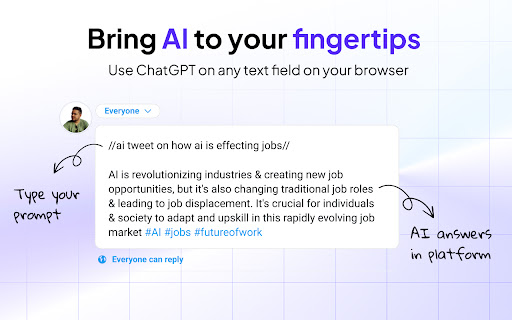
Type '//ai' in any text field on your browser and unleash the power of ChatGPT AI.
As of May 2026, TwoSlash: An OpenAI ChatGPT Chrome Extension has 131 users and a 5.00/5 rating from 2 reviews in the Workflow & Planning category.
Usersup 0.8 percent+0.8%
131
131
Ratingno change0%
5.00
2 reviews
Reviewsno change0%
2
Version
2.0.7
Manifest V3
History
2 snapshotsTracking since Apr 26, 2026.
View as table
| Date | Users | Rating | Reviews | Version |
|---|---|---|---|---|
| Apr 26, 2026 | 130 | 5.00 | 2 | 2.0.7 |
| May 23, 2026 | 124 | 5.00 | 2 | 2.0.7 |
| Now | 131 | 5.00 | 2 | 2.0.7 |
Permissions & access
- Permissions
- storage
- Host access
- <all_urls>
Screenshots


About
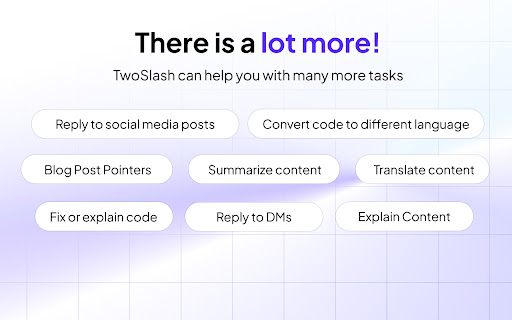
🚀 Welcome to TwoSlash, the ultimate productivity tool that harnesses the power of ChatGPT AI to enhance your online experience. 🌟 Features at a Glance: ✓ Fix bugs and write code in your preferred programming language ✓ Create and improve social media content across multiple platforms ✓ Write, reply, and summarize emails for a professional touch ✓ Generate and understand Google Sheets formulas seamlessly ✓ Translate content to different languages with accuracy ✓ Boost your productivity with AI-powered tasks ✨ How It Works Simply type "//ai" anywhere you can enter text on the web, and watch as your ideas transform into reality. TwoSlash empowers you to generate content, improve grammar, translate languages, write and fix code, and much more—all with the speed and precision of ChatGPT AI. Let your creativity flow, while TwoSlash handles the heavy lifting. 🔒 Simple Pricing, No Hassle Enjoy the full range of TwoSlash features with our straightforward pricing plan. For just $9 per month, unlock unlimited access to all current and upcoming features, without the need for an API key. Experience the power of TwoSlash today and take your productivity to new heights. 👨💻 Coding Made Effortless Developers, rejoice! TwoSlash makes coding a breeze. Fix bugs, write code in your preferred programming language, explain complex code snippets, and even convert code to a different language—all in seconds. With TwoSlash, your coding journey becomes smoother and more enjoyable. 🐦 Supercharge Your Social Media Presence Level up your social media game with TwoSlash. Craft compelling Facebook, LinkedIn, Instagram, and Twitter posts effortlessly. Engage with your audience by leveraging AI to reply to comments and direct messages, and watch your social media presence grow organically. 📧 Professional Emailing, Simplified Impress clients and colleagues with professional emails, written flawlessly by TwoSlash. Compose new emails, reply promptly, and summarize lengthy email threads with ease. TwoSlash ensures your communication stands out, giving you more time to focus on what matters most. 📊 Master Google Sheets with ChatGPT's AI Supercharge your Google Sheets productivity using TwoSlash. Generate complex formulas right within Google Sheets, saving you valuable time and effort. Need to understand a specific formula? TwoSlash provides clear explanations, empowering you to navigate spreadsheets effortlessly. 🌐 Search Keywords: AI productivity tool, code writing, social media generator, email assistant, Google Sheets formulas, translate languages, coding made easy, boost productivity, effortless automation, AI-powered tasks, professional content generation, enhanced web experience
Technical
- Version
- 2.0.7
- Manifest
- V3
- Size
- 4.0MiB
- Min Chrome
- 88
- Languages
- 1
- Featured
- No
Metadata
- ID
- nejdeohbihmiaamplfbgdoeaoikcanjm
- Developer ID
- u544841329e33adb47e1fc9d17a049bc2
- Developer Email
- [email protected]
- Created
- Jun 6, 2023
- Last Updated (Store)
- Sep 18, 2023
- Last Scraped
- May 23, 2026
- Website
- —
- Support URL
- https://twoslash.ai/support
- Privacy Policy
- https://twoslash.ai/privacy-policy/
Similar extensions
Alternatives to TwoSlash: An OpenAI ChatGPT Chrome Extension, ranked by description similarity.

BrowserGPT: ChatGPT Anywhere Powered by GPT 4
Write, reword, and translate 8x faster. Reply to emails in a click. Works on Google Docs, Gmail, YouTube, Twitter, Instagram, etc.
30.0K
★ 4.3

SmartSlash
AI magic for text fields, transforming '//' prompts into smart content.
12
★ 5.0

ChatGPT to Help
Get Instant Help Anywhere and Anytime with ChatGPT AI Assistant on Chrome
506
★ 4.6
AI ON THE GO
Get instant, personalized AI assistance on any website with AI ON THE GO, powered by ChatGPT. Streamline your workflow today!
104

Improvise GPT
AI-based email and message improvisation using ChatGPT - A powerful and user-friendly solution for written communication.
62
★ 4.8

WebCopilot.ai - Use GPT on any input box
Use the power of ChatGPT anywhere on the web.
1.0K
★ 2.5

AISlash.IO
Unleash Your Productivity with AISlash(ai/) - Your Personal AI Assistant for Web Inputs
12

Autowriter | ChatGPT on Every Website
Your own AI assistant, everywhere you go.
557
★ 4.0
Data sourced from the Chrome Web Store · last verified May 23, 2026.