
Improvise GPT
AI-based email and message improvisation using ChatGPT - A powerful and user-friendly solution for written communication.
As of May 2026, Improvise GPT has 62 users and a 4.83/5 rating from 6 reviews in the Workflow & Planning category.
Usersup 12.7 percent+12.7%
62
62
Ratingno change0%
4.83
6 reviews
Reviewsno change0%
6
Version
1.1
Manifest V3
History
2 snapshotsTracking since Apr 26, 2026.
View as table
| Date | Users | Rating | Reviews | Version |
|---|---|---|---|---|
| Apr 26, 2026 | 55 | 4.83 | 6 | 1.1 |
| May 23, 2026 | 58 | 4.83 | 6 | 1.1 |
| Now | 62 | 4.83 | 6 | 1.1 |
Permissions & access
- Permissions
- contextMenusstorage
- Host access
- None declared
Screenshots



About
Leveraging the power of AI through the GPT model (chat GPT), this innovative browser extension is designed to significantly enhance your productivity across various websites. Whether you're writing emails on Gmail or any other email client, this extension will help you craft more polished and accurate messages by providing grammar and spelling suggestions. Moreover, it opens up the possibility to compose emails in over 15 different languages, making communication more accessible and inclusive.

Here are some practical use cases for this versatile tool:

1. Seamlessly enhance your writing, including grammar and spell checks, across popular platforms like Google, LinkedIn, Facebook, Stack Overflow, Twitter, Reddit, and more.

2. With a simple click, you can effortlessly translate any content on any website into more than 15 languages, making language barriers a thing of the past.

3. For news enthusiasts, selecting an entire article and clicking a single button will generate a concise summary, saving valuable time without compromising on information.

4. Code improvement becomes effortless with the extension's ability to fix or enhance code in various programming languages.

Now, let's see how to make the most of this extension:

1. Begin by creating a ChatGPT account and signing in, which takes just a couple of minutes.

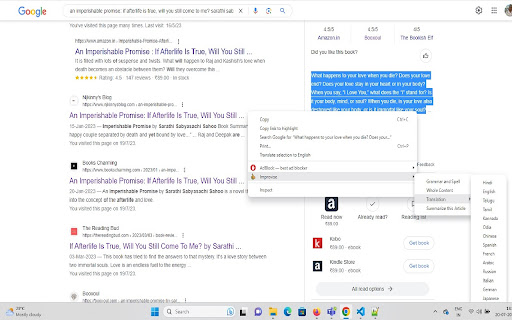
2. Upon visiting any website, simply select the content you want to work on, right-click, and discover the "Improvise" option in the context menu. This unlocks a wide array of features for your specific needs.

3. For Gmail or LinkedIn users, composing emails or messages becomes a breeze. Type your content, right-click on the textbox, and access the same "Improvise" menu.

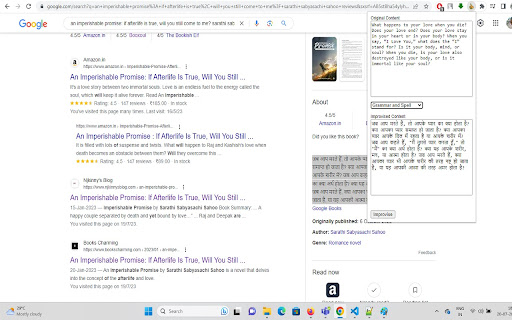
4. In addition to the right-click option, you'll find a convenient extension button in the top-right corner of your Chrome browser. This button not only lets you see the original and improved versions of your content but also grants access to various other extension features.

It's important to note that this extension caters not only to content writers but to anyone who spends significant time browsing the web or writing and sending emails and messages.

As the extension is currently in its beta stage, your feedback is invaluable. Feel free to review or report any bugs you encounter, and rest assured that our team will promptly address them. We're also eager to hear your suggestions for new and enhanced features; don't hesitate to share them through reviews, and we'll be more than happy to incorporate them.

Join us in revolutionizing your online experience and maximizing productivity with this powerful AI-driven extension.
Technical
- Version
- 1.1
- Manifest
- V3
- Size
- 61.43KiB
- Min Chrome
- 88
- Languages
- 1
- Featured
- No
Metadata
- ID
- fbnonfcopbcaanlcmeaiabgmlapobdlp
- Developer ID
- u397f334a058cbc7e540dc88b5dfb990d
- Developer Email
- [email protected]
- Created
- Aug 1, 2023
- Last Updated (Store)
- Aug 10, 2023
- Last Scraped
- May 23, 2026
- Website
- —
- Support URL
- —
Similar extensions
Alternatives to Improvise GPT, ranked by description similarity.

AI Search Assistant for Google & Email Writer
Get AI answers beside Google results. Write, rewrite, summarize, and improve emails or messages anywhere.
1.0K
★ 5.0

SimpleGPT
Enhance your writing with AI-powered email composition, text rewriting, and translation in one handy Chrome extension
14
★ 5.0

WebCopilot.ai - Use GPT on any input box
Use the power of ChatGPT anywhere on the web.
1.0K
★ 2.5

Scriboost
Your AI scribe.
—
★ 5.0

Tivit Engage
Engage with people like a pro
—

101GPT - StandAlone Chat
Boost productivity with 101GPT stand-alone chat. 150 custom prompts included to save you time & enhance your browsing experience.
16
★ 5.0

FrogGPT
Connect to your openai.com account and use ChatGPT on any webpage.
26

ChatGPT - Auto-continue Generating
A simple extension that let ChatGPT to auto-continue generating text when the button appear.
183
★ 1.0
Data sourced from the Chrome Web Store · last verified May 23, 2026.