
My Hours Extension
My Hours Time Tracker
As of May 2026, My Hours Extension has 577 users and a 3.67/5 rating from 3 reviews in the Workflow & Planning category.
Usersup 5.3 percent+5.3%
577
577
Ratingno change0%
3.67
3 reviews
Reviewsno change0%
3
Version
1.4.8
Manifest V3
History
2 snapshotsTracking since Apr 29, 2026.
View as table
| Date | Users | Rating | Reviews | Version |
|---|---|---|---|---|
| Apr 29, 2026 | 548 | 3.67 | 3 | 1.4.8 |
| May 26, 2026 | 550 | 3.67 | 3 | 1.4.8 |
| Now | 577 | 3.67 | 3 | 1.4.8 |
Permissions & access
- Permissions
- storageidentity
- Host access
- https://api2.myhours.com/*, https://login.myhours.com/*
Screenshots

About
### Time tracking for teams

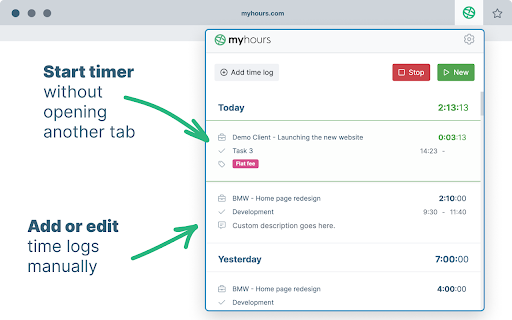
Track time without the need for opening another tab. Start timer or enter time manually right from the browser extension.

1. Setup your My Hours account
Sign up for My Hours account on myhours.com.

Create Projects, Tasks and Clients and invite your Team members to track time.

2. Download extension
Download Chrome extension from this page.

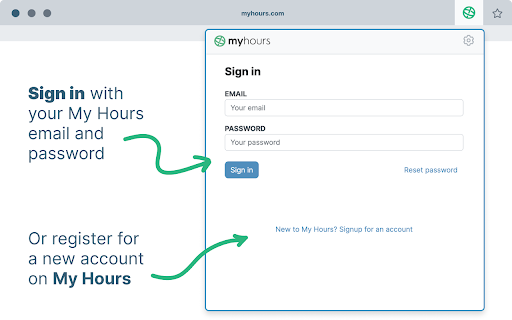
3. Sign in into your account
Each team member logs in with the same email and password they used in the web app.

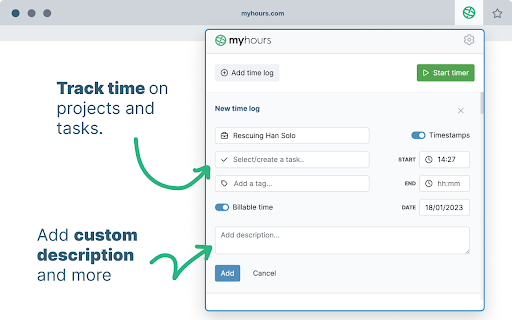
4. Track time on projects & tasks
Select from a list of pre-assigned clients, project and tasks. Optionally add tags or custom description and enter time.

5. Start the timer or enter time manually
Start and stop the running stopwatch without opening another browser tab. Edit your time logs at any time.

6. Generate reports for clients or managers
Finally go to myhours.com web app to create professional-looking reports for your clients or managers. Select from available reports and customize it based on your needs. Download to PDF or export to XLS.

For all questions reach out to [email protected]
Technical
- Version
- 1.4.8
- Manifest
- V3
- Size
- 2.89MiB
- Min Chrome
- 88
- Languages
- 1
- Featured
- Yes
Metadata
- ID
- nddemmhobkicpmpdfpcihpfhfnofgjcc
- Developer ID
- ud4d764418a7f831c19007ac5030a742b
- Developer Email
- [email protected]
- Created
- Jan 26, 2023
- Last Updated (Store)
- Dec 20, 2024
- Last Scraped
- May 26, 2026
- Website
- https://myhours.com/
- Support URL
- https://myhours.com/support
- Privacy Policy
- https://myhours.com/legal/terms-of-use
Similar extensions
Alternatives to My Hours Extension, ranked by description similarity.

Employee Time Tracking
Employee Time Tracking app is a task management software and a time tracker. Calculate hours worked to manage tasks across projects
771
★ 4.9

Work Hours Tracker
Track the date and amount of time worked each day.
18

Lucen Track widget
Track your time directly from Google Chrome in all your favorite tools
6.0K
★ 4.2

WebWork Time Tracker
The simplest way to track your work hours.
1.0K
★ 4.0

Time Calculator
Calculate hours and minutes you've worked in any given time period
103
★ 5.0

Toggl Extension
Drop busy. Plan, track, focus.
495
★ 3.0

Sandtime.io
Track time with ease
30
★ 5.0

Open Time Tracker
Professional time tracking extension with task management and reporting
7
★ 5.0
Data sourced from the Chrome Web Store · last verified May 26, 2026.