
Norton Safe Search
Search safely online by enabling Norton Safe Search as your default search provider for maximum protection on Chrome.
As of June 2026, Norton Safe Search has 5,000,000 users and a 2.42/5 rating from 370 reviews in the Productivity category.
Usersno change0%
5.0M
5,000,000
Ratingno change0%
2.42
370 reviews
Reviewsup 1.1 percent+1.1%
370
Version
3.25.0.6
Manifest V3
90-day change · In the last 90 days this extension 2 version updates.
History
7 snapshotsTracking since Apr 3, 2026.
View as table
| Date | Users | Rating | Reviews | Version |
|---|---|---|---|---|
| Apr 3, 2026 | 5.0M | 2.42 | 366 | 3.25.0.3 |
| Apr 16, 2026 | 5.0M | 2.42 | 366 | 3.25.0.4 |
| Apr 23, 2026 | 5.0M | 2.42 | 367 | 3.25.0.4 |
| May 7, 2026 | 5.0M | 2.42 | 367 | 3.25.0.4 |
| May 28, 2026 | 5.0M | 2.42 | 368 | 3.25.0.4 |
| Jun 5, 2026 | 5.0M | 2.42 | 368 | 3.25.0.6 |
| Jun 21, 2026 | 5.0M | 2.41 | 369 | 3.25.0.6 |
| Now | 5.0M | 2.42 | 370 | 3.25.0.6 |
Permissions & access
- Permissions
- tabsstoragescriptingalarmsdeclarativeNetRequestwebRequest
- Host access
- *://nortonsafe.search.ask.com/, https://ss-sym.search.ask.com/*, https://*.norton.com/*
Screenshots
About
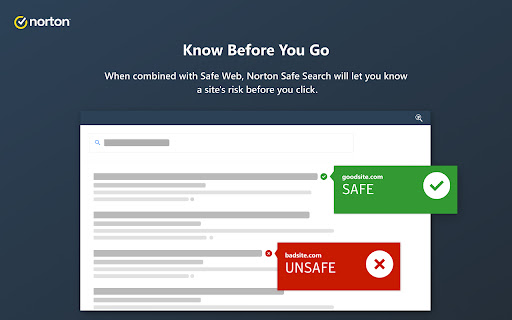
Norton Safe Search helps protect you from identity thieves and online scams by warning you of dangerous sites when you search, shop or browse online.

Norton Safe Search provides you added peace of mind by showing site safety ratings when a search by showing,

1. If the site is Trusted

2. If you should exercise additional caution

3. If the site is known to be malicious, which should be avoided.

---

This extension uses permissions that produce the following Chrome messages to perform necessary functions within the extension.

“Read your browsing history”
Shown for permissions needed for creation and management of tabs and information from the extension’s installation page.

“This extension can read and change your data on sites. You can control which sites the extension can access.”
Shown for permissions needed for exchange of configuration information for performing safety markup on search results.

“Change your search settings to: searchsafe.norton.com”
Shown for permissions needed for delivery of search results through the Norton Safe Search service.

This extension also uses permissions that are not displayed in Chrome for performing certain functions within the extension:

“webRequest” permission
Used to obtain search terms from the omnibar/address bar.

“webRequestBlocking” permission
Used to add data needed to perform safety markup on search results.

“storage” permission
Used to store and retrieve settings data used by the extension.

---
By using this add-on, you agree to our License and Services Agreement (https://www.nortonlifelock.com/content/dam/nortonlifelock/pdfs/eulas/licensing-agreement/customer-agreement-en.pdf) and have read and acknowledge our Global Privacy Statement (https://www.nortonlifelock.com/us/en/privacy/global-privacy-statement/).

This add-on makes use of Google Analytics’s Measurement Protocol to transmit critical error and feature usage information to Google Analytics services.  NortonLifeLock uses Google Analytics services to maintain and improve this add-on, but the services are not operated by NortonLifeLock.

If you do not consent to this data collection and usage, please do not install this add-on or remove it if it is already installed.

This add-on sets parameters that Google provides to obfuscate your IP address when processing Google Analytics. See more details here for our obligations to use Google Analytics, Google’s privacy practices, and Google's IP obfuscation support:

- https://developers.google.com/analytics/policy
- https://support.google.com/analytics/answer/6004245
- https://support.google.com/analytics/answer/2763052

Copyright © 2022 NortonLifeLock Inc. All rights reserved. NortonLifeLock, the NortonLifeLock Logo, the Checkmark Logo, Norton, LifeLock, and the LockMan Logo are trademarks or registered trademarks of NortonLifeLock Inc. or its affiliates in the United States and other countries. Google Chrome is a trademark of Google, LLC. Other names may be trademarks of their respective owners.
Technical
- Version
- 3.25.0.6
- Manifest
- V3
- Size
- 5.9MiB
- Min Chrome
- 88
- Languages
- 24
- Featured
- No
Metadata
- ID
- mpnlkmlkncncpgnnkmkgoobfpnjmblnk
- Developer ID
- u0db872c0213001a4ed5b26605cf0f2b0
- Developer Email
- [email protected]
- Created
- Feb 15, 2018
- Last Updated (Store)
- May 26, 2026
- Last Scraped
- Jun 21, 2026
- Website
- norton.com
- Support URL
- —
- Privacy Policy
- https://www.nortonlifelock.com/privacy
Similar extensions
Alternatives to Norton Safe Search, ranked by description similarity.

My Safe Search
Set your search provider to mysafesearch.co
1.0K
★ 5.0

Surf Safely
Surfsafe.ai allows easy switching between custom and private search engines for secure and flexible searches.
3

Nova Searches
Search powered by Yahoo, via novasearches.com – fast, simple results from your browser’s address bar.
1

Content Site Search Guru
Provides an easy and pleasant search of content on the content sites directly from your browser's address bar.
40.0K
★ 4.2

Privacy Surf
Search the web your way. Switch between private and standard modes. Yahoo is set as your default via privacysurf.co
—

Explore News
Quickly access top news sites and search with Yahoo by default using explorenews.co.
4

Newz Finder
Brings your news search and digesting experience to your address bar.
40.0K
★ 4.2

Safe Web Search
Search by SafeWebSearch - The best way to search
—
Data sourced from the Chrome Web Store · last verified Jun 21, 2026.