
Content Site Search Guru
Provides an easy and pleasant search of content on the content sites directly from your browser's address bar.
As of June 2026, Content Site Search Guru has 40,000 users and a 4.23/5 rating from 48 reviews in the Productivity category.
Usersno change0%
40.0K
40,000
Ratingno change0%
4.23
48 reviews
Reviewsno change0%
48
Version
3.2.2
Manifest V3
History
1 snapshotsTracking since Apr 19, 2026.
View as table
| Date | Users | Rating | Reviews | Version |
|---|---|---|---|---|
| Apr 19, 2026 | 40.0K | 4.23 | 48 | 3.2.2 |
| Now | 40.0K | 4.23 | 48 | 3.2.2 |
Permissions & access
- Permissions
- storage
- Host access
- None declared
Screenshots




About
Are you frustrated sometimes with the built-in search engine of large content sites? Did you once get lost on the sites and didn't manage to find the topics you wanted to look for? Were you curious about how to look efficiently for articles and for certain topics on a news website?

This extension is a Chrome extension that dedicates to providing an easy and pleasant content search experience from your browser’s address bar.

How does it work?

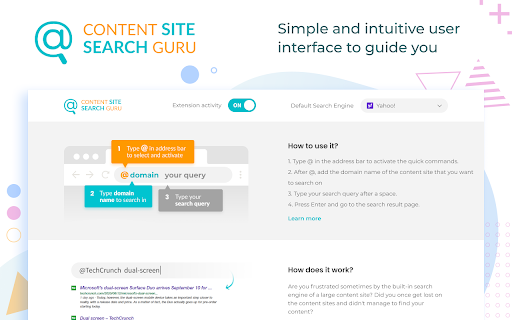
1. Type @ in the address bar to activate the quick commands.
2. After @, add the domain name of the website that you want to look on
3. Type your query after a space, example: @techcrunch dual-screen
4. Press Enter and go to the result page.

Permissions used and reasons:

1. Access to “cookies” (optional). We require this permission to customize and modify your search engine as well as to keep autocomplete default suggestions. It’s optional because if you don’t allow permission to use cookies, we will not need it. Once after you grant permission to use cookies, you can always revoke it at any time.
2. Change your default search engine to our private domain search.searchsafe.tech powered by Yahoo. We require this permission to use our domain as a placeholder and to provide you the functionality in the autocomplete suggestions of your address bar. Inside this extension, we support Yahoo, Google, and Bing. You can switch to a different provider at any time inside the Settings section.

How to remove this extension?

If you want to remove our extension, go to “Settings” on Chrome, and find our extension in the “Extensions” tab. Click “remove”. Alternatively, you can right-click on the extension’s icon on your browser and select “Uninstall” from the drop-down menu.

Chrome™  is a trademark of Google LLC. The use of it does not imply any affiliation to or endorsement by Google LLC.

By adding this extension to your Chrome browser, you accept and agree to our Privacy Policy and End-User License Agreement.

Privacy: https://www.sites-guru.com/privacy

Terms: https://www.sites-guru.com/terms

FAQ: https://www.sites-guru.com/#faq

Contact: https://www.sites-guru.com/contact

Uninstall: https://www.sites-guru.com/uninstall
Technical
- Version
- 3.2.2
- Manifest
- V3
- Size
- 889KiB
- Min Chrome
- 88
- Languages
- 1
- Featured
- Yes
Metadata
- ID
- fgomgoininjjcilkdpghijnhmlagbndk
- Developer ID
- u51bdc2dbc85cd65dea291395815f9e62
- Developer Email
- [email protected]
- Created
- Dec 11, 2018
- Last Updated (Store)
- Aug 3, 2025
- Last Scraped
- Jun 7, 2026
- Website
- sites-guru.com
- Support URL
- https://www.sites-guru.com/contact
- Privacy Policy
- https://www.sites-guru.com/privacy
Similar extensions
Alternatives to Content Site Search Guru, ranked by description similarity.

Newz Finder
Brings your news search and digesting experience to your address bar.
40.0K
★ 4.2

Search Manager by My Secure Search
Easily switch between popular search engines right from your browser's address bar.
4

Search Anything
Enjoy a customized web search experience from your browser search bar with Search Anything.
3.0K
★ 3.7

Private Search by My Secure Search
Easily switch between private and non-private search modes with the Private Search by My Secure Search browser extension.
10

Nova Searches
Search powered by Yahoo, via novasearches.com – fast, simple results from your browser’s address bar.
1

Great Start - Homepage
Quickly access your favorite apps and websites
300.0K
★ 4.7

Easy Trip Finder
With Easy Trip Finder, switch between top hotel booking sites and Yahoo web search using one easy toggle.
—

Quick Navigator
Navigate with ease using Yahoo search via QuickNavigator.net, built for a smooth and focused browsing experience.
—
Data sourced from the Chrome Web Store · last verified Jun 7, 2026.