
Whitaker's Words Helper
This extension uses the wonderful program, designed by William Whitaker, to easily get detailed and accurate Latin definitions.
As of May 2026, Whitaker's Words Helper has 316 users and a 5.00/5 rating from 6 reviews in the Productivity category.
Usersup 2.3 percent+2.3%
316
316
Ratingno change0%
5.00
6 reviews
Reviewsno change0%
6
Version
2.1.1
Manifest V3
History
3 snapshotsTracking since Apr 1, 2026.
View as table
| Date | Users | Rating | Reviews | Version |
|---|---|---|---|---|
| Apr 1, 2026 | 309 | 5.00 | 6 | 2.1.1 |
| May 1, 2026 | 326 | 5.00 | 6 | 2.1.1 |
| May 29, 2026 | 305 | 5.00 | 6 | 2.1.1 |
| Now | 316 | 5.00 | 6 | 2.1.1 |
Permissions & access
- Permissions
- storagecontextMenus
- Host access
- None declared
Screenshots
About
Update: The extension has been restored to full functionality and any new bugs will be dealt with as soon as possible. The development team apologizes for the app breaking.

As a Latin student myself I was often frustrated with constantly switching tabs to look up Latin vocabulary and I'm sure I wasn't the only one irritated by this. Wouldn't it be so much better if there was a way to look up words without switching tabs? This extension uses the wonderful application designed by the late William Whitaker (through a website set up by University Notre Dame) to seamlessly bring you Latin definitions while you're working, without ever needing you to leave the page you're working on. Carpe diem!

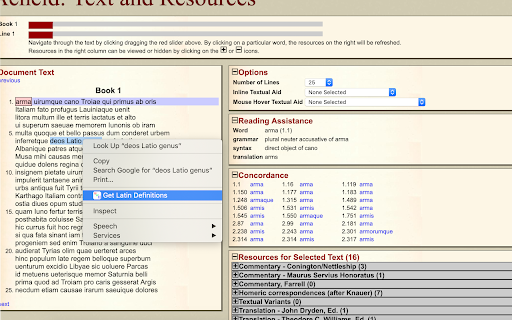
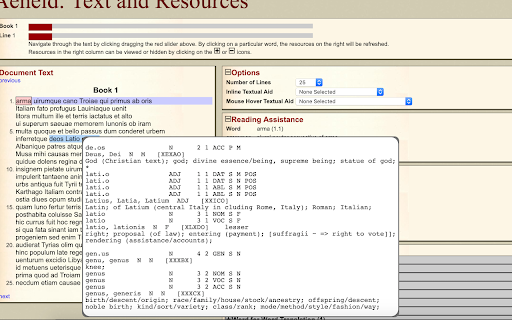
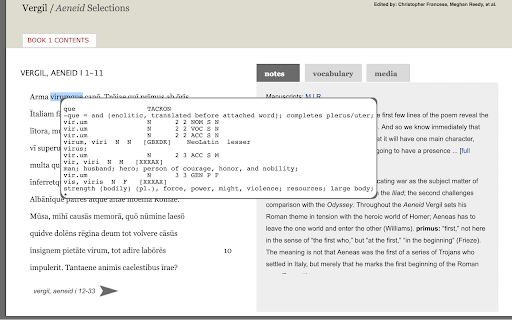
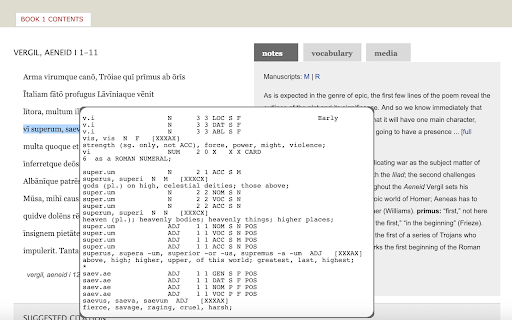
How To Use: Using this extension is incredibly easy, all you have to is double click on a word and the definition will appear. If you want to look up many words at once you can either drag-highlight the words and then right click and select 'Get definitions' from the Whitaker's Words Helper menu, or double click and drag. If you want to see only definitions, without the possible parts of speech, check the definitions only option. The Whitaker's Words Helper right click menu also has a 'Get scansion' option that will scan the selected text for dactylic hexameter. Finally, if you want to disable the extension, click on the icon in the top left, next to the search bar and click the toggle to disable the extension.

The original Whitaker's Words site can be found at https://latin-words.com. Copyright © 1993-2007
The scansion is provided by The Latin Macronizer at www.alatius.com/macronizer/. Copyright 2015-2021 Johan Winge.
Technical
- Version
- 2.1.1
- Manifest
- V3
- Size
- 36.01KiB
- Min Chrome
- 88
- Languages
- 1
- Featured
- Yes
Metadata
- ID
- mpjaoplmcdeknomnaphnfipccfbppidl
- Developer ID
- u6431baff4b1b95c3f0e34a3a9a9257e7
- Developer Email
- [email protected]
- Created
- Mar 15, 2019
- Last Updated (Store)
- Aug 12, 2024
- Last Scraped
- May 29, 2026
- Website
- —
- Support URL
- —
- Privacy Policy
- —
Similar extensions
Alternatives to Whitaker's Words Helper, ranked by description similarity.

Greek/Latin Word Lookup
Look up definitions of Greek/Latin words conveniently in your browser. Not affiliated with Perseus Digital Library.
285
★ 5.0

Origin ai
Enhance your reading experience by analyzing selected words. Get instant access to meanings, etymology, usage examples and synonyms.
15
★ 5.0

English-to-English Definitions - Merriam-Webster Dictionary
Find precise English-to-English definitions effortlessly and for free with this intuitive dictionary extension.
10.0K
★ 4.6

Definer - Word Translator, Ask AI, Dictionary Extension
Select text to translate, define, or ask AI. A word translator and dictionary extension for webpages, PDFs, and EPUBs.
40.0K
★ 4.8

WordLens - Smart Dictionary
Instantly understand any word with definitions, pronunciation, etymology, prefix/suffix analysis, and more. Just select a word!
30
★ 5.0

Google Dictionary (by Google)
View definitions easily as you browse the web.
3.0M
★ 4.4

Monkeytype Word Helper
Real-time word definitions for enhanced typing practice on Monkeytype
25

Pickvocab: AI-powered Dictionary & Writing Assistant
Unlock precise meanings and elevate your writing instantly while browsing.
540
★ 4.6
Data sourced from the Chrome Web Store · last verified May 29, 2026.