
SingleFile
Save a complete page into a single HTML file
As of June 2026, SingleFile has 500,000 users and a 4.37/5 rating from 1,080 reviews in the Productivity category.
Usersno change0%
500.0K
500,000
Ratingno change0%
4.37
1.1K reviews
Reviewsup 1.7 percent+1.7%
1.1K
Version
1.22.98
Manifest V3
History
11 snapshotsTracking since Apr 1, 2026.
View as table
| Date | Users | Rating | Reviews | Version |
|---|---|---|---|---|
| Apr 1, 2026 | 500.0K | 4.37 | 1.1K | 1.22.98 |
| Apr 16, 2026 | 500.0K | 4.37 | 1.1K | 1.22.98 |
| Apr 22, 2026 | 500.0K | 4.37 | 1.1K | 1.22.98 |
| Apr 26, 2026 | 500.0K | 4.37 | 1.1K | 1.22.98 |
| May 7, 2026 | 500.0K | 4.37 | 1.1K | 1.22.98 |
| May 11, 2026 | 500.0K | 4.37 | 1.1K | 1.22.98 |
| May 14, 2026 | 500.0K | 4.37 | 1.1K | 1.22.98 |
| May 18, 2026 | 500.0K | 4.37 | 1.1K | 1.22.98 |
| May 23, 2026 | 500.0K | 4.37 | 1.1K | 1.22.98 |
| May 27, 2026 | 500.0K | 4.37 | 1.1K | 1.22.98 |
| Jun 5, 2026 | 500.0K | 4.37 | 1.1K | 1.22.98 |
| Now | 500.0K | 4.37 | 1.1K | 1.22.98 |
Permissions & access
- Permissions
- contextMenusdownloadsstoragetabsactiveTabscriptingoffscreensidePaneldeclarativeNetRequest
- Host access
- <all_urls>
Screenshots

About
SingleFile is an extension that helps you to save a complete page (with CSS, images, fonts, frames, etc.) as a single HTML file.

Getting started
 - Wait until the page is fully loaded.
 - Click on the SingleFile button in the extension toolbar to process and save the page.
 - You can click again on the button to cancel the action when processing a page.

Additional notes
 - Open the context menu by right-clicking the SingleFile button in the extension toolbar or on the webpage. It allows you to save:
   - the current tab,
   - the selected content,
   - the selected frame,
   - the selected link(s).
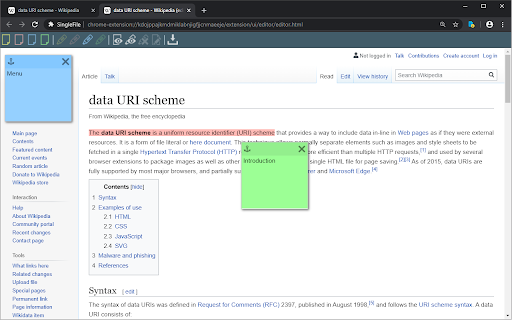
 - Select "Annotate and save the page..." in the context menu to:
   - Highlight text,
   - add notes,
   - remove content.
 - You can also process multiple tabs in one click and save:
   - the selected tabs,
   - the unpinned tabs,
   - all the tabs.
 - The context menu also allows you to activate the auto-save (after pages are being loaded) of:
   - the current tab,
   - the unpinned tabs,
   - all the tabs.
 - Right-click on the SingleFile button and select "Manage extension" to open the options page.
 - Upload pages to Google Drive/Dropbox/GitHub/WebDAV via the Destination section in the options page.
 - Enable the option "Misc. > add proof of existence" to prove the existence of saved pages by linking the SHA256 of the pages into the blockchain.
 - You can use the customizable shortcut Ctrl+Shift+Y to save the current tab or selected tabs.
 - And more!

More info
 - FAQ: https://github.com/gildas-lormeau/SingleFile/blob/master/faq.md
 - Known issues: https://github.com/gildas-lormeau/SingleFile#known-issues

See the extension help in the options page for more detailed information about the options.
Project on GitHub: https://github.com/gildas-lormeau/SingleFile

Suggestions are welcome :)
Technical
- Version
- 1.22.98
- Manifest
- V3
- Size
- 1.23MiB
- Min Chrome
- 88
- Languages
- 16
- Featured
- Yes
Metadata
- ID
- mpiodijhokgodhhofbcjdecpffjipkle
- Developer ID
- u6b3546e57c4e3059f786f5260957d293
- Developer Email
- [email protected]
- Created
- Apr 12, 2010
- Last Updated (Store)
- Feb 26, 2026
- Last Scraped
- Jun 5, 2026
- Website
- getsinglefile.com
Similar extensions
Alternatives to SingleFile, ranked by description similarity.

Save Webpage
One click tool that captures any page as a single offline HTML file with all images and styles inlined.
876
★ 5.0

linkding advanced extension
Companion extension for the linkding bookmark service
22

Tab Save
One-click download for files from open tabs, lists of URLs, or scholarly article PDFs from their associated DOI.
1.0K
★ 5.0

UnderControl Web Clipper
Save web pages locally or to UnderControl — full HTML snapshots and Markdown, no login required
18

AiFiler - Save to Knowledge Base
Save any webpage to your AI-powered knowledge base with one click. Smart organization, instant search, and beautiful design.
1

Choose Folder to Save Downloads
Pick a subfolder for each download before it saves.
38

Save Page WE
Save a complete web page (as curently displayed) as a single HTML file that can be opened in any browser.
100.0K
★ 4.5

Batch Downloader
Scan a page (or selection) for links/media and bulk download them. Filters by type/extension. MV3.
581
★ 5.0
Data sourced from the Chrome Web Store · last verified Jun 5, 2026.