
Drag Maze
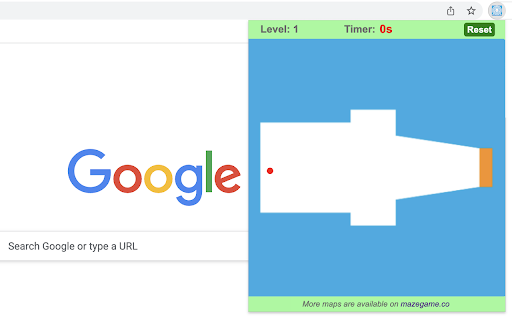
Quickly drag the red dot to the orange exit while avoiding borders.
As of June 2026, Drag Maze has 4,000 users and a 3.67/5 rating from 6 reviews in the Games category.
Usersdown 20.0 percent−20.0%
4.0K
4,000
Ratingno change0%
3.67
6 reviews
Reviewsno change0%
6
Version
0.1.9
Manifest V3
90-day change · In the last 90 days this extension lost 1.0K users, 1 version update.
History
4 snapshotsTracking since Apr 5, 2026.
View as table
| Date | Users | Rating | Reviews | Version |
|---|---|---|---|---|
| Apr 5, 2026 | 5.0K | 3.67 | 6 | 0.1.8 |
| Apr 16, 2026 | 4.0K | 3.67 | 6 | 0.1.8 |
| May 27, 2026 | 5.0K | 3.67 | 6 | 0.1.8 |
| Jun 1, 2026 | 5.0K | 3.67 | 6 | 0.1.9 |
| Now | 4.0K | 3.67 | 6 | 0.1.9 |
Changelog
- May 27, 2026description
Just click on the maze extension icon in the top right corner of your browser and the game will start immediately in a popup! All you need to do is to move the red dot along the white path until it reaches the orange exit.

🎮 How to Play

• For moving the red dot, just click on it and drag it with your mouse. Just be careful not to touch the blue borders as you move.

• A timer is displayed in the top bar of the maze, indicating the amount of time you've spent on the current level. Once you've completed all the levels, you'll be able to view the total time used.

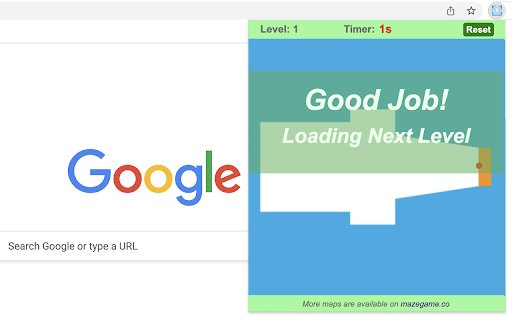
• To advance to the next level, completion of the current level is required. To return to level one, just click the reset button whenever you wish.

• If you happen to fail the current level, the game will automatically restart shortly thereafter.

The extension has thirteen built-in maps and if you want to try more maps, just visit our website to access them.

Beat the maze challenge and have fun!

CHANGELOG
==========
Version 0.1.1 - 0.1.8
- Add google analytics
- Update the link to more maps
- Prettify code and styles

Version 0.1.0
- Initial release of game
Just click on the maze extension icon in the top right corner of your browser and the game will start immediately in a popup! All you need to do is to move the red dot along the white path until it reaches the orange exit.

🎮 How to Play

• For moving the red dot, just click on it and drag it with your mouse. Just be careful not to touch the blue borders as you move.

• A timer is displayed in the top bar of the maze, indicating the amount of time you've spent on the current level. Once you've completed all the levels, you'll be able to view the total time used.

• To advance to the next level, completion of the current level is required. To return to level one, just click the reset button whenever you wish.

• If you happen to fail the current level, the game will automatically restart shortly thereafter.

The extension has thirteen built-in maps and if you want to try more maps, just visit our website to access them.

Beat the maze challenge and have fun!

CHANGELOG
==========
Version 0.1.1 - 0.1.9
- Add google analytics
- Update the link to more maps
- Prettify code and styles

Version 0.1.0
- Initial release of game
Permissions & access
- Permissions
- storage
- Host access
- None declared
Screenshots


About
Just click on the maze extension icon in the top right corner of your browser and the game will start immediately in a popup! All you need to do is to move the red dot along the white path until it reaches the orange exit.

🎮 How to Play

• For moving the red dot, just click on it and drag it with your mouse. Just be careful not to touch the blue borders as you move.

• A timer is displayed in the top bar of the maze, indicating the amount of time you've spent on the current level. Once you've completed all the levels, you'll be able to view the total time used.

• To advance to the next level, completion of the current level is required. To return to level one, just click the reset button whenever you wish.

• If you happen to fail the current level, the game will automatically restart shortly thereafter.

The extension has thirteen built-in maps and if you want to try more maps, just visit our website to access them.

Beat the maze challenge and have fun!

CHANGELOG
==========
Version 0.1.1 - 0.1.9
- Add google analytics
- Update the link to more maps
- Prettify code and styles

Version 0.1.0
- Initial release of game
Technical
- Version
- 0.1.9
- Manifest
- V3
- Size
- 706KiB
- Min Chrome
- 88
- Languages
- 1
- Featured
- Yes
Metadata
- ID
- mpekdelojgbomfnlgbakjjokngoidjhl
- Developer ID
- u16493971c7485c0ca9ef0153d13c1c1a
- Developer Email
- [email protected]
- Created
- Jul 19, 2023
- Last Updated (Store)
- May 25, 2026
- Last Scraped
- Jun 21, 2026
- Website
- gameanything.com
- Support URL
- https://www.gameanything.com/contact-us/
- Privacy Policy
- https://www.gameanything.com/privacy-policy/
Similar extensions
Alternatives to Drag Maze, ranked by description similarity.
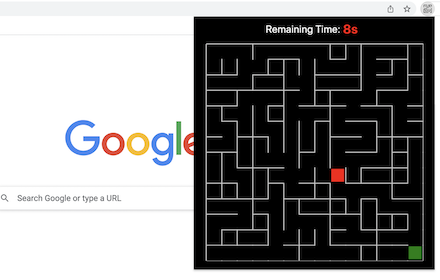
Maze
A fun maze game that plays in a popup.
60.0K
★ 4.1

Barcode Maze
A novel maze game that plays in a popup.
2.0K
★ 4.5
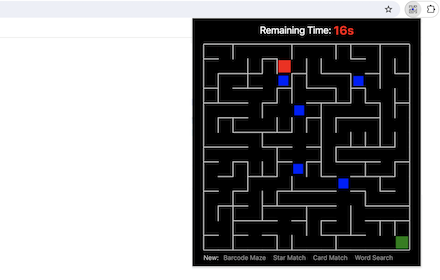
Blocker Maze
Move red block to the exit while avoiding random blockers.
863
★ 5.0

Level Maze
A level up maze game that plays in a popup.
10.0K
★ 4.6

Mazes 2.0 BT
A fast, solvable maze game that generates a new maze every time. Play in the popup!
—

Maze Popup
Now you can play Maze Path of Light Game right on Chrome™ Browser! Offline and Popup Version, without internet required!
158

Maze Rescue
Rescue every character trapped in the maze before making your way to the exit!
563
★ 5.0

Maze Game
You can play a maze generation game.
168
★ 5.0
Data sourced from the Chrome Web Store · last verified Jun 21, 2026.