
Level Maze
A level up maze game that plays in a popup.
As of June 2026, Level Maze has 10,000 users and a 4.57/5 rating from 7 reviews in the Games category.
Usersno change0%
10.0K
10,000
Ratingup 1.6 percent+1.6%
4.57
7 reviews
Reviewsup 16.7 percent+16.7%
7
Version
0.3.4
Manifest V3
90-day change · In the last 90 days this extension 1 version update.
History
3 snapshotsTracking since Apr 16, 2026.
View as table
| Date | Users | Rating | Reviews | Version |
|---|---|---|---|---|
| Apr 16, 2026 | 10.0K | 4.50 | 6 | 0.3.3 |
| May 23, 2026 | 10.0K | 4.50 | 6 | 0.3.3 |
| May 28, 2026 | 10.0K | 4.50 | 6 | 0.3.4 |
| Now | 10.0K | 4.57 | 7 | 0.3.4 |
Changelog
- May 23, 2026description
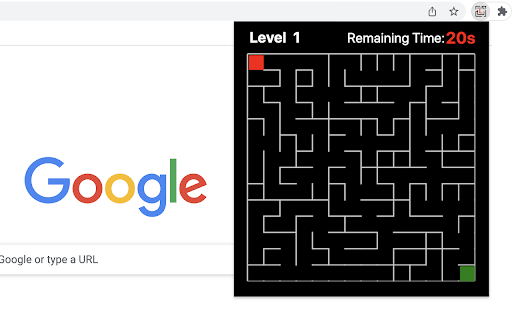
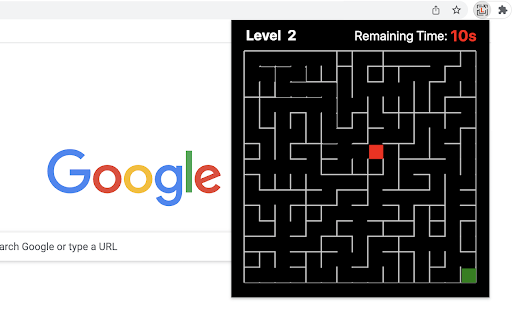
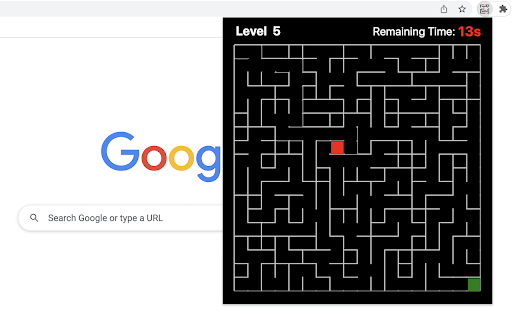
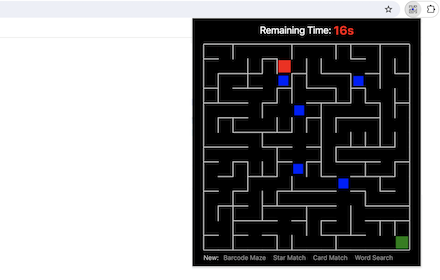
The play is very simple, just move the top-left red block to touch the green block at the bottom right corner in the given time (20s). Use the Arrow keys or WASD to move and keep an eye on the timer bar at the top of the maze to see how much time you have left.

Only when you win current game, you can go to next level. If you want to go back to level 1, just click reset button when current game is over.  Try to challenge yourself to see if you can win at the level of 10 or higher (really hard!!!).

The maze is randomly generated based on current difficulty level and the map will be different each time the game starts.

Have fun with the maze game! To discover the shortest path, click the link located below the 'Restart' button. To enjoy even more, check out some of our featured game extensions on the game over page.

CHANGELOG
==========
Version 0.2.3 - 0.3.3
- Update the link of the shortest path
- Enable dynamic update of featured games
- Add WASD movement support
- Prettify code and styles

Version 0.1.8 - 0.2.2
- Add the link of bonus features
- Add the link of the shortest path
- Display featured games after game over

Version 0.1.7
- Fix allowing moves after losing
- Enable Space/Enter keys for next level

Version 0.1.3 - 0.1.6
- Add the section of new games
- Update new game list with time
- Update level maze icon

Version 0.1.0 - 0.1.2
- Initial release of maze game
- Improve interface and features
The play is very simple, just move the top-left red block to touch the green block at the bottom right corner in the given time (20s). Use the Arrow keys or WASD to move and keep an eye on the timer bar at the top of the maze to see how much time you have left.

Only when you win current game, you can go to next level. If you want to go back to level 1, just click reset button when current game is over.  Try to challenge yourself to see if you can win at the level of 10 or higher (really hard!!!).

The maze is randomly generated based on current difficulty level and the map will be different each time the game starts.

Have fun with the maze game! To discover the shortest path, click the link located below the 'Restart' button. To enjoy even more, check out some of our featured game extensions on the game over page.

CHANGELOG
==========
Version 0.2.3 - 0.3.4
- Update the link of the shortest path
- Enable dynamic update of featured games
- Add WASD movement support
- Prettify code and styles

Version 0.1.8 - 0.2.2
- Add the link of bonus features
- Add the link of the shortest path
- Display featured games after game over

Version 0.1.7
- Fix allowing moves after losing
- Enable Space/Enter keys for next level

Version 0.1.3 - 0.1.6
- Add the section of new games
- Update new game list with time
- Update level maze icon

Version 0.1.0 - 0.1.2
- Initial release of maze game
- Improve interface and features
Permissions & access
- Permissions
- storage
- Host access
- None declared
Screenshots


About
The play is very simple, just move the top-left red block to touch the green block at the bottom right corner in the given time (20s). Use the Arrow keys or WASD to move and keep an eye on the timer bar at the top of the maze to see how much time you have left.

Only when you win current game, you can go to next level. If you want to go back to level 1, just click reset button when current game is over.  Try to challenge yourself to see if you can win at the level of 10 or higher (really hard!!!).

The maze is randomly generated based on current difficulty level and the map will be different each time the game starts.

Have fun with the maze game! To discover the shortest path, click the link located below the 'Restart' button. To enjoy even more, check out some of our featured game extensions on the game over page.

CHANGELOG
==========
Version 0.2.3 - 0.3.4
- Update the link of the shortest path
- Enable dynamic update of featured games
- Add WASD movement support
- Prettify code and styles

Version 0.1.8 - 0.2.2
- Add the link of bonus features
- Add the link of the shortest path
- Display featured games after game over

Version 0.1.7
- Fix allowing moves after losing
- Enable Space/Enter keys for next level

Version 0.1.3 - 0.1.6
- Add the section of new games
- Update new game list with time
- Update level maze icon

Version 0.1.0 - 0.1.2
- Initial release of maze game
- Improve interface and features
Technical
- Version
- 0.3.4
- Manifest
- V3
- Size
- 38.85KiB
- Min Chrome
- 88
- Languages
- 1
- Featured
- Yes
Metadata
- ID
- jbnboceikbdhfinjlebidbhhlplagahc
- Developer ID
- u16493971c7485c0ca9ef0153d13c1c1a
- Developer Email
- [email protected]
- Created
- Feb 23, 2023
- Last Updated (Store)
- May 22, 2026
- Last Scraped
- Jun 22, 2026
- Website
- gameanything.com
- Support URL
- https://www.gameanything.com/contact-us/
- Privacy Policy
- https://www.gameanything.com/privacy-policy/
Similar extensions
Alternatives to Level Maze, ranked by description similarity.
Maze
A fun maze game that plays in a popup.
60.0K
★ 4.1
Blocker Maze
Move red block to the exit while avoiding random blockers.
863
★ 5.0

Barcode Maze
A novel maze game that plays in a popup.
2.0K
★ 4.5

Drag Maze
Quickly drag the red dot to the orange exit while avoiding borders.
4.0K
★ 3.7

Maze Release
Release all the characters trapped among the bricks before racing to the exit!
272
★ 5.0

Maze Rescue
Rescue every character trapped in the maze before making your way to the exit!
563
★ 5.0

Maze Explorer
Navigate a grid maze to find the target node!
1

Maze Game
You can play a maze generation game.
168
★ 5.0
Data sourced from the Chrome Web Store · last verified Jun 22, 2026.