
Rename Tabs with F2
Rename tab titles at extension page that can be opened with F2 keyboard shortcut.
As of June 2026, Rename Tabs with F2 has 467 users and a 3.80/5 rating from 5 reviews in the Productivity category.
Usersup 37.0 percent+37.0%
467
467
Ratingup 1.3 percent+1.3%
3.80
5 reviews
Reviewsup 25.0 percent+25.0%
5
Version
1.3.0
Manifest V3
90-day change · In the last 90 days this extension 1 version update, changed permissions.
History
11 snapshotsTracking since Apr 1, 2026.
View as table
| Date | Users | Rating | Reviews | Version |
|---|---|---|---|---|
| Apr 1, 2026 | 341 | 3.75 | 4 | 1.2.1 |
| Apr 10, 2026 | 349 | 3.75 | 4 | 1.2.1 |
| Apr 20, 2026 | 350 | 3.80 | 5 | 1.2.1 |
| Apr 25, 2026 | 402 | 3.80 | 5 | 1.2.1 |
| May 3, 2026 | 442 | 3.80 | 5 | 1.2.1 |
| May 9, 2026 | 424 | 3.80 | 5 | 1.3.0 |
| May 14, 2026 | 439 | 3.80 | 5 | 1.3.0 |
| May 20, 2026 | 438 | 3.80 | 5 | 1.3.0 |
| May 26, 2026 | 429 | 3.80 | 5 | 1.3.0 |
| Jun 2, 2026 | 435 | 3.80 | 5 | 1.3.0 |
| Jun 8, 2026 | 464 | 3.80 | 5 | 1.3.0 |
| Now | 467 | 3.80 | 5 | 1.3.0 |
Changelog
- May 3, 2026description
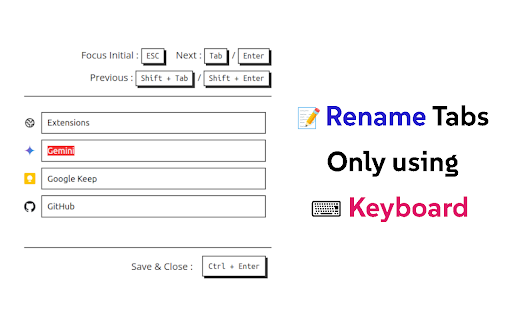
⌨️ Rename tabs without using a mouse!

- Press 'F2' to Open Rename Page at any tab
- 'Tab' or 'Enter' / 'Shift+Tab' or 'Shift+Enter' to Move around tab titles
- 'Ctrl+Enter' to Apply changes and Close
- 'Shift+R' to reload connectable tabs
- 'F5' or 'Ctrl+R' to Reset changes (browser original)
- 'Ctrl+W' or 'Ctrl+F4' to Close without applying (browser original)

📌 'F2' shortcut and Renaming is ⚠️not available⚠️ at some pages (e.g. ⚠️ chrome web store page ⚠️, chrome:// pages, new tab page, etc) due to security reasons of the browser.
📌 When extension is 'first installed ⬇️', you need to 'refresh 🔄' tab to use 'F2' shortcut because extension cannot connect to tabs that are created before its installed.

v1.2
- Added descriptions about unavailable tabs
- Reload all reconnectable tabs with 'Shift+R' shortcut
- All buttons are now clickable

v1.1
- Added settings
  - Change shortcut
  - Darkmode
  - Adjust list width

Source code of this extension is opened : https://github.com/vhv3y8/rename-tabs-with-f2
Feature Request, Language Support, Bug Report : Github Issue or [email protected]
⌨️ Rename tabs without using a mouse!

- Press 'F2' to Open Rename Page at any tab
- 'Tab' or 'Enter' / 'Shift+Tab' or 'Shift+Enter' to Move around tab titles
- 'Ctrl+Enter' to Apply changes and Close
- Titles are automatically applied with 'Persist & Apply Titles' option
- 'Shift+R' to reload connectable tabs
- 'F5' or 'Ctrl+R' to Reset changes (browser original)
- 'Ctrl+W' or 'Ctrl+F4' to Close without applying (browser original)

📌 'F2' shortcut and Renaming is ⚠️not available⚠️ at some pages (e.g. ⚠️ chrome web store page ⚠️, chrome:// pages, new tab page, etc) due to security reasons of the browser.
📌 When extension is 'first installed ⬇️', you need to 'refresh 🔄' tab to use 'F2' shortcut because extension cannot connect to tabs that are created before its installed.

v1.3
- Added option to toggle persist & apply titles
- Titles are automatically applied when tab is created or title has changed (when 'Persist & Apply Titles' option is on)
- Save, upload titles data as file & clear titles data
- Resolve upload title conflictions by selecting
- Added option to change point colors

v1.2
- Added descriptions about unavailable tabs
- Reload all reconnectable tabs with 'Shift+R' shortcut
- All buttons are now clickable

v1.1
- Added settings
  - Change shortcut
  - Darkmode
  - Adjust list width

Source code of this extension is opened : https://github.com/vhv3y8/rename-tabs-with-f2
Feature Request, Language Support, Bug Report : Github Issue or [email protected]
- May 3, 2026short_description
Rename opened tabs using the F2 keyboard shortcut.
Rename tab titles at extension page that can be opened with F2 keyboard shortcut.
- May 3, 2026permissions
tabs, storage
tabs, storage, unlimitedStorage
Permissions & access
- Permissions
- tabsstorageunlimitedStorage
- Host access
- None declared
Screenshots


About
⌨️ Rename tabs without using a mouse!

- Press 'F2' to Open Rename Page at any tab
- 'Tab' or 'Enter' / 'Shift+Tab' or 'Shift+Enter' to Move around tab titles
- 'Ctrl+Enter' to Apply changes and Close
- Titles are automatically applied with 'Persist & Apply Titles' option
- 'Shift+R' to reload connectable tabs
- 'F5' or 'Ctrl+R' to Reset changes (browser original)
- 'Ctrl+W' or 'Ctrl+F4' to Close without applying (browser original)

📌 'F2' shortcut and Renaming is ⚠️not available⚠️ at some pages (e.g. ⚠️ chrome web store page ⚠️, chrome:// pages, new tab page, etc) due to security reasons of the browser.
📌 When extension is 'first installed ⬇️', you need to 'refresh 🔄' tab to use 'F2' shortcut because extension cannot connect to tabs that are created before its installed.

v1.3
- Added option to toggle persist & apply titles
- Titles are automatically applied when tab is created or title has changed (when 'Persist & Apply Titles' option is on)
- Save, upload titles data as file & clear titles data
- Resolve upload title conflictions by selecting
- Added option to change point colors

v1.2
- Added descriptions about unavailable tabs
- Reload all reconnectable tabs with 'Shift+R' shortcut
- All buttons are now clickable

v1.1
- Added settings
  - Change shortcut
  - Darkmode
  - Adjust list width

Source code of this extension is opened : https://github.com/vhv3y8/rename-tabs-with-f2
Feature Request, Language Support, Bug Report : Github Issue or [email protected]
Technical
- Version
- 1.3.0
- Manifest
- V3
- Size
- 408KiB
- Min Chrome
- 88
- Languages
- 2
- Featured
- No
Metadata
- ID
- mpamlkcaopbfeopljmhplhobhdofngaa
- Developer ID
- u007e541f805b1cfd997d1bb83e917f98
- Developer Email
- [email protected]
- Created
- Nov 13, 2024
- Last Updated (Store)
- Apr 29, 2026
- Last Scraped
- Jun 8, 2026
- Website
- —
- Support URL
- —
- Privacy Policy
- —
Similar extensions
Alternatives to Rename Tabs with F2, ranked by description similarity.

Rename Tab
Rename Chrome tabs with persistent titles across page refreshes
58
★ 3.0

Easy Tab Renamer
Click the icon, right-click, or use a shortcut to rename your tabs!
4

Card Style Tab Search
List and manage all open tabs in card style, efficiently
10

simple-tab-rename
This is a Simple Tab Rename.
140
★ 5.0

Advanced Tab Renamer - Custom Names & Icons
Rename any tab & set a custom favicon by URL, prefix, or regex. phpMyAdmin DB detection. Bilingual EN/FR. For all users !
40
★ 4.5

Best Tab Renamer
Rename browser tabs by URL or original title and set favicon to an emoji.
9
TabSave
Save tabs into safe sessions, restore anytime, and export backups.
221
★ 5.0

SnapTab
Organize tabs with custom names. Rename tabs (Alt+R) and switch between them (Alt+S). Say goodbye to browser chaos!
—
Data sourced from the Chrome Web Store · last verified Jun 8, 2026.