
SnapTab
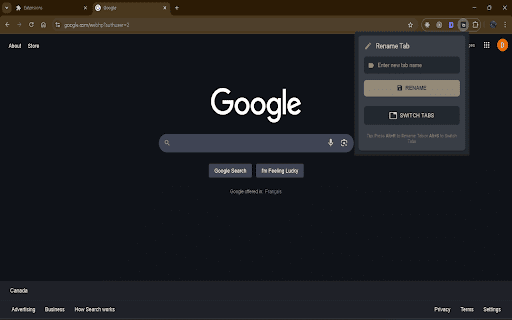
Organize tabs with custom names. Rename tabs (Alt+R) and switch between them (Alt+S). Say goodbye to browser chaos!
As of May 2026, SnapTab has — users in the Productivity category.
Usersno change0%
—
—
Ratingno change0%
—
— reviews
Reviewsno change0%
—
Version
2.0
Manifest V3
History
4 snapshotsTracking since Apr 1, 2026.
View as table
| Date | Users | Rating | Reviews | Version |
|---|---|---|---|---|
| Apr 1, 2026 | 4 | — | — | 2.0 |
| Apr 21, 2026 | 3 | — | — | 2.0 |
| May 6, 2026 | 3 | — | — | 2.0 |
| May 18, 2026 | 4 | — | — | 2.0 |
| Now | — | — | — | 2.0 |
Permissions & access
- Permissions
- tabsactiveTabscriptingstoragecontextMenusalarmsnotifications
- Host access
- http://*/*, https://*/*
Screenshots


About
SnapTab v2 – Smarter Tab Management for Chrome
Declutter your browsing experience. Stay focused. Work faster.

SnapTab v2 is a productivity-focused Chrome extension designed to help users manage and navigate open tabs more efficiently. Whether you're a student researching multiple topics, a developer juggling staging and production environments, or a professional managing complex workflows, SnapTab v2 brings simplicity and speed to your browser experience.

✅ What’s New in Version 2
Redesigned Dark Theme
Enjoy a clean, modern UI built with Material Design principles. The new dark theme reduces eye strain during long sessions.

Updated Logo & Branding
SnapTab now features a fresh logo and refined interface, making it feel at home in modern browsers.

Smarter Tab Search and Switcher
Navigate, rename, and manage open tabs through a centralized interface optimized for keyboard control.

🔑 Core Features
🏷️ Custom Tab Naming
Rename any tab title to reflect its actual purpose. Whether it's a dashboard, article, or project page, custom naming helps you stay organized and find tabs faster.

🔍 Fast Tab Search
Instantly search across open tabs using a dedicated dashboard. SnapTab displays the site favicon and your custom label to help you locate the right tab quickly.

⌨️ Keyboard Shortcuts
Use intuitive keys to speed up your workflow:

Tab – move between tabs

Enter – select and activate a tab

R – rename the selected tab

C – close the selected tab

Esc – exit the interface

⚡ Quick Launch (Alt+S)
Activate the SnapTab overlay using a keyboard shortcut—even when working with 50+ tabs.

🧠 Persistent Tab Memory
SnapTab remembers your renamed tab titles between sessions, so you don't lose track of your work after closing or restarting your browser.

🎨 Minimal Interface with Material Design
Stay focused with a responsive, distraction-free layout. SnapTab is crafted for usability and visual clarity.

🚀 Lightweight and Optimized
SnapTab is performance-tuned to remain fast and responsive, without using excess memory—even with dozens of open tabs.

🔒 Privacy-Conscious by Design
SnapTab runs fully offline and does not collect, store, or transmit any personal or tab data. Your tab names are stored locally and never synced unless explicitly allowed.

💼 Who It's For
Professionals working with multiple projects or research threads

Students managing tabs for different assignments or courses

Developers and testers who need clear tab labeling

Anyone who wants a faster, cleaner tab-switching experience

📩 Support and Contact
SnapTab is actively maintained. For feedback, feature suggestions, or support inquiries:

📧 Email: [email protected]

🔎 Tags and Search Keywords
Tab manager, tab switcher, rename Chrome tabs, tab search, productivity tools, dark mode tab extension, browser organization, keyboard shortcuts, efficient tab navigation, Chrome tab tools

Download SnapTab v2 and upgrade how you manage tabs—stay focused, stay productive.
Technical
- Version
- 2.0
- Manifest
- V3
- Size
- 68.49KiB
- Min Chrome
- 88
- Languages
- 1
- Featured
- No
Metadata
- ID
- gccnfamphabcminhglcliinpgodbjean
- Developer ID
- ude9ab40359d183be7175faa042f9074e
- Developer Email
- [email protected]
- Created
- Jan 20, 2025
- Last Updated (Store)
- May 11, 2025
- Last Scraped
- May 18, 2026
- Website
- —
- Support URL
- —
- Privacy Policy
- —
Similar extensions
Alternatives to SnapTab, ranked by description similarity.

SideTab Manager - Vertical Tabs & Sessions
Transform Your Tab Management Experience. The Ultimate Vertical Tab Manager for Chrome
84
★ 4.9

Desktab - Quick visual tab manager
Tame tab clutter instantly. Visual grid to switch, search, mute, and close tabs with Cmd+. Includes light/dark theme settings.
1

Smart Tab Switcher
Fast tab switching and management with fuzzy search and keyboard shortcuts
87
★ 5.0

Side Tab Manager 📑
Streamline your browsing with this powerful side tab manager. Organize tabs boost productivity and manage browser memory efficiently
7

Tab Manager Pro
Professional tab management with suspension, grouping, and session management. Clean, focused, and fast.
—

TabSaver
Save and restore browser tab sessions with ease. Features include export/import, search, tags, auto-save, and more.
16
★ 5.0

Tabs Snapshot
Automatically capture tab snapshots to recover from auth redirects and tab management
9

Spotlight Tab
Quickly search and switch between open tabs. Supports fuzzy search through titles, URLs and tab groups.
2
Data sourced from the Chrome Web Store · last verified May 18, 2026.