
Enable Copy Paste & Right Click
Enable Copy Paste & Right Click on websites that have disabled Copy Paste & Right Click.
As of May 2026, Enable Copy Paste & Right Click has 10,000 users and a 4.00/5 rating from 23 reviews in the Workflow & Planning category.
Usersno change0%
10.0K
10,000
Ratingno change0%
4.00
23 reviews
Reviewsno change0%
23
Version
1.0
Manifest V3
Permissions & access
- Permissions
- storage
- Host access
- *://*/*
Screenshots


About
Enable Copy Paste & Right Click on websites that have disabled copy paste & Right Click.

How to use this Extension:

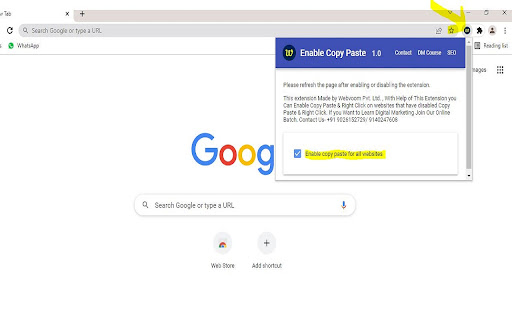
- Click on the extension icon
-  Pin Icon For Easy Use
- After a popup is opened, use the “Enable copy paste for all websites” checkbox.
-  Refresh the page and see if the extension has successfully enabled copy paste & Right Click functionality on the website.

Step for Disable Extension-
- Click on the extension icon.
- After a popup is opened, UNTICK checkbox “Enable copy paste for all websites”.

This Extension Made for Enable Copy Paste and Right Click from Disabled Copy Paste & Right Click Website.

For any Doubt  & More Digital Marketing Tricks Visit Our YouTube Channel - webvoom . Where We Explains How to Use Our Extension and Many More Interesting Tricks
I hope you like it, and please review it if you're happy with it!
Technical
- Version
- 1.0
- Manifest
- V3
- Size
- 892KiB
- Min Chrome
- 88
- Languages
- 1
- Featured
- No
Metadata
- ID
- moomnncijchljipbmkiblfbaaldinhde
- Developer ID
- uef643359db4bd4599c89f36403586d95
- Developer Email
- [email protected]
- Created
- Feb 25, 2022
- Last Updated (Store)
- Feb 25, 2022
- Last Scraped
- May 29, 2026
- Website
- —
- Support URL
- https://webvoom.com/contact-us
- Privacy Policy
- https://webvoom.com/terms-policy
Similar extensions
Alternatives to Enable Copy Paste & Right Click, ranked by description similarity.

Enable Right Click - Allow Copy & Select Text
Enable Right Click, selection text and copy text on websites that disable these features.
60

Activate Enable Right Click & Copy
Allow Right Click, Enable Copy and Paste in Every Site. Simple Allow Copy, Activate Enable Right Click, Copy Text Easily.
50.0K
★ 4.3
Allow Copy - Select & Enable Right Click
Enable copy on protected websites: allow right click, unblock context menu. Enable text highlight and allow copy.
200.0K
★ 4.4

Enable Right Click ─ Allow Copy Everywhere
Allow copying and remove copy protection. Enable text selection, right-click menu, and context menu.
6.0K
★ 4.9

Pro Copy Paste
Enable Copy, Paste, Select Text, Right Click On Websites
25

Allow Right-Click
Re-enable the possibility to use the context menu, copy, paste, and text selection on sites that prevent them.
400.0K
★ 4.3

Enable Right Click – Copy, Paste & Context Menu
Enables right-click, copy, Paste, and text selection on websites that block these actions. Restore full control of your browser.
214

Enable Right Click
Enable right-click, text selection, and copy functionality on protected websites
895
★ 3.5
Data sourced from the Chrome Web Store · last verified May 29, 2026.