
Securify Identity Plugin
Securify Identity browser extension used for logging into single sign-on applications.
As of May 2026, Securify Identity Plugin has 69 users and a 5.00/5 rating from 2 reviews in the Productivity category.
Usersdown 10.4 percent−10.4%
69
69
Ratingno change0%
5.00
2 reviews
Reviewsno change0%
2
Version
0.0.0.3
Manifest V3
History
2 snapshotsTracking since Apr 30, 2026.
View as table
| Date | Users | Rating | Reviews | Version |
|---|---|---|---|---|
| Apr 30, 2026 | 77 | 5.00 | 2 | 0.0.0.3 |
| May 29, 2026 | 73 | 5.00 | 2 | 0.0.0.3 |
| Now | 69 | 5.00 | 2 | 0.0.0.3 |
Permissions & access
- Permissions
- storagewebRequest
- Host access
- <all_urls>, http://*/
Screenshots
About
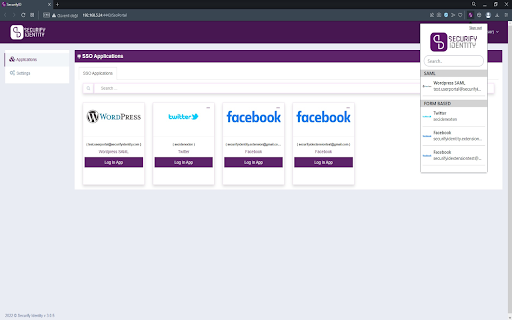
SecurifyID provides single sign-on services for their customers using protocols such as SAML and OpenID Connect. To support form-based websites, we also offer a browser extension that automatically fills in credentials saved before for these types of websites. These usernames and passwords are organizational and added by customers using our portal, and they are kept encrypted on our servers. The SecurifyID extension works as follows:
1) After a user logs in, a list of users' single sign on websites is downloaded and stored.
2) The user can either open a website through the extension or the SecurifyID portal.
3) The extension sends a query to the back-end server and requests the user's password for that particular website.
4) The extension fills in the username and password fields and logs the user in accordingly.
Technical
- Version
- 0.0.0.3
- Manifest
- V3
- Size
- 2.13MiB
- Min Chrome
- 88
- Languages
- 1
- Featured
- No
Metadata
- ID
- mojobmhedhllbmbbmfigjkoconcenebn
- Developer ID
- u1293c84b29427a93820b26f015150e7e
- Developer Email
- [email protected]
- Created
- Dec 28, 2022
- Last Updated (Store)
- Nov 19, 2023
- Last Scraped
- May 29, 2026
- Website
- securifyidentity.com
- Support URL
- https://www.securifyidentity.com/contact
- Privacy Policy
- https://securifyid.com/legal/privacy-policy/
Similar extensions
Alternatives to Securify Identity Plugin, ranked by description similarity.

ARCON Browser Extension
Arcon Extensions
10.0K
★ 5.0

12Port Browser Extension
12Port Browser Extension
3
★ 5.0

YPass
Secure credential management and auto-login extension
—

PassSecurium
Your Password Database - available anytime and anywhere.
613
★ 5.0

Universal Login
One-click universal password autofill for Chrome. Secure, local, and lightning fast.
—
★ 5.0

KIT Auto-Login
Zero-click login for KIT services. Automatically clicks through the login for ILIAS, CAS Campus, and other portals.
2

ActivID CMS extension
ActivID Credential Management System Extension
1.0M
★ 1.0

SmartAssist
Simplify your digital experience with SmartAssist.
12
Data sourced from the Chrome Web Store · last verified May 29, 2026.