MailChimp Templates for Gmail™ by cloudHQ
Import and integrate MailChimp templates into Gmail
As of June 2026, MailChimp Templates for Gmail™ by cloudHQ has 10,000 users and a 4.33/5 rating from 18 reviews in the Communication category.
Usersno change0%
10.0K
10,000
Ratingdown 4.4 percent−4.4%
4.33
18 reviews
Reviewsup 5.9 percent+5.9%
18
Version
1.0.3.2
Manifest V3
History
2 snapshotsTracking since Apr 18, 2026.
View as table
| Date | Users | Rating | Reviews | Version |
|---|---|---|---|---|
| Apr 18, 2026 | 10.0K | 4.53 | 17 | 1.0.3.2 |
| May 14, 2026 | 10.0K | 4.53 | 17 | 1.0.3.2 |
| Now | 10.0K | 4.33 | 18 | 1.0.3.2 |
Permissions & access
- Permissions
- scriptingstoragebackgroundtabs
- Host access
- https://mail.google.com/, https://www.cloudhq.net/, https://*.mailchimp.com/*
Screenshots



About
Integrate your Mailchimp email templates directly into Gmail™ for seamless access and increased productivity!

This extension allows you to:
✅  Import Mailchimp email templates to Gmail™
✅  Send your MailChimp template via Gmail™ without leaving the Mailchimp editor
✅  No more sending emails from impersonal "[email protected]" email addresses; they are sent from your email address
✅  After importing your Mailchimp email templates into Gmail, you can access them in your new Gmail email template library without ever leaving Gmail.

Whether you're a sales professional, small business owner, designer, marketer or anyone needing access to their Mailchimp templates, this app simplifies the process and keeps you productive. This is your solution to conveniently send high quality, personalized emails.

~~~ Key Features ~~~
🌟 Import your Mailchimp templates directly into Gmail™.
🌟 Send your Mailchimp templates using your email, without ever leaving Mailchimp.
🌟 Unlimited template storage for Premium Plan users.
🌟 Quick and easy installation, works in Chrome and Microsoft Edge without consuming space on your computer.
🌟 5-Star ratings by our highly satisfied users.

How it works:

1. Install the extension.
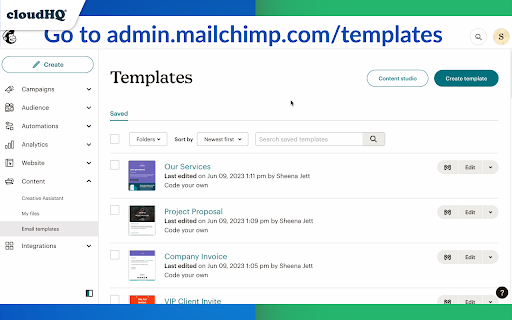
2. Go to https://admin.mailchimp.com/templates/
3. Choose the template you want to send.
4. You will see a "Gmail" icon next to your template. Click on it and your template will show in your Gmail email compose window.
5. Send your email using your own Gmail address, without leaving Mailchimp.

~~~~~~~~~~~~~~~~~

Mailchimp Templates in Gmail by cloudHQ is perfect for:

🎯 **Sales Professionals** who need access to their email templates from Gmail to effectively reach out to clients.

🎯 **Small Business Owners** who appreciate the convenience of sending customized emails right from their Gmail.

🎯 **Designers and Marketers** who love to send visually stunning emails from their Gmail without leaving Mailchimp.

🎯 **Anyone** who wants a more efficient way to access their Mailchimp templates.

No more switching between platforms or impersonal emails. Start improving your productivity with Mailchimp Templates in Gmail by cloudHQ.

cloudHQ. Helping your productivity, 1 click at a time.


cloudHQ website: https://www.cloudhq.net/
App website: https://www.mailchimp-templates.com
Pricing: https://www.mailchimp-templates.com/pricing
Support page: https://support.cloudhq.net/?s=mailchimp
Blog: https://blog.cloudhq.net

Gmail is a trademark of Google LLC. Use of this trademark is subject to Google Permissions.

cloudHQ is trademark of CloudHQ LLC. https://www.cloudhq.net/trademark
Technical
- Version
- 1.0.3.2
- Manifest
- V3
- Size
- 945KiB
- Min Chrome
- 88
- Languages
- 11
- Featured
- Yes
Metadata
- ID
- mmjgchjpejidmgmemdpemiojmblddmfb
- Developer ID
- u9999076a1cee8608be24fd86bc3000b6
- Developer Email
- [email protected]
- Created
- Jun 2, 2023
- Last Updated (Store)
- Nov 29, 2025
- Last Scraped
- Jun 2, 2026
- Website
- mailchimp-templates.com
- Support URL
- https://support.cloudhq.net
- Privacy Policy
- https://www.cloudhq.net/privacy
Similar extensions
Alternatives to MailChimp Templates for Gmail™ by cloudHQ, ranked by description similarity.

HubSpot Templates for Gmail™ by cloudHQ
Send HubSpot marketing email templates using Gmail™
2.0K
★ 5.0

Gmail™ Email Templates by cloudHQ
Beautiful email templates for Gmail. Design your templates or import templates from Mailchimp. With team sharing!
100.0K
★ 4.2

Gmail Template Creator
Save time and boost productivity by inserting predefined templates into Gmail emails.
41
★ 5.0

Auto Follow Up for Gmail™ by cloudHQ
Automated follow up emails and mail merge
9.0K
★ 4.9

Gmail Template Manager
Manage and insert email templates into Gmail compose window
6

Email Signature Generator by cloudHQ
Email signature generator and signature templates
20.0K
★ 4.5

Shared Email Templates & Signatures for Gmail
Boost Gmail: create, reuse, personalize templates & signatures with dynamic fields. Share with your team to stay on the same page!
1.0K
★ 4.8

Mail Merge for Gmail - Mailmeteor
Free mail merge with email tracker and auto follow-ups.
60.0K
★ 4.8
Data sourced from the Chrome Web Store · last verified Jun 2, 2026.