
GTM Watson
A GTM helper which let's you see events in real time, copy it and define selectors for possible variable definitions
As of June 2026, GTM Watson has 564 users and a 5.00/5 rating from 10 reviews in the Developer Tools category.
Usersup 0.7 percent+0.7%
564
564
Ratingno change0%
5.00
10 reviews
Reviewsno change0%
10
Version
1.3.3
Manifest V3
History
3 snapshotsTracking since Apr 23, 2026.
View as table
| Date | Users | Rating | Reviews | Version |
|---|---|---|---|---|
| Apr 23, 2026 | 560 | 5.00 | 10 | 1.3.3 |
| May 13, 2026 | 555 | 5.00 | 10 | 1.3.3 |
| Jun 8, 2026 | 562 | 5.00 | 10 | 1.3.3 |
| Now | 564 | 5.00 | 10 | 1.3.3 |
Permissions & access
- Permissions
- storageactiveTabscripting
- Host access
- http://*/, https://*/
Screenshots


About
GTM Watson: Your Ultimate Google Tag Manager Companion

Overview

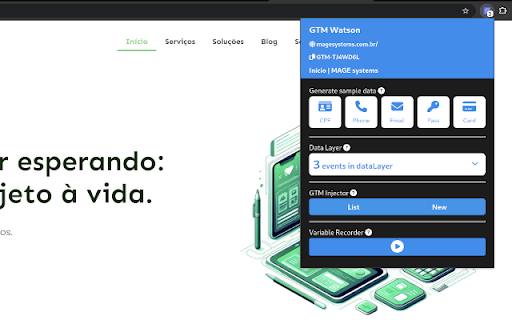
GTM Watson is a powerful Chrome extension designed to streamline and enhance your Google Tag Manager (GTM) experience. It offers a suite of features to assist web developers, marketers, and analysts in testing, managing, and optimizing their GTM implementations. With GTM Watson, you can generate test data, monitor your dataLayer, inject GTM containers, and record variables effortlessly.


Features

1. Quick Actions

Description: Instantly generate test data for CPF (Brazilian Individual Taxpayer Registry), phone numbers, emails, passwords, and credit card information.
Usage: Ideal for developers and testers who need realistic sample data for their projects without manually creating it.
Benefits: Save time and ensure consistency in your test cases with auto-generated data that mimics real-world information.

2. DataLayer Viewer

Description: View all the data collected by your dataLayer in a clear, organized manner.
Usage: Analyze and verify the information being pushed to your dataLayer to ensure accurate tracking and reporting.
Benefits: Simplify troubleshooting and debugging by easily copying dataLayer information to your clipboard for further analysis.

3. GTM Injector

Description: Load different GTM containers onto your web page to test various tags and triggers.
Usage: Perfect for A/B testing or experimenting with different tracking setups without modifying the site’s actual GTM configuration.
Benefits: Quickly switch between containers to compare performance and functionality, ensuring the best configuration for your needs.

4. Variable Recorder

Description: Record variables on your web page for later use. Capture the JS path or a direct function to save as a variable in GTM.
Usage: Facilitate the creation of GTM variables by recording and copying the necessary paths or functions.
Benefits: Enhance your GTM setup by easily creating accurate and reusable variables, improving tracking accuracy and data collection efficiency.


Why Choose GTM Watson?

Efficiency: Reduce the time spent on routine tasks with automated data generation and easy-to-use tools.
Accuracy: Ensure your dataLayer and GTM configurations are working as expected with comprehensive viewing and recording features.
Flexibility: Test multiple GTM setups without hassle, enabling you to find the optimal configuration for your site.
User-Friendly: Intuitive interface designed for both beginners and advanced users, making it easy to navigate and utilize all features.


Conclusion

GTM Watson is an indispensable tool for anyone working with Google Tag Manager. Whether you're a developer needing test data, a marketer optimizing your tracking, or an analyst verifying data collection, GTM Watson simplifies and enhances your workflow. Download GTM Watson today and take your GTM management to the next level.
Technical
- Version
- 1.3.3
- Manifest
- V3
- Size
- 1.31MiB
- Min Chrome
- 88
- Languages
- 1
- Featured
- No
Metadata
- ID
- mmejcjjlincimgicadmipokeopbhbapa
- Developer ID
- ud9f07e8e8d2202a260687f19f2125bcb
- Developer Email
- [email protected]
- Created
- Dec 18, 2023
- Last Updated (Store)
- Dec 3, 2024
- Last Scraped
- Jun 8, 2026
- Website
- magesystems.com.br
- Support URL
- —
- Privacy Policy
- https://magesystems.com.br/politica-de-privacidade/
Similar extensions
Alternatives to GTM Watson, ranked by description similarity.

Stape GTM Helper
Enhance your Google Tag Manager debugging.
7.0K
★ 5.0

GTMFixer - Google Tag Manager Enhancements
Google Tag Manager enhancements for easier tag, trigger and variable organization.
6.0K
★ 5.0

GTM Event Helper — GA4 & Meta Tag Creator
Create GTM tags in seconds. Click any element, get smart CSS selectors, build GA4 & Meta tags via API. AI Wizard for bulk setup.
278
★ 5.0

GTM Audit Assistant
Audit Google Tag Manager containers like a pro. Identify issues with Tags, Triggers, and Variables instantly.
35

GTM Params Injector By Nexef Labs
Instantly inject tracking parameters into Google Tag Manager
14
★ 5.0

GTM Copy Paste - TAGGRS
Easily copy GTM elements, save configurations, and enjoy server-side support with the Taggrs Copy Paste Extension
496
★ 3.5

Bounteous GTM Extractor
Extract, audit, and export GTM tags, triggers, variables, templates, zones, environments, findings, and snapshots in bulk.
75
★ 5.0

GTM Parser
Parse the GTM container from the page and watch what exactly includes GTM on this page
498
★ 5.0
Data sourced from the Chrome Web Store · last verified Jun 8, 2026.