
ImgSrc-er
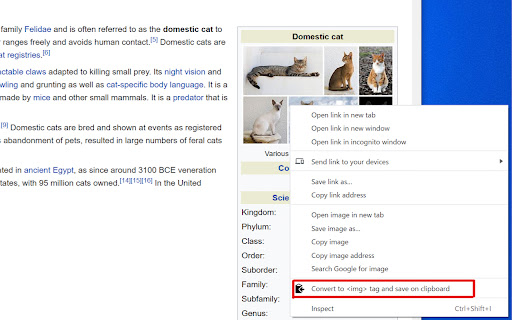
Convert selected image link URL into an HTML <img> tag with src attribute on the clipboard.
As of June 2026, ImgSrc-er has 194 users and a 5.00/5 rating from 1 reviews in the Developer Tools category.
Usersup 4.9 percent+4.9%
194
194
Ratingno change0%
5.00
1 reviews
Reviewsno change0%
1
Version
2.1.1
Manifest V3
History
3 snapshotsTracking since Apr 23, 2026.
View as table
| Date | Users | Rating | Reviews | Version |
|---|---|---|---|---|
| Apr 23, 2026 | 185 | 5.00 | 1 | 2.1.1 |
| May 13, 2026 | 205 | 5.00 | 1 | 2.1.1 |
| Jun 8, 2026 | 207 | 5.00 | 1 | 2.1.1 |
| Now | 194 | 5.00 | 1 | 2.1.1 |
Permissions & access
- Permissions
- contextMenusclipboardWrite
- Host access
- None declared
Screenshots
About
Convert selected image link URL into an HTML <img> tag with src attribute on the clipboard. Either an image, URL of an image, or link to an image can be selected.

For example when a text
"https://example.com/image.jpg"
is selected and this extension is executed via the context menu, the string
<img src="https://example.com/image.jpg" alt="">
is save on the clipboard. You can in turn use this to edit your website or wherever you like.

The text
"https://example.com/image.jpg"
in the above example can be replaced by the image itself or a link object, i.e.,
<a href="https://example.com/image.jpg">Link to Image</a>
in any website.

Attributes:
The icon of this Chrome extension was made by Freepik (https://www.flaticon.com/authors/freepik) from www.flaticon.com (https://www.flaticon.com/).
Technical
- Version
- 2.1.1
- Manifest
- V3
- Size
- 12.12KiB
- Min Chrome
- 88
- Languages
- 2
- Featured
- Yes
Metadata
- ID
- mmalpdcdmbloijpgoagaeallfnmioika
- Developer ID
- uee2e4435073dd7ca0f2fd62fd4970742
- Developer Email
- [email protected]
- Created
- Oct 7, 2020
- Last Updated (Store)
- Jan 29, 2024
- Last Scraped
- Jun 8, 2026
- Website
- scriptable-assets.page
- Privacy Policy
- https://www.scriptable-assets.page/privacy-policy/
Similar extensions
Alternatives to ImgSrc-er, ranked by description similarity.

Image URL Extractor
Extract and display all image URLs from the current page with a vibrant UI.
319

Copy Link on Hover
Easily copy link URLs by hovering over them and pressing Ctrl+C (or Cmd+C on Mac).
127
★ 5.0

Editable HTML to clipboard
Copy or paste source HTML of editable fields to/from clipboard
20
★ 5.0

lnkbrd
Link Bird is an open-source API-first URL shortener
2

Copy DOM + CSS
Select any element and copy its HTML with all styles
61

Color Picker
Simple color picker.
31
★ 5.0

Show and Copy Image Properties
You can see the properties of the image and copy them to the clipboard easily.
271
★ 4.0

Chrome Extension Icon Generator
Generate icons for your Chrome extensions in various required sizes
41
Data sourced from the Chrome Web Store · last verified Jun 8, 2026.