
Copy DOM + CSS
Select any element and copy its HTML with all styles
As of June 2026, Copy DOM + CSS has 61 users in the Developer Tools category.
Usersup 335.7 percent+335.7%
61
61
Ratingno change0%
—
— reviews
Reviewsno change0%
—
Version
1.0.0
Manifest V3
History
11 snapshotsTracking since Apr 1, 2026.
View as table
| Date | Users | Rating | Reviews | Version |
|---|---|---|---|---|
| Apr 1, 2026 | 14 | — | — | 1.0.0 |
| Apr 17, 2026 | 23 | — | — | 1.0.0 |
| Apr 22, 2026 | 35 | — | — | 1.0.0 |
| Apr 27, 2026 | 36 | — | — | 1.0.0 |
| May 4, 2026 | 34 | — | — | 1.0.0 |
| May 10, 2026 | 39 | — | — | 1.0.0 |
| May 15, 2026 | 38 | — | — | 1.0.0 |
| May 21, 2026 | 43 | — | — | 1.0.0 |
| May 28, 2026 | 46 | — | — | 1.0.0 |
| Jun 4, 2026 | 48 | — | — | 1.0.0 |
| Jun 9, 2026 | 59 | — | — | 1.0.0 |
| Now | 61 | — | — | 1.0.0 |
Permissions & access
- Permissions
- activeTabscripting
- Host access
- None declared
Screenshots


About
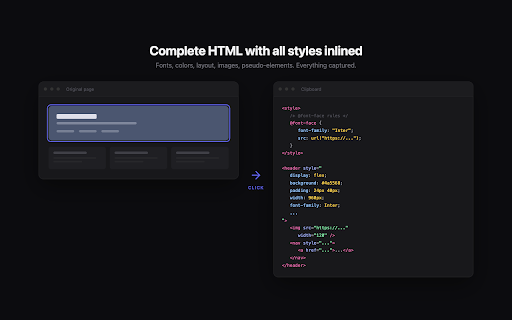
Point at any element on a webpage, click, and get its complete HTML with all styles inlined on your clipboard. Paste it into any HTML file and it renders exactly like the original.

  What gets captured:
  • Full HTML tree of the selected element
  • All computed CSS styles, inlined on each element
  • Custom web fonts with @font-face rules and resolved URLs
  • CSS animations and @keyframes
  • Pseudo-elements (::before, ::after) converted to real elements
  • SVG icons with correct colors, strokes, and dimensions
  • Images with absolute URLs and preserved sizes
  • Background images and gradients

  How to use:
  1. Click the extension icon in the toolbar
  2. Hover over any element to see it highlighted
  3. Click to copy the element to your clipboard
  4. Press Escape to cancel
  5. Paste into any HTML file

  No data is collected. No data is sent anywhere. Everything stays on your clipboard.
Technical
- Version
- 1.0.0
- Manifest
- V3
- Size
- 17.08KiB
- Min Chrome
- 88
- Languages
- 1
- Featured
- No
Metadata
- ID
- hnbgeddloidmdbbokpfacbknbacdhpbl
- Developer ID
- u62ff1e5116d25aa08cffd0c52fed7829
- Developer Email
- [email protected]
- Created
- Mar 18, 2026
- Last Updated (Store)
- Mar 18, 2026
- Last Scraped
- Jun 9, 2026
- Website
- —
Similar extensions
Alternatives to Copy DOM + CSS, ranked by description similarity.

CSS Copy Tool
Instantly copy CSS from any element. Lightweight alternative to CSS Scan.
13

HTML/CSS Extractor
Extract HTML & CSS from any element with live preview, smart selector simplification, and syntax-highlighted editor
115
★ 5.0

HTML Copy
Copy or Export to file the HTML of a page with options to ignore certain elements.
2.0K
★ 4.0

Copy CSS Selector
Copy the CSS selector of any element easily.
115
★ 5.0

GetCSS
Extract final computed CSS that differs from browser defaults
8

Quick Copy DOM
Visually select any element on the page and instantly copy its HTML to clipboard. Like DevTools element inspector, but faster.
127
★ 5.0

CSS Inspector
Inspect CSS, selectors, animations, and layout in real time.
2

CSS Bucket
The fastest and easiest way to inspect and copy CSS from any element on any webpage.
7
Data sourced from the Chrome Web Store · last verified Jun 9, 2026.