TypeGenieAI
The cutting-edge browser extension that brings the power of AI-generated text and images to your fingertips.
As of June 2026, TypeGenieAI has 1 users in the Workflow & Planning category.
Usersno change0%
1
1
Ratingno change0%
—
— reviews
Reviewsno change0%
—
Version
1.1.0
Manifest V3
History
2 snapshotsTracking since Apr 23, 2026.
View as table
| Date | Users | Rating | Reviews | Version |
|---|---|---|---|---|
| Apr 23, 2026 | 1 | — | — | 1.1.0 |
| May 13, 2026 | — | — | — | 1.1.0 |
| Now | 1 | — | — | 1.1.0 |
Permissions & access
- Permissions
- contextMenusstorage
- Host access
- https://www.googleapis.com/*, https://www.google.com/*
Screenshots

About
Introducing TypeGenieAI, the ultimate Chrome extension for anyone looking to improve their content creation, analysis, and productivity skills. With its advanced natural language processing algorithms, TypeGenieAI helps you generate polished and professional content effortlessly. Whether you're a blogger, marketer, or business owner, this extension is the perfect solution for anyone looking to improve their content creation and analysis skills.

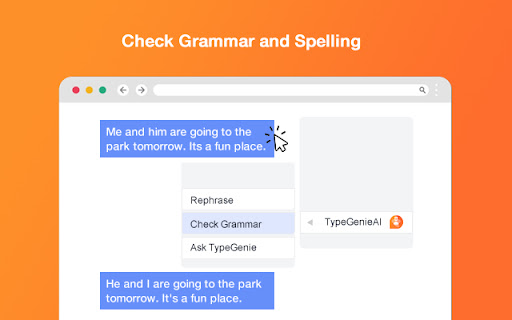
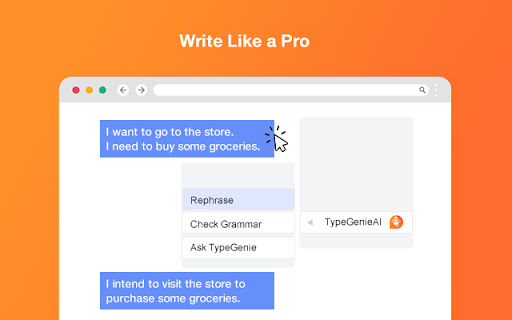
With TypeGenieAI, you can quickly and easily improve the clarity and professionalism of your written content. Simply right-click on any text edit box and choose from three convenient options: Rephrase, Check grammar, and Ask TypeGenieAI. The "Rephrase" option generates alternative phrasing for your text, while the "Check grammar" option ensures your content is polished and professional. With "Ask TypeGenieAI," you can access our powerful natural language processing technology directly from the text edit box, allowing you to generate compelling content with ease.

TypeGenieAI is a powerful browser-based tool that provides users with advanced natural language processing capabilities directly within text editors. By simply right-clicking on any text edit box, users can access a convenient menu that provides three options: Rephrase, Check grammar, and Ask TypeGenieAI. This means that whether you are writing an email, drafting a blog post, or analyzing data, you can use TypeGenieAI to quickly and easily improve your content's clarity, professionalism, and accuracy. And because TypeGenieAI is browser-based, you can use it on any website and get results directly inside the textarea. The possibilities are endless, from language translations to code creation and beyond.

So why wait? Start using TypeGenieAI today and experience a new level of productivity. And with the added bonus of being able to easily write cover letters and compose email replies, TypeGenieAI is the perfect tool for streamlining your workday. Try it today and see the difference for yourself!
Technical
- Version
- 1.1.0
- Manifest
- V3
- Size
- 163KiB
- Min Chrome
- 88
- Languages
- 1
- Featured
- No
Metadata
- ID
- mlbodggjjecccbeolloalaaphcdncmff
- Developer ID
- u65ef328c1f8eced34705066fd6337217
- Developer Email
- [email protected]
- Created
- Feb 23, 2023
- Last Updated (Store)
- Mar 7, 2023
- Last Scraped
- Jun 8, 2026
- Website
- —
- Support URL
- https://app.typegenieai.com/
- Privacy Policy
- —
Similar extensions
Alternatives to TypeGenieAI, ranked by description similarity.

Improvise GPT
AI-based email and message improvisation using ChatGPT - A powerful and user-friendly solution for written communication.
62
★ 4.8

GeneAI
GeneAI, a chrome extension that helps you write better.
284
★ 5.0

AI Text Assistant
Smart AI Extension for Chat, Writing, Emails & Translation
6
★ 5.0

SimpleGPT
Enhance your writing with AI-powered email composition, text rewriting, and translation in one handy Chrome extension
14
★ 5.0

ChatGPT - Auto-continue Generating
A simple extension that let ChatGPT to auto-continue generating text when the button appear.
183
★ 1.0

ChatGPT Everywhere - TypeAhead for Chrome
Get ChatGPT Everywhere! A Chrome extension that provides AI-powered text suggestions in any input field or textarea.
64

Autowriter | ChatGPT on Every Website
Your own AI assistant, everywhere you go.
557
★ 4.0

TextMate
An extension that helps you use chatgpt anywhere on any webpage
37
Data sourced from the Chrome Web Store · last verified Jun 8, 2026.