
GV To-Do List
A simple and effective To-Do List Chrome extension.
As of May 2026, GV To-Do List has 9 users and a 5.00/5 rating from 1 reviews in the Productivity category.
Usersdown 40.0 percent−40.0%
9
9
Ratingno change0%
5.00
1 reviews
Reviewsno change0%
1
Version
1.0
Manifest V3
History
2 snapshotsTracking since Apr 24, 2026.
View as table
| Date | Users | Rating | Reviews | Version |
|---|---|---|---|---|
| Apr 24, 2026 | 15 | 5.00 | 1 | 1.0 |
| May 19, 2026 | 10 | 5.00 | 1 | 1.0 |
| Now | 9 | 5.00 | 1 | 1.0 |
Permissions & access
- Permissions
- storage
- Host access
- None declared
Screenshots

About
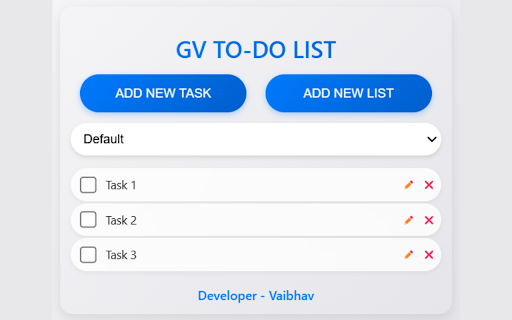
GV To-Do List is a simple yet powerful Chrome extension designed to help users manage their tasks and to-do lists efficiently. Whether you're a student, professional, or someone who loves staying organized, this tool ensures your tasks are always accessible and well-structured.

Key Features:

- Add Tasks Instantly: Quickly add new tasks with a single click.
- Multiple Lists: Create and manage multiple to-do lists for different projects, categories, or priorities.
- Task Completion: Mark tasks as completed with a checkbox to track your progress.
- Edit Tasks: Rename or update tasks to keep them relevant and organized.
- Persistent Storage: All tasks and lists are saved locally, so they remain intact even after closing the browser.
- Minimalistic Design: A clean and intuitive interface ensures ease of use for all users.
- Delete Tasks: Remove completed or unnecessary tasks to keep your lists clutter-free.
- Task Limit: Restrict tasks to 7 per list for better focus and productivity.

Why Choose GV To-Do List?

- Lightweight: Runs smoothly without consuming excessive system resources.
- No External Accounts: All data is stored locally in Chrome for privacy and convenience.
- Ideal for Productivity: Perfect for managing daily tasks, work projects, or personal goals.
- User-Friendly: Designed for simplicity, making it accessible to beginners and advanced users alike.

How It Works:

- Install: Download and install the extension from the Chrome Web Store.
- Add Tasks: Click the "ADD NEW TASK" button to add tasks to your list.
- Create Lists: Use the "ADD NEW LIST" button to create multiple lists for different purposes.
- Manage Tasks: Edit, mark as complete, or delete tasks directly from the extension.
- Stay Organized: Switch between lists and keep track of your tasks effortlessly.

Perfect For:

- Students: Keep track of assignments, deadlines, and study goals.
- Professionals: Manage work tasks, meetings, and project milestones.
- Researchers: Organize research tasks and to-dos for different projects.
- Everyone: Stay on top of daily chores, shopping lists, and personal goals.
Technical
- Version
- 1.0
- Manifest
- V3
- Size
- 29.54KiB
- Min Chrome
- 88
- Languages
- 1
- Featured
- No
Metadata
- ID
- mikeklgefekbpdjodjkifdadmenbphhi
- Developer ID
- uf2bd45c240b7d296fbba0d7eaae9d27e
- Developer Email
- [email protected]
- Created
- Mar 6, 2025
- Last Updated (Store)
- Mar 6, 2025
- Last Scraped
- May 19, 2026
- Website
- —
- Support URL
- https://guptavaibhav.com/contact/
- Privacy Policy
- https://guptavaibhav.com/privacy-policy/
Similar extensions
Alternatives to GV To-Do List, ranked by description similarity.

ToDo List with Notifications
A simple to-do list extension with notification and reminder features.
22

Advanced To Do List
A simple and advanced to-do list Chrome extension.
—
My To-Do List
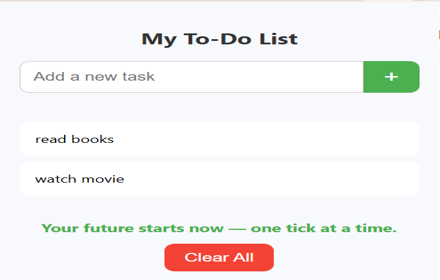
A simple Chrome extension to manage your tasks with motivational feedback.
11
★ 4.5

To-Do List Extension
ToDoList is a straightforward Chrome extension that helps you stay organized and on top of your tasks. With its intuitive…
8

To-Do List Manager
A simple offline to-do list manager.
45
★ 5.0

To Do Manager
A modern task manager with Today and Later categories
—

DataTab ToDo List
DataTab To-Do List is a minimalist Chrome extension designed for productivity lovers who want clarity and control. With a sleek,…
8
★ 5.0

Hari's To Do List
A simple to-do list with checkboxes that strikes through and removes tasks.
2
Data sourced from the Chrome Web Store · last verified May 19, 2026.