
Voice OTP Input
Accessibility tool: Enter OTP/verification codes using voice input. No background listening, no data storage, fully local.
As of June 2026, Voice OTP Input has — users in the Accessibility category.
Usersno change0%
—
—
Ratingno change0%
—
— reviews
Reviewsno change0%
—
Version
1.0.0
Manifest V3
History
2 snapshotsTracking since Apr 17, 2026.
Not enough history yet for this metric — the chart fills in as we collect more snapshots.
View as table
| Date | Users | Rating | Reviews | Version |
|---|---|---|---|---|
| Apr 17, 2026 | — | — | — | 1.0.0 |
| Apr 27, 2026 | — | — | — | 1.0.0 |
| Now | — | — | — | 1.0.0 |
Permissions & access
- Permissions
- activeTabscripting
- Host access
- None declared
Screenshots


About
**Voice OTP Input** ermöglicht die Eingabe von OTP/Verifizierungscodes per Sprache – ganz ohne Tastatur.

### ✨ Features

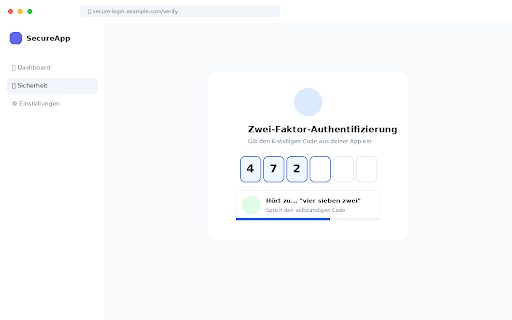
• **Automatische Erkennung** – Die Extension erkennt OTP-Felder automatisch auf jeder Website
• **Sprachgesteuerte Eingabe** – Sprich den Code laut und er wird eingetragen
• **Multi-Field Support** – Funktioniert mit einzelnen Feldern und aufgeteilten 6-stelligen Codes
• **Mehrsprachig** – Versteht deutsche Zahlwörter ("eins zwei drei") und Ziffern
• **Barrierefrei** – Perfekt für Nutzer mit motorischen Einschränkungen

### 🔒 Datenschutz & Sicherheit

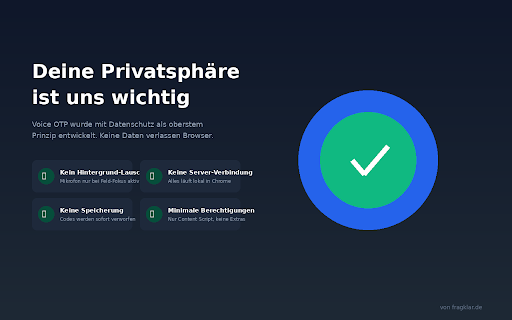
Diese Extension wurde mit Datenschutz als oberstem Prinzip entwickelt:

✓ **Kein Hintergrund-Lauschen** – Mikrofon nur aktiv bei fokussiertem OTP-Feld
✓ **Keine Server** – Alles läuft lokal in deinem Browser
✓ **Keine Speicherung** – Codes werden sofort verworfen
✓ **Keine Datensammlung** – Wir wissen nicht, welche Codes du eingibst
✓ **Minimale Berechtigungen** – Nur das Nötigste für die Funktion

### 🎯 So funktioniert's

1. Klicke in ein OTP-Eingabefeld auf einer beliebigen Website
2. Die Extension erkennt das Feld und zeigt "Sprich den Code..."
3. Sprich die Ziffern – z.B. "vier sieben zwei neun eins acht"
4. Der Code wird automatisch eingetragen

### 📋 Unterstützte Eingaben

• "eins zwei drei vier fünf sechs" → 123456
• "vier sieben zwei neun" → 4729
• "1 2 3 4 5 6" → 123456
• Englisch: "one two three" → 123

### ⚠️ Hinweis

Die Spracherkennung nutzt die Web Speech API von Chrome. Bei der ersten Nutzung wird der Browser um Mikrofon-Zugriff bitten. Die Extension selbst speichert keine Audio-Daten.
Technical
- Version
- 1.0.0
- Manifest
- V3
- Size
- 19.61KiB
- Min Chrome
- 102
- Languages
- 1
- Featured
- No
Metadata
- ID
- mhijlgcaiagcideiejgemhmoppiofkkj
- Developer ID
- u77ccb08930f2e637348ab4d9873a03e4
- Developer Email
- [email protected]
- Created
- Jan 10, 2026
- Last Updated (Store)
- Jan 12, 2026
- Last Scraped
- Jun 10, 2026
- Website
- https://fragklar.de/
- Support URL
- https://fragklar.de/
- Privacy Policy
- —
Similar extensions
Alternatives to Voice OTP Input, ranked by description similarity.

Voicy - Voice to Text Powered by AI
Speech to Text Chrome Extension with +99% accuracy in over 50 languages
10.0K
★ 4.7

Auto CAPTCHA with LLM
Automatically solves numerical CAPTCHAs and fills in the verification code using LLMs (Gemini, Cloud Vision AI).
670
★ 5.0

Voice to Text Transcription
Convert speech to text in any input field using voice recognition
3

REGMIO
Register accounts without having to repeat yourself!
—

numbernavigator
Navigate hands-free by speaking numbers.
—

YourVoice - Control Browser by Voice
YourVoice: control your browser by your voice!
34
★ 5.0

Voice to Action : UI Controller
Introducing Voice to Actions, your indispensable browser companion!
With Voice to Actions, you can seamlessly interact with…
29
Voice Typing for ChatGPT
A simple extension by Diakiv A.A. that allows users to type text using their voice on chat.openai.com
364
★ 3.0
Data sourced from the Chrome Web Store · last verified Jun 10, 2026.