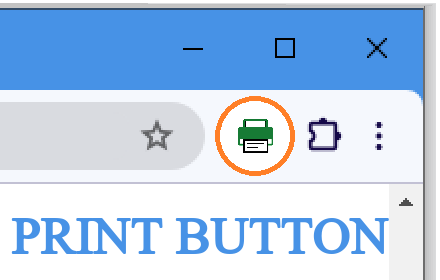
Print button extension
Button shortcut to the printing window, same as pressing Ctrl + p.
As of June 2026, Print button extension has 2,000 users and a 4.76/5 rating from 29 reviews in the Functionality & UI category.
Usersno change0%
2.0K
2,000
Ratingdown 0.4 percent−0.4%
4.76
29 reviews
Reviewsup 26.1 percent+26.1%
29
Version
0.8.0
Manifest V3
History
4 snapshotsTracking since Apr 18, 2026.
View as table
| Date | Users | Rating | Reviews | Version |
|---|---|---|---|---|
| Apr 18, 2026 | 2.0K | 4.78 | 23 | 0.8.0 |
| May 3, 2026 | 2.0K | 4.78 | 23 | 0.8.0 |
| May 12, 2026 | 2.0K | 4.75 | 24 | 0.8.0 |
| May 24, 2026 | 2.0K | 4.74 | 27 | 0.8.0 |
| Now | 2.0K | 4.76 | 29 | 0.8.0 |
Permissions & access
- Permissions
- activeTabscriptingstoragetabsmanagement
- Host access
- <all_urls>
Screenshots

About
This extension is intended:
• To be used on touch screens.
• To be used in situations where there isn't access to a keyboard.
• To provide a fast option for people that prefer to use a mouse.
• To increase accessibility.

The extension does not change the print, you will get the same thing you will get if you press Ctrl+p or Cmd+p.

There isn't any customization.

#Limitations:
All extensions can work on web sites ONLY - The extension will NOT work on pdf files.
All extensions can't work on the Chrome web store.

#How to set up:
Press the puzzle icon near the address bar and then press the pin next to the extension.
Technical
- Version
- 0.8.0
- Manifest
- V3
- Size
- 195KiB
- Min Chrome
- 88
- Languages
- 51
- Featured
- Yes
Metadata
- ID
- mhcepidlpdgdfcliacjbmiomdiilmhij
- Developer ID
- u599713063e4e6565f674d92ec7aaa6c7
- Developer Email
- [email protected]
- Created
- Feb 12, 2024
- Last Updated (Store)
- Oct 7, 2025
- Last Scraped
- Jun 6, 2026
- Website
- suricata.software
- Support URL
- https://suricata.software/en/print
- Privacy Policy
- —
Similar extensions
Alternatives to Print button extension, ranked by description similarity.

Print without images button
Replaces all images with white blanks.
304
★ 5.0

Bookmarks & Tabs Search
Extension for keyboard focused users to easily switch tabs or open bookmarks. Use Ctrl+M to open (Extensions / Keyboard Shortcuts).
81
★ 5.0

SmartZoom
SmartZoom without touchpad
11
★ 2.0
No Swipe - Disable Swipe
Disable trackpad two fingers navigation.
3.0K
★ 4.5

Mouse Gestures
Use mouse gestures to navigate.
24

Tab Number
MacOs option+Tab Keys || Window Linux shift+Tab Keys Press & Typing Element Number
—

Pinner
An extension to easy pin/unpin tabs and close all unpinned at lightning speed
2

Right click allow - copy & save
Unblock right click menu, save as menu, highlighting and copying for all websites
441
Data sourced from the Chrome Web Store · last verified Jun 6, 2026.