
Salesforce Apex Studio
Execute anonymous code, manage files in modern UI editor.
As of June 2026, Salesforce Apex Studio has 36 users and a 5.00/5 rating from 5 reviews in the Developer Tools category.
Usersup 24.1 percent+24.1%
36
36
Ratingno change0%
5.00
5 reviews
Reviewsno change0%
5
Version
1.0.2
Manifest V3
History
5 snapshotsTracking since Apr 18, 2026.
View as table
| Date | Users | Rating | Reviews | Version |
|---|---|---|---|---|
| Apr 18, 2026 | 29 | 5.00 | 5 | 1.0.2 |
| Apr 28, 2026 | 25 | 5.00 | 5 | 1.0.2 |
| May 9, 2026 | 31 | 5.00 | 5 | 1.0.2 |
| May 22, 2026 | 33 | 5.00 | 5 | 1.0.2 |
| Jun 4, 2026 | 30 | 5.00 | 5 | 1.0.2 |
| Now | 36 | 5.00 | 5 | 1.0.2 |
Permissions & access
- Permissions
- storagetabsactiveTabcookies
- Host access
- https://*.salesforce.com/*, https://*.force.com/*, https://*.visual.force.com/*, https://*.lightning.force.com/*, https://*.salesforce-setup.com/*
Screenshots


About
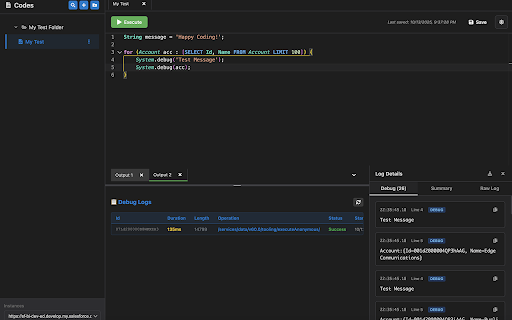
Salesforce Apex Studio is a powerful, VS Code-inspired code editor that lives right in your browser. Designed for Salesforce developers who need to quickly write, test, and debug Anonymous Apex code without the overhead of traditional IDEs. With a familiar Monaco editor interface, multi-tab file management, and seamless org switching, you can boost your productivity and streamline your development workflow—all without ever leaving your browser.

🔒 Privacy First: Everything runs locally in your browser. No data is sent to external servers. Your code, sessions, and settings stay private and secure.

✨ Features
🎨 VS Code-Style Editor
Write Apex code with the same powerful Monaco editor that powers Visual Studio Code. Enjoy syntax highlighting, IntelliSense-style features, and a familiar coding experience.

💾 Save & Manage Your Code
- Create and save multiple Apex code files
- All code persists locally in your browser
- Never lose your work—even after closing the browser

📑 Multi-Tab Interface
- Work on multiple Apex scripts simultaneously
- Each tab maintains its own code and execution history

🔄 Seamless Org Switching
Switch between Salesforce instances and orgs without leaving the extension. Just select a different Salesforce org in the instances dropdown, and Apex Studio automatically adapts to your active session.

🐛 Built-in Debugging
- Execute Anonymous Apex with one click (or Ctrl+Enter)
- View execution results and debug logs instantly
- Identify and fix issues faster with clear error messages

🎭 Dark & Light Themes
Toggle between dark and light themes to match your preference and reduce eye strain during long coding sessions.

📏 Resizable Interface
Customize your workspace with a resizable sidebar. Drag to adjust the width to your preference—perfect for different screen sizes and workflows.

🔒 Privacy & Security
- All code execution uses your existing Salesforce session
- No external servers—everything runs in your browser
- Your code and data never leave your machine
- No tracking, no analytics, no data collection

🚀 Coming Soon
📦 Metadata Management
Create, modify, and delete metadata (e.g: Apex, LWC) directly from the extension

🔍 Global Metadata Search
- Search specific file or keyword across all metadata in your org instantly
- Jump directly to any metadata file

🔗 Metadata Dependency Search
- Discover where your Apex classes and components are used
- Visualize dependencies between metadata
- Understand impact before making changes
- Prevent accidental breaks in production

📞 Support
Need help or have feedback? I'd love to hear from you!
Email: [email protected]

Found a bug? Please include:
- Your Chrome version
- Steps to reproduce the issue
- Screenshots if applicable

⭐ Rate Us
Love Salesforce Apex Studio? Please leave us a 5-star review! Your feedback helps other developers discover this tool and motivates us to keep improving.
Happy Coding! 🚀
Technical
- Version
- 1.0.2
- Manifest
- V3
- Size
- 1.3MiB
- Min Chrome
- 88
- Languages
- 1
- Featured
- No
Metadata
- ID
- mfndfpgcofcnfphcnelgghpncdhdgkml
- Developer ID
- u647cdc8ca375efd95f47d9a23f3e28c8
- Developer Email
- [email protected]
- Created
- Oct 14, 2025
- Last Updated (Store)
- Oct 21, 2025
- Last Scraped
- Jun 4, 2026
- Website
- —
- Support URL
- —
Similar extensions
Alternatives to Salesforce Apex Studio, ranked by description similarity.

My Salesforce Mate
A browser extension designed to enhance your Salesforce experience with productivity tools and features.
70
★ 5.0

Salesforce Debugger - All in One
Advanced Salesforce debugging tools for developers.
1.0K
★ 4.8

Superforce – Salesforce Command Palette
Boost your efficiency in Salesforce with hotkeys, global search, shortcuts, and more, without ever leaving the keyboard.
54
★ 5.0

Salesforce Admin Plus
Salesforce formula editor with autocomplete and instant error checks—write formulas faster.
200
★ 3.8

Salesforce Inspector Advanced
Productivity tools for Salesforce administrators and developers to inspect data and metadata directly from the Salesforce UI.
40.0K
★ 4.5

Salesforce Debug Pro
Analyze Salesforce debug logs, detect N+1 SOQL queries, and visualize governor limits
27
★ 5.0

sftools
Salesforce developer tools: SOQL, Apex, REST API, debug logs, record viewer, data import, etc.
43
★ 5.0

Apex Code Quality & Security Scanner
Analyze Salesforce Apex classes for code quality, security vulnerabilities, and best practices directly in the browser.
24
Data sourced from the Chrome Web Store · last verified Jun 4, 2026.