
Apex Code Quality & Security Scanner
Analyze Salesforce Apex classes for code quality, security vulnerabilities, and best practices directly in the browser.
As of May 2026, Apex Code Quality & Security Scanner has 24 users in the Developer Tools category.
Usersup 26.3 percent+26.3%
24
24
Ratingno change0%
—
— reviews
Reviewsno change0%
—
Version
1.0
Manifest V3
History
4 snapshotsTracking since Apr 1, 2026.
View as table
| Date | Users | Rating | Reviews | Version |
|---|---|---|---|---|
| Apr 1, 2026 | 19 | — | — | 1.0 |
| Apr 21, 2026 | 21 | — | — | 1.0 |
| May 6, 2026 | 22 | — | — | 1.0 |
| May 17, 2026 | 25 | — | — | 1.0 |
| Now | 24 | — | — | 1.0 |
Permissions & access
- Permissions
- storagecookies
- Host access
- https://*.salesforce.com/*, https://test.salesforce.com/*, https://*.my.salesforce.com/*, https://*.cloudforce.com/*, https://login.salesforce.com/*
Screenshots


About
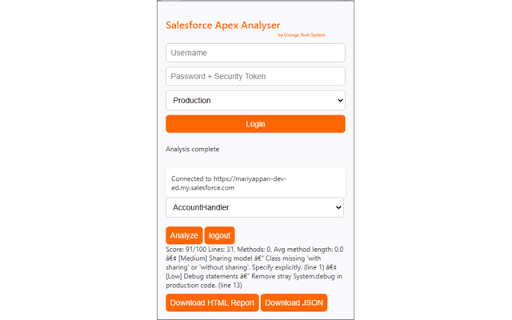
SF Apex Analyser is a Chrome extension designed for Salesforce developers who want to improve the quality and reliability of their Apex code. Instead of just giving static guidelines, it inspects each Apex class and highlights areas that may affect maintainability, scalability, or performance.
With SF Apex Analyser, you can quickly understand how well your code aligns with Salesforce coding standards and identify areas to refactor — before issues reach production.
🔹 Key Features
•	Apex Class Analysis – Scan Apex classes line by line for potential issues
•	Code Quality Insights – Identify unused variables, inefficient loops, and hard-coded values
•	Best Practice Checks – Highlight missing bulkification, improper exception handling, or DML in loops
•	Maintainability Metrics – Detect overly complex methods and suggest simplifications
•	Developer-Friendly Output – Clear reports that make it easy to act on findings
🔹 Why Developers Use SF Apex Analyser
•	Save time during code reviews by catching common mistakes early
•	Improve long-term maintainability of Salesforce orgs
•	Reduce performance issues by following recommended patterns
•	Support team-wide consistency with standardized checks
Whether you’re a Salesforce Developer, Technical Lead, or Architect, SF Apex Analyser helps you ensure your Apex code is clean, optimized, and production-ready.
Bring better coding discipline to your Salesforce projects with SF Apex Analyser 🚀.
Technical
- Version
- 1.0
- Manifest
- V3
- Size
- 2.39MiB
- Min Chrome
- 88
- Languages
- 1
- Featured
- No
Metadata
- ID
- ckfemkgkjbogaohclgedfcpelikgphla
- Developer ID
- uc4a093923da144c0edc85b3c27e4da3c
- Developer Email
- [email protected]
- Created
- Sep 10, 2025
- Last Updated (Store)
- Sep 24, 2025
- Last Scraped
- May 31, 2026
- Website
- —
- Support URL
- —
Similar extensions
Alternatives to Apex Code Quality & Security Scanner, ranked by description similarity.

Apex Coverage Inspector
This extension searches the code coverage and class names in the Salesforce Developer Console.
392
★ 4.8

Seacloud Software - Salesforce Debug Inspector
Inspect Salesforce data and debug logs.
12

Salesforce Inspector Advanced
Productivity tools for Salesforce administrators and developers to inspect data and metadata directly from the Salesforce UI.
40.0K
★ 4.5

Salesforce Apex Studio
Execute anonymous code, manage files in modern UI editor.
36
★ 5.0

My Salesforce Mate
A browser extension designed to enhance your Salesforce experience with productivity tools and features.
70
★ 5.0

Salesforce Dev Toolkit
A suit of Salesforce tools to improve you productivity.
253
★ 5.0

SF Code Coverage Extractor
Shows the code coverage and code covered by each method induvidually
69

Salesforce Test Executions
Salesforce developer and administrator tool to run Apex test classes and view code coverage from the Salesforce UI.
1.0K
★ 5.0
Data sourced from the Chrome Web Store · last verified May 31, 2026.