ChatX - Your AI Copilot for Web
An AI copilot available for all websites. It can answer any complex questions, also capability to auto-summarize and translate.
As of June 2026, ChatX - Your AI Copilot for Web has 1,000 users and a 4.59/5 rating from 22 reviews in the Productivity category.
Usersno change0%
1.0K
1,000
Ratingno change0%
4.59
22 reviews
Reviewsno change0%
22
Version
0.4.0
Manifest V3
History
1 snapshotsTracking since May 2, 2026.
View as table
| Date | Users | Rating | Reviews | Version |
|---|---|---|---|---|
| May 2, 2026 | 1.0K | 4.59 | 22 | 0.4.0 |
| Now | 1.0K | 4.59 | 22 | 0.4.0 |
Permissions & access
- Permissions
- storagecontextMenusfavicon
- Host access
- https://*/*
Screenshots


About
Do you want to use ChatGPT directly in your browser without needing to create an additional ChatGPT account?
Do you want ChatGPT/GPT-4 to assist you while browsing web pages?
Do you want to use artificial intelligence to gain a deeper understanding of browsing knowledge?
All of this can be achieved with ChatX AI Copilot!


Whether the content is lengthy or difficult, ChatX AI Copilot will help you quickly find satisfactory answers based on your needs.


Not sure how to leverage AI here?

Simply select the content while browsing the web and click on the shortcut button on ChatX AI Copilot!
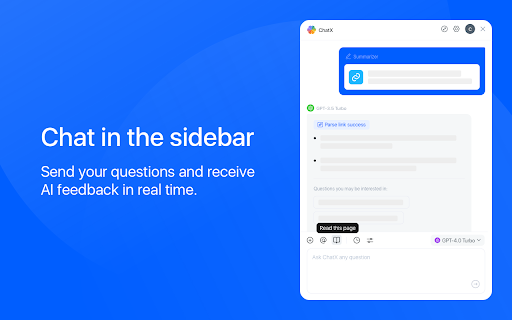
Or engage in conversations with multiple AI models in the browser sidebar, send your questions, and receive real-time AI feedback.

Hope that ChatX AI Copilot can become your on-the-go intelligent advisor!


⭐️ Key Features ⭐️


1️⃣ AI Copilot supported by various LLMs:

- ChatX has achieved integration with mainstream large language models (LLMs), allowing you to choose your preferred model as your default productivity tool.
- Currently supported models include GPT 3.5, GPT 4, Google Gemini Pro, Claude Instant, Claude 2 and Claude 3, among others.
- You can utilize the power of AI for translation, summarization, or even to ask for more information about the content you are reading.


2️⃣ Reading Assistant:

- Quickly translate or understand selected content using the context menu.
- Quick ask questions about selected content and receive real-time answers.
- Create and save custom prompts for reuse when needed.

- How to use it? ⬇️
- Simply drag your mouse to select the content you want to understand and click on the ChatX toolbar icon to perform the desired action.
- Alternatively, you can use the ChatX menu in the browser's right-click menu to perform full-text translate/summarize on the current webpage.


3️⃣ Instant Chat Assistant:

- Engage in conversation with designated models, answer any questions or generate various creative texts based on your needs.
- Upload images and ask questions utilizing the exceptional visual recognition capabilities of GPT-4V and Gemini Pro Vision.
- Chat with multiple models at the same time and compare their answers in real-time.


4️⃣ More efficiency tools:

- Immersive paragraph and full-text translation, generating translated results compared to the original text.
- Summarize webpage content by paragraphs to enhance reading efficiency.
- Enhanced search engine results for improved search effectiveness.


ℹ️ Introduction to ChatX AI Copilot:

ChatX AI Copilot currently aggregates various mainstream LLMs. With our AI Copilot, you can translate, summarize, or gain a deeper understanding of the content you are reading. ChatX AI Copilot will help you find more accurate and higher-quality information, saving you time and effort.


ChatX can be used on any webpage, and its built-in chat assistant can answer any complex questions. This allows you to have deeper insights into the content you are browsing by discussing with the AI assistant accompanying you everywhere.


➕ How to use in your browser?
We currently offer extensions for Chrome and Edge. Simply download and log in to our extension to use AI and ChatGPT on any website without needing to create additional accounts.

📪 How to get support?
If you have any questions or feedback, feel free to contact us at [email protected].

🔏 Privacy Policy
We have updated our privacy policy to ensure it includes detailed information about user data collection, processing, storage, and sharing. You can view it at https://chatx.im/privacy.
Technical
- Version
- 0.4.0
- Manifest
- V3
- Size
- 4.54MiB
- Min Chrome
- 88
- Languages
- 2
- Featured
- Yes
Metadata
- ID
- mfkfdcmahjobmohdhpgbhflegccgnmec
- Developer ID
- uf0a8b5420b8c4e73dbfdc519b7113dab
- Developer Email
- [email protected]
- Created
- Sep 11, 2023
- Last Updated (Store)
- Mar 23, 2024
- Last Scraped
- Jun 1, 2026
- Website
- chatx.im
- Support URL
- —
- Privacy Policy
- https://chatx.im/privacy
Similar extensions
Alternatives to ChatX - Your AI Copilot for Web, ranked by description similarity.

Chat with Ai (gpt ,grok ,claude,gemini)
Open ChatGPT, DeepSeek, Gemini, Claude, Grok in sidebar, for explain, summarize, & Fix Grammer.
106
★ 5.0

AIChatOne : AI ChatGPT Copilot (ChatHub tools)
Your AI Copilot powered by ChatGPT. Answers complex questions. Writes emails, reads articles, searches smartly. Usable everywhere.
811
★ 4.5

GPT Anywhere: ChatGPT AI Assistant | Claude 4, GPT-4o, Claude 3.5, o1 &More
Your AI assistant with ChatGPT, Claude & more. Chat, compare, and interact with multiple AI models anywhere in your browser.
23
★ 5.0
ChatPilot - AI Copilot Powered by ChatGPT-4
ChatGPT Sidebar: Enhance workflow with ChatGPT for advanced search, read,and write.
155
★ 5.0

ChromeGPT for ChatGPT
The easiest way to use ChatGPT.
889
★ 5.0

AI-Chat Assistant
An extension that provides an AI chat for the current website
4

ChatGPT Chrome Extension
Use ChatGPT Chrome Extension to add fast ChatGPT search and an AI assistant through a convenient ChatGPT sidebar in your browser.
159
★ 5.0

ChatGPT AI Sidebar
Access ChatGPT in your browser sidebar for quick and convenient assistance
3
Data sourced from the Chrome Web Store · last verified Jun 1, 2026.