
GPT Anywhere: ChatGPT AI Assistant | Claude 4, GPT-4o, Claude 3.5, o1 &More
Your AI assistant with ChatGPT, Claude & more. Chat, compare, and interact with multiple AI models anywhere in your browser.
As of May 2026, GPT Anywhere: ChatGPT AI Assistant | Claude 4, GPT-4o, Claude 3.5, o1 &More has 23 users and a 5.00/5 rating from 1 reviews in the Productivity category.
Usersup 27.8 percent+27.8%
23
23
Ratingno change0%
5.00
1 reviews
Reviewsno change0%
1
Version
1.0
Manifest V3
History
4 snapshotsTracking since Apr 1, 2026.
View as table
| Date | Users | Rating | Reviews | Version |
|---|---|---|---|---|
| Apr 1, 2026 | 18 | 5.00 | 1 | 1.0 |
| Apr 21, 2026 | 19 | 5.00 | 1 | 1.0 |
| May 6, 2026 | 23 | 5.00 | 1 | 1.0 |
| May 31, 2026 | 19 | 5.00 | 1 | 1.0 |
| Now | 23 | 5.00 | 1 | 1.0 |
Permissions & access
- Permissions
- contextMenusactiveTabstoragetabsdeclarativeNetRequestWithHostAccesssidePaneltabsidentitycookieswebNavigation
- Host access
- <all_urls>
Screenshots


About
🔥 GPT Anywhere is your all-in-one AI extension.
Right-click anywhere, use keyboard shortcuts, or click the extension icon to get started.
We offer seamless AI assistance directly on any webpage without tab switching.

💪 Key Features:
👉 Multiple View Modes
  ✔️ Side Panel: Always visible on any webpage, persists even when switching tabs.
  ✔️ Overlay Popup: Draggable popup that spawns over any webpage content.
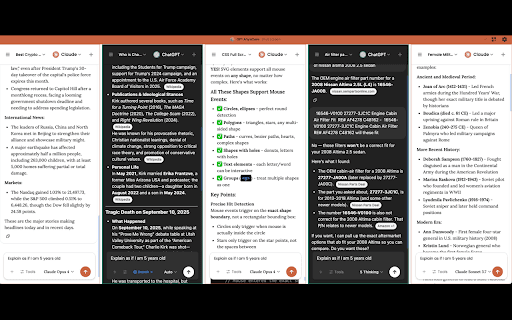
  ✔️ Full Screen Grid: Chat with multiple AI models simultaneously in a grid layout.

👉 Universal Access
  ✔️ Right-Click Context: Access all view modes via right-click context menu on any content.
  ✔️ Extension Popup: Quick access buttons through the extension icon in your toolbar.
  ✔️ Keyboard Shortcuts: Open any view mode instantly with customizable hotkeys.
  ✔️ Multi-Model Support: ChatGPT, Gemini, Claude, and more AI models in one place.

👉 Context Awareness
  ✔️ Screen Capture: Use webpage screenshots as context for your AI conversations.
  ✔️ Text Selection: Select any text on webpages to use as context for your prompts.
  ✔️ Element Picker: Select specific HTML elements as context for targeted assistance.
  ✔️ Image Context: Upload images directly for visual AI assistance.

👉 Multi-Chat Comparison
  ✔️ Parallel Chatting: Send the same prompt to multiple AI models simultaneously.
  ✔️ Model Comparison: Compare responses from different AI providers side-by-side.
  ✔️ Provider Switching: Seamlessly switch between ChatGPT, Claude, Gemini without changing tabs.
  ✔️ Best Response Selection: Quickly identify the most suitable AI model for your specific task.

👉 Productivity Boost
  ✔️ No Tab Switching: Eliminate the need to constantly switch between work tabs and AI chat tabs.
  ✔️ Instant Access: Get AI assistance without leaving your current webpage.
  ✔️ Context Preservation: Maintain webpage context while interacting with AI models.
  ✔️ Workflow Integration: Seamlessly integrate AI assistance into your existing browsing workflow.

💻 How to use:
🔸 Click the "Add to Chrome" button and install the extension.
🔸 Log in to your existing AI accounts (ChatGPT, Claude, Gemini, etc.).
🔸 Right-click anywhere, use keyboard shortcuts, or click the extension icon.
🔸 Start chatting with AI without leaving your current webpage!

❓ Frequently Asked Questions:

🤖 Which AI models are supported?
- We support ChatGPT and Claude, and other popular AI chatbots are being added regularly.

💳 Do I need premium subscriptions to AI services?
- You can use your existing accounts and subscriptions. If you have ChatGPT Plus, Claude Pro, or Gemini Advanced, you'll enjoy those premium benefits through our extension.

🔒 Is my data private and secure?
- Yes. We don't collect or process your prompts. All requests go directly to your existing AI accounts, ensuring complete privacy.

💰 Is it free to use?
- Yes, GPT Anywhere is completely free and unlimited. No monthly subscriptions required.

🌐 Can I use it on any website?
- Yes, the extension works on all websites and webpages in your Chrome browser.

📬 Contact us:
Any questions or suggestions? Please contact us at 💌 [email protected]
Try it now and experience the power of having multiple AI assistants accessible anywhere in your browser!
Technical
- Version
- 1.0
- Manifest
- V3
- Size
- 1.09MiB
- Min Chrome
- 88
- Languages
- 1
- Featured
- No
Metadata
- ID
- aneljdlgmamcgjpfkcbbjmomhopcjmfo
- Developer ID
- u11a797909fdc7879926662d919fbf1a4
- Developer Email
- [email protected]
- Created
- Sep 18, 2025
- Last Updated (Store)
- Sep 18, 2025
- Last Scraped
- May 31, 2026
- Website
- —
- Support URL
- —
- Privacy Policy
- https://flitsoft.github.io/gpt-anywhere/privacy.html
Similar extensions
Alternatives to GPT Anywhere: ChatGPT AI Assistant | Claude 4, GPT-4o, Claude 3.5, o1 &More, ranked by description similarity.

ChromeGPT for ChatGPT
The easiest way to use ChatGPT.
889
★ 5.0

Chat with Ai (gpt ,grok ,claude,gemini)
Open ChatGPT, DeepSeek, Gemini, Claude, Grok in sidebar, for explain, summarize, & Fix Grammer.
106
★ 5.0

Select to AI
Send selected text to ChatGPT, Gemini, or Perplexity via New Tab, Popup Window, or Side Panel.
905
★ 3.7

BrowseMate
Floating AI chat for OpenAI, Gemini, Hugging Face. Voice, screenshots, reminders. Your API keys stay on your device.
7
★ 5.0

TurboPanel AI
AI Assistant Extension - ChatGPT, Claude, Gemini & More. Side Panel, Floating Windows, Custom Prompts for Productivity
4

AI2GO.chat - AI Chat New Tab
The Best AI chat platforms all in one place: GPT, Claude, Gemini, Grok, Copilot and more!
57
★ 3.0

NextChatAI a.k.a. ChatGPT-Next-Web
Best AI Assistant From Github ⭐️80k+, Quick & Local-Focused AI Copilot.
262
★ 5.0

AI Panel: Privacy-first AI sidebar on any webpage
Talk to AI in one click — without leaving a page.
300
★ 5.0
Data sourced from the Chrome Web Store · last verified May 31, 2026.