
CustomTitle
Change any tab name using domain and url parameters
As of June 2026, CustomTitle has 11 users and a 5.00/5 rating from 1 reviews in the Workflow & Planning category.
Usersup 22.2 percent+22.2%
11
11
Ratingno change0%
5.00
1 reviews
Reviewsno change0%
1
Version
1.5
Manifest V3
History
3 snapshotsTracking since Apr 1, 2026.
View as table
| Date | Users | Rating | Reviews | Version |
|---|---|---|---|---|
| Apr 1, 2026 | 9 | 5.00 | 1 | 1.5 |
| May 2, 2026 | 12 | 5.00 | 1 | 1.5 |
| Jun 1, 2026 | 9 | 5.00 | 1 | 1.5 |
| Now | 11 | 5.00 | 1 | 1.5 |
Permissions & access
- Permissions
- storagetabsscripting
- Host access
- http://*/*, https://*/*
Screenshots

About
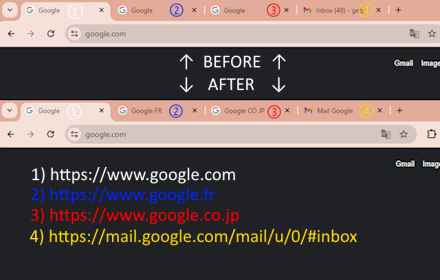
Imagine you have three pages on the same example.com with the same title "Dashboard - Website name" but contents are different:

https://example.com?content=alpha
https://example.com?content=beta
https://example.com?content=gamma

You can see same url structure but "content" parameter values are different.

So we can set up the rule:
Domain - "example.com" with replacement text: "Content"
Parameter - "content" with values and replacement text:
... alpha - "Alpha"
... beta - "Beta"
... gamma - "Gamma"

which gives us respective tab names:
Content | Alpha
Content | Beta
Content | Gamma

By default separator is " | " but you can change it in options page
Technical
- Version
- 1.5
- Manifest
- V3
- Size
- 420KiB
- Min Chrome
- 88
- Languages
- 1
- Featured
- No
Metadata
- ID
- mfhdkainpkeacebnlpchimkomilkmdlf
- Developer ID
- u1f291602c786b8962f5790312e253af0
- Developer Email
- [email protected]
- Created
- Dec 1, 2020
- Last Updated (Store)
- Sep 5, 2021
- Last Scraped
- Jun 1, 2026
- Website
- —
- Support URL
- https://github.com/yevsa/CustomTitle/issues
- Privacy Policy
- —
Similar extensions
Alternatives to CustomTitle, ranked by description similarity.
Domain Tab Title
Prepend the current tab's domain name as keywords inside the tab's title.
37
★ 5.0

Tabby
A chrome extension for single-click tab sorting and grouping
21
★ 5.0

Tab Renamer
Rename and group your Chrome tabs with custom titles and colors — organize your workflow effortlessly.
14

[PRE]fixed – Tab Title Prefixer
Readable, prioritised prefixes for browser tabs.
3

URL Rewriter
Rewrite URLs using custom rules.
276
★ 3.0

Auto Tab Groups
Automatically Set Your Tab Groups!
1.0K
★ 4.4

Domain Driven Tabs
Automatically Organize Tabs by Domain
1

PrettyTabs
Rename your Tabs based on the URL — prevent shoulder surfing or add an Aesthetic look to Chrome
—
Data sourced from the Chrome Web Store · last verified Jun 1, 2026.