
PassGen
Password generator based on a code and domain name
As of June 2026, PassGen has 79 users and a 4.00/5 rating from 1 reviews in the Productivity category.
Usersup 11.3 percent+11.3%
79
79
Ratingno change0%
4.00
1 reviews
Reviewsno change0%
1
Version
1.0.14
Manifest V3
History
3 snapshotsTracking since Apr 1, 2026.
View as table
| Date | Users | Rating | Reviews | Version |
|---|---|---|---|---|
| Apr 1, 2026 | 71 | 4.00 | 1 | 1.0.14 |
| May 2, 2026 | 80 | 4.00 | 1 | 1.0.14 |
| Jun 1, 2026 | 69 | 4.00 | 1 | 1.0.14 |
| Now | 79 | 4.00 | 1 | 1.0.14 |
Permissions & access
- Permissions
- storageclipboardWrite
- Host access
- https://*/*, http://*/*
Screenshots

About
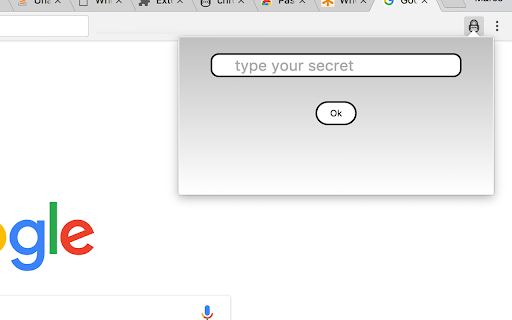
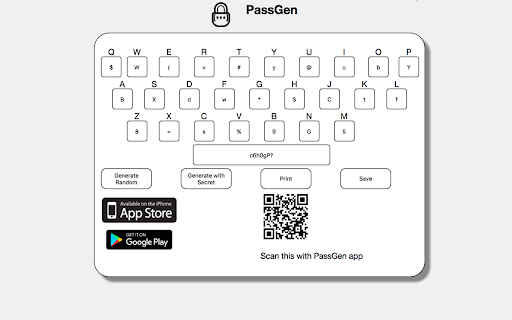
Generates a different password for each site, based on a coded keyboard + code and your unique secret word.

*** new in 1.0.14*********
Updated the Google Policy, removed unnecessary permissions

*** new in 1.0.13*********
many users asked for drop the autofill

*** new in 1.0.12 *********
> minor bug with some urls

*** new in 1.0.10 *********
> minor bug with the copy button fixed

*** new in 1.0.9 *********
> minor bug fixed

*** new in 1.0.8 *********
> minor improvements for cross browser compatibility
> New version for Firefox Quantum !!!

*** new in 1.0.7 *********
> Autofill the password field, when user enter the secret word the extension will open, code the url and fill into password field in the current page

*** new in 1.0.6 *********
> Minor improvement in the QR generation

*** new in 1.0.5 *********
> QR image to scan with PassGen app and sync the codes
   find the apps at
   iOS: https://itunes.apple.com/us/app/passgennerator/id1209958536?ls=1&mt=8
   Android: https://play.google.com/store/apps/details?id=com.pkos.passgen
*** New in 1.0.3 *********
> ˆ_ˆ We have apps!!!
   iOS: https://itunes.apple.com/us/app/passgennerator/id1209958536?ls=1&mt=8
   Android: https://play.google.com/store/apps/details?id=com.pkos.passgen
> Improved the messaged when copy
> Improved when the extension is opened and process the password it copy it to clipboard automatically
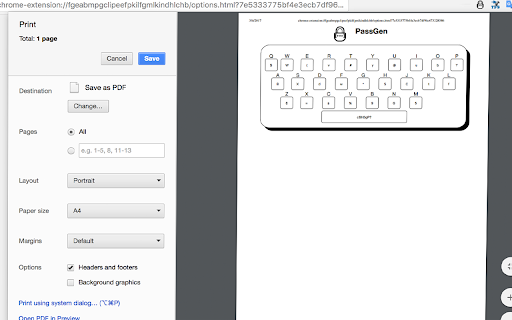
> Improved the Print feature in Options section
> Added the links to markets in Options section

*** New in 1.0.1 **********
Improved the Initial code to include at least one Capital letter, number and symbol in case the generated password does not contains them.
Some UI improved

*** New in 1.0.0 **********
it generates a unique coded keyboard based on Secret Word, you don't need to save the codes unless you change it.
 +++++ >  We already have Android App :) \m/

https://play.google.com/store/apps/details?id=com.pkos.passgen
Technical
- Version
- 1.0.14
- Manifest
- V3
- Size
- 128KiB
- Min Chrome
- 88
- Languages
- 1
- Featured
- Yes
Metadata
- ID
- meeikdencabckgiefhojbbpebimpblml
- Developer ID
- u3209e5f9125e5c6da1effb9b19dc6206
- Developer Email
- [email protected]
- Created
- Aug 23, 2016
- Last Updated (Store)
- Dec 8, 2023
- Last Scraped
- Jun 1, 2026
- Website
- —
- Support URL
- —
Similar extensions
Alternatives to PassGen, ranked by description similarity.

Password Generator
Free, ad-free, open-source simple password generator.
22
★ 5.0

Quick Password Gen
Generates a secure password and copies it to the clipboard.
15
★ 5.0

Generate Password
Secure your digital life with Chrome extension Generate Password. Use random password generator for instant, strong combinations.
6.0K
★ 4.9

Human-Readable Passphrase Generator
Generate secure, human-readable passphrases (10–25 chars) with readable separators — one click copies to clipboard.
21

Password Generator
Create strong and random passwords. Customize options and copy to clipboard with one click.
7
★ 5.0

Password Generator Pro
Generate secure, random passwords with customizable options.
1

Password Generator
Secure password generator browser extension
—

EasyPass Gen
Easy Password Generator
1
Data sourced from the Chrome Web Store · last verified Jun 1, 2026.