
Reading Assist
A Chrome extension that selects and highlights sentences as visual cues for digital reading.
As of June 2026, Reading Assist has 91 users and a 3.67/5 rating from 3 reviews in the Workflow & Planning category.
Usersdown 10.8 percent−10.8%
91
91
Ratingup 22.3 percent+22.3%
3.67
3 reviews
Reviewsup 50.0 percent+50.0%
3
Version
1.1
Manifest V3
History
3 snapshotsTracking since Apr 1, 2026.
View as table
| Date | Users | Rating | Reviews | Version |
|---|---|---|---|---|
| Apr 1, 2026 | 102 | 3.00 | 2 | 1.1 |
| May 2, 2026 | 98 | 3.00 | 2 | 1.1 |
| Jun 1, 2026 | 93 | 3.00 | 2 | 1.1 |
| Now | 91 | 3.67 | 3 | 1.1 |
Permissions & access
- Permissions
- activeTabstorage
- Host access
- None declared
Screenshots

About
# Chrome Extension for Seamless Reading using Visual Pointer Cue.

Are you tired of scrolling through long digital documents or books and losing track of where you are? Do you ever find yourself re-reading the same sentence multiple times because you lost your spot?

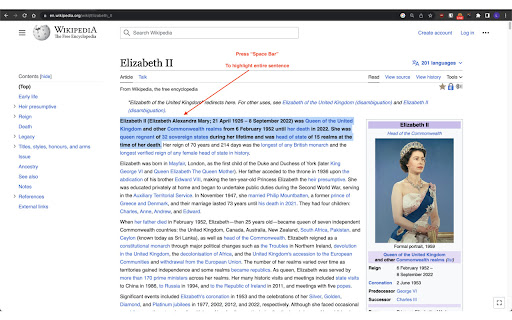
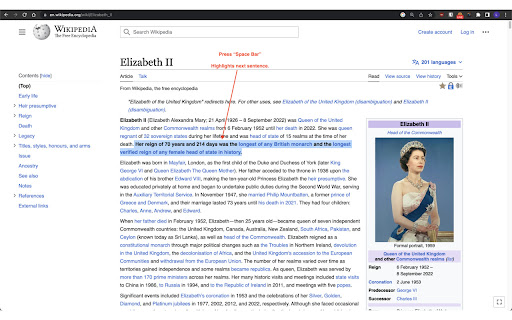
We have a solution for you. We developed a **feature that selects and highlights the current sentence being read** as a visual cue for readers. This feature enhances the reading experience by providing clear cues on the sentence you are currently reading, helping you to maintain focus and engagement with the content.

## Video Demo


To see our feature in action and better understand its benefits, watch our video demonstration. This demo showcases how our sentence selection and highlighting feature functions and how it can significantly improve your reading focus.

By clicking on the image above or following this link, you can access our video demo:

https://www.youtube.com/watch?v=g0j8K9ukuGo
or
https://www.loom.com/share/b17f9d891f3b408d8ff52fb7a2f81a45

## Usage

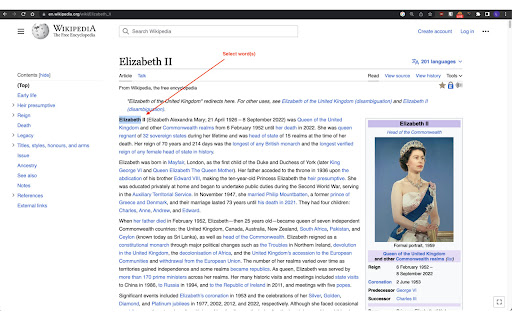
Our feature is easy to use and seamlessly integrates with existing web applications. To select a sentence in an article, simply highlight a word or phrase, press **space bar**, and our feature will determine the current sentence based on cursor position and surrounding text. The chosen sentence will be highlighted in real-time as you scroll through the document.

We are excited to introduce our new feature that selects and highlights sentences as visual cues for digital reading. **Try it now** and see how it can improve your reading experience.
Technical
- Version
- 1.1
- Manifest
- V3
- Size
- 1.77MiB
- Min Chrome
- 88
- Languages
- 1
- Featured
- Yes
Metadata
- ID
- mdpcpdnelomalncmjbdcnledmmfepkco
- Developer ID
- u26c0a95137aa5ad15261cb0cb557c02c
- Developer Email
- [email protected]
- Created
- Apr 11, 2023
- Last Updated (Store)
- May 11, 2023
- Last Scraped
- Jun 1, 2026
- Website
- —
- Support URL
- —
- Privacy Policy
- —
Similar extensions
Alternatives to Reading Assist, ranked by description similarity.

Pacer
Guides your eyes to read faster and better.
51
★ 5.0

SpeedReader
RSVP speed reading for any article or blog post
4

Easy Read Assit - Dyslexia Helper
Easy Read Assit is designed to aid individuals with dyslexia or ADHD, helping them navigate the web more comfortably
234
★ 4.5

Dynamic Text Enhancer
Enhance your reading experience with Dynamic Text Enhancer. Bold first halves of words for improved readability.
16

Sprint Reader - Speed Reading Extension
Speed reading made easy, train yourself to read 1800+ words per minute. Rapid serial visual presentation (RSVP) at its best!
20.0K
★ 4.4

VoiceMagic: Transform Text into Spoken Words
Select text and read it. Hear text read aloud. A Text to Speech Voice Reader.
114
★ 3.0

BoldSpeed Reading
Transforms text on webpages to bionic reading style.
4

Quantum Highlighter PRO
Web annotation system inspired by Zotero. Highlight, underline, and manage annotations on any page.
452
★ 5.0
Data sourced from the Chrome Web Store · last verified Jun 1, 2026.