
Pacer
Guides your eyes to read faster and better.
As of May 2026, Pacer has 51 users and a 5.00/5 rating from 3 reviews in the Workflow & Planning category.
Usersno change0%
51
51
Ratingno change0%
5.00
3 reviews
Reviewsno change0%
3
Version
1.1
Manifest V3
History
3 snapshotsTracking since Apr 1, 2026.
View as table
| Date | Users | Rating | Reviews | Version |
|---|---|---|---|---|
| Apr 1, 2026 | 51 | 5.00 | 3 | 1.1 |
| Apr 30, 2026 | 50 | 5.00 | 3 | 1.1 |
| May 28, 2026 | 49 | 5.00 | 3 | 1.1 |
| Now | 51 | 5.00 | 3 | 1.1 |
Permissions & access
- Permissions
- storagecontextMenustabs
- Host access
- None declared
Screenshots



About
Read 2-3x faster on the web with Pacer. Do focused speed reading!

Do you use a pen or pencil while reading a textbook? Does it help you read with more focus and speed? Imagine having such a tool for reading online as well!

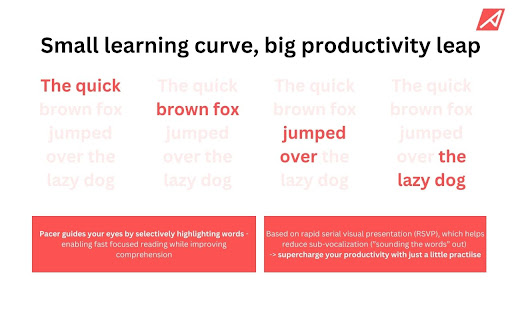
Pacer is that tool. It guides your eyes while reading any text on the web, just like a pencil guides your eyes while reading a textbook. Pacer highlights text in a paragraph sequentially, ensuring your eyes follow the highlighted text, enhancing your reading experience.

Pacer works on all popular websites like Wikipedia, The New York Times, Reddit, and ChatGPT. Simply visit the website you want to speed read on, click the Play button in the Pacer toolbox, and start reading.

Pacer utilizes a visual technique called Rapid Serial Visual Presentation (RSVP), used by the fastest speed readers in the world. It helps eliminate subvocalization (the inner voice that sounds out each word) and excessive focus on individual words, allowing you to read more visually. This means faster reading while maintaining comprehension. With Pacer, you can boost your reading speed from an average of 200 words per minute to around 400 words per minute or faster. Think of the time you’d save every day!

As a new tool, Pacer may take a little getting used to. Try adjusting the speed to your liking and selecting the right highlight color. Early reviews suggest that it takes about 3-4 sessions before users become accustomed to Pacer and unlock their full reading potential.

PRO TIP: Reduce subvocalization as much as possible. Focus on the highlighted words and try not to sound them out. You'll notice an instant boost in comprehension!

As an independent developer, my sole goal is to serve you, the user. I am always working to improve Pacer. Please email me at [email protected] with any bugs or features you’d find helpful. Your support makes my work possible, and I am tremendously grateful.

For more information about Pacer and me, visit readwithpacer.weebly.com.

NOTE: Pacer uses analytics code, such as Google Analytics, to measure how many people are using the extension. The analytics code cannot see anything you do on your webpage; it only tracks clicks on the Pacer toolbox and the websites you use it on.

Do try to use the shortcuts highlighted on readwithpacer.weebly.com/how-it-works.
Technical
- Version
- 1.1
- Manifest
- V3
- Size
- 1.66MiB
- Min Chrome
- 88
- Languages
- 1
- Featured
- No
Metadata
- ID
- maldniojhhfdekdgeikaopmjeanfbojb
- Developer ID
- u59aade4d38c1ae4837ce93e24e6d969e
- Developer Email
- [email protected]
- Created
- Jul 21, 2024
- Last Updated (Store)
- Jul 22, 2024
- Last Scraped
- May 28, 2026
- Website
- —
- Privacy Policy
- https://readwithpacer.weebly.com/privacy-policy.html
Similar extensions
Alternatives to Pacer, ranked by description similarity.

Pacer speed reading
An assistant to help you boost your reading speed!
1.0K
★ 4.4

Speed Reader
Word-by-word speed reading with ORP focus point and dark mode
1.0K
★ 4.3

Speed Reading
Reedy Speed Reading, learn how to increase reading speed in a sec and read faster today. Take words per minute test. Boost wpm
30.0K
★ 4.8

ReadPulse
Bionic Reading for the web — bold word beginnings to read faster
3

Quick Read: RSVP Speed Reader & Cloud OCR
Boost reading speed using RSVP. Auto-extract web articles, scan images/PDFs with OCR, and read distraction-free.
2

The Read Time: Speed Reading & Listening Software
Enhance your reading & learning efficiency with adjustable speed controls
4.0K
★ 4.7

Fast Reader
Unleash Fast Reader to be a speed reader. Improve your reading wpm and concentration with this fast reading app.
261
★ 4.6

BoldSpeed Reading
Transforms text on webpages to bionic reading style.
4
Data sourced from the Chrome Web Store · last verified May 28, 2026.