ScreenCam
Record your screen with a circular webcam overlay. Preview → record → Save As.
As of June 2026, ScreenCam has 43 users in the Productivity category.
Usersup 7.5 percent+7.5%
43
43
Ratingno change0%
—
— reviews
Reviewsno change0%
—
Version
0.6.0
Manifest V3
History
6 snapshotsTracking since Apr 1, 2026.
View as table
| Date | Users | Rating | Reviews | Version |
|---|---|---|---|---|
| Apr 1, 2026 | 40 | — | — | 0.6.0 |
| Apr 19, 2026 | 35 | — | — | 0.6.0 |
| May 4, 2026 | 34 | — | — | 0.6.0 |
| May 13, 2026 | 38 | — | — | 0.6.0 |
| May 25, 2026 | 42 | — | — | 0.6.0 |
| Jun 6, 2026 | 40 | — | — | 0.6.0 |
| Now | 43 | — | — | 0.6.0 |
Permissions & access
- Permissions
- downloads
- Host access
- None declared
Screenshots
About
ScreenCam — Record your screen with a circular face cam.

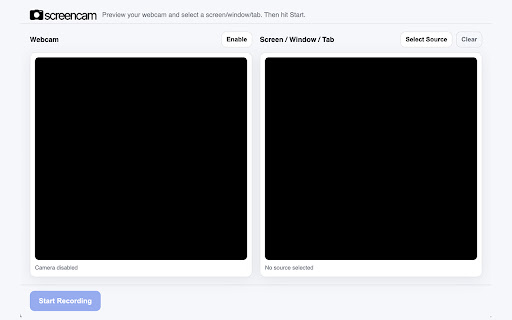
ScreenCam makes it effortless to record your screen with your webcam overlaid in a clean circular frame. Open the preview, pick a screen/window/tab, hit Start, and ScreenCam handles the rest—mixing your mic and tab/system audio, compositing your face on top, and saving the final video wherever you choose.

Why install it:

- Show your work + your reactions. The circular face cam keeps you present without covering key content.
- Fast, no-fuss setup. Big preview to confirm camera and source before you record—no maze of settings.
- Clear audio by default. Your microphone and (when supported) the tab’s audio are mixed into one track.
- Own your files. On Stop, choose exactly where to save. No uploads, no accounts, no tracking.
- Lightweight & private. Uses only the permissions needed to save your video. Everything stays on your device.

What it does:

- Captures screen/window/tab + webcam simultaneously
- Composites your webcam into a polished circular overlay
- Records mic and (for tab capture) tab/system audio
- Shows a minimal controller while recording (timer + Stop)
- Exports to .webm with modern codecs for easy sharing

Perfect for quick demos, walkthroughs, bug reports, async updates, tutorials, and customer videos—without the complexity of full video suites.
Technical
- Version
- 0.6.0
- Manifest
- V3
- Size
- 27.29KiB
- Min Chrome
- 88
- Languages
- 1
- Featured
- No
Metadata
- ID
- mdlglohjgfmngeepmdgfdcehnpeifgeo
- Developer ID
- u22438322d01703638eb142319adff5d8
- Developer Email
- [email protected]
- Created
- Oct 10, 2025
- Last Updated (Store)
- Oct 12, 2025
- Last Scraped
- Jun 6, 2026
- Website
- duffisberg.com
- Support URL
- —
- Privacy Policy
- —
Similar extensions
Alternatives to ScreenCam, ranked by description similarity.

Shootsta - Screen Recording
Local screen recording with your camera in one click. Save and download an mp4 instantly.
10

Easy Screen Recorder
Easy Screen Recorder - Capture your screen, webcam & audio in HD with smart tools, seamless sharing, and zero lag.
159
★ 4.4
Screen Recorder
Capture your screen, camera, utilize tools, and download with a single click
642
★ 4.4

Buzzcreen Screen Recorder
Record your screen with automatic zoom effects. One-click upload to Buzzcreen for instant editing and sharing.
51

Quick Screen Recorder
A powerful and easy-to-use screen recording extension.
6

Screen Recorder Studio - Unlimited, Zoom, Video & GIF
Stable screen recording with no time limits. Built-in editor to seamlessly zoom, trim, and export to high-quality MP4 or GIF.
114
★ 3.0

Screen Recorder Lite
Record your browser tab as video with one click. Tab + microphone recording, pause/resume, and download as WebM.
4

Simple Screen Recorder
Record screen with mic or system audio in one click. Simple, fast, and easy screen recorder for everyone. No setup needed!
27
Data sourced from the Chrome Web Store · last verified Jun 6, 2026.