
Quick Screen Recorder
A powerful and easy-to-use screen recording extension.
As of June 2026, Quick Screen Recorder has 6 users in the Productivity category.
Usersup 100.0 percent+100.0%
6
6
Ratingno change0%
—
— reviews
Reviewsno change0%
—
Version
1.0
Manifest V3
History
8 snapshotsTracking since Apr 1, 2026.
View as table
| Date | Users | Rating | Reviews | Version |
|---|---|---|---|---|
| Apr 1, 2026 | 3 | — | — | 1.0 |
| Apr 24, 2026 | 4 | — | — | 1.0 |
| May 1, 2026 | 5 | — | — | 1.0 |
| May 7, 2026 | — | — | — | 1.0 |
| May 12, 2026 | 5 | — | — | 1.0 |
| May 24, 2026 | — | — | — | 1.0 |
| May 31, 2026 | 5 | — | — | 1.0 |
| Jun 6, 2026 | 7 | — | — | 1.0 |
| Now | 6 | — | — | 1.0 |
Permissions & access
- Permissions
- storageoffscreenscriptingtabCapturedownloadsunlimitedStorage
- Host access
- <all_urls>
Screenshots

About
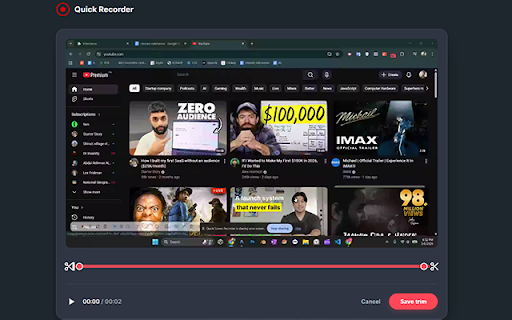
Quick Screen Recorder is the ultimate tool for capturing high-quality video of your screen, tab, or webcam without any complicated setup. Whether you're creating tutorials, recording bug reports, or sharing a quick walkthrough, Quick Recorder makes it effortless.

Key Features
🎥 Flexible Recording Modes: Capture your entire desktop, a specific browser tab, or just your webcam.
🎙️ Crystal Clear Audio: Record system audio, your microphone, or both simultaneously.
📷 Webcam Overlay: Embed your camera feed into your screen recordings for a personal touch.
✏️ Real-time Drawing Tools: Annotate on the fly! Use our built-in toolbar to draw, highlight, and point out key details while recording.
⚙️ Customizable Quality: Choose your format (MP4 or WebM), resolution (720p, 1080p, or Original), and frame rate (30 or 60 FPS).
⏱️ Countdown Timer: Get ready with a customizable countdown (3, 5, or 10 seconds) before the action starts.
⌨️ Keyboard Shortcuts: Start, stop, pause, and resume instantly with customizable hotkeys.
📂 Instant Downloads: No waiting for "cloud processing"—your videos are ready to download locally as soon as you finish recording.

Why Choose Quick Screen Recorder?
Privacy First: Your recordings are processed locally on your machine. We don't store your data on our servers.
Lightweight: Built with the latest Manifest V3 standards for maximum performance and security.
No Limits: Record for as long as you need without watermarks or hidden fees.
Shortcuts (Default)

Start/Stop Recording: Alt + Shift + S
Pause/Resume Recording: Alt + Shift + P

Install Quick Screen Recorder today and experience the simplest way to capture your screen!
Technical
- Version
- 1.0
- Manifest
- V3
- Size
- 44.49KiB
- Min Chrome
- 88
- Languages
- 1
- Featured
- No
Metadata
- ID
- hhiimcjddiglkbijkkgkmokfemakgeil
- Developer ID
- u00183ec53e605d7d6eb04a823435ed11
- Developer Email
- [email protected]
- Created
- Mar 11, 2026
- Last Updated (Store)
- Mar 11, 2026
- Last Scraped
- Jun 6, 2026
- Website
- —
- Support URL
- —
Similar extensions
Alternatives to Quick Screen Recorder, ranked by description similarity.

Simple Screen Recorder
The easiest way to record your screen.
11
Screen Recorder
Capture your screen, camera, utilize tools, and download with a single click
642
★ 4.4

Easy Screen Recorder
Easy Screen Recorder - Capture your screen, webcam & audio in HD with smart tools, seamless sharing, and zero lag.
159
★ 4.4

Screen Recorder and Screenshot Tool
Record your screen, capture screenshots, annotate, and share instantly. Full HD recording with audio support.
4

Screen Recorder Lite
Record your browser tab as video with one click. Tab + microphone recording, pause/resume, and download as WebM.
4

Shootsta - Screen Recording
Local screen recording with your camera in one click. Save and download an mp4 instantly.
10

Free Screen Recorder
A simple screen recorder: start/pause/resume/stop from the toolbar, then download the video to your Downloads folder.
5

Snappr - Makes screen-recording easier
Experience a free and privacy-focused screen recorder with limitless features. Effortlessly capture, annotate, and edit your videos!
35
Data sourced from the Chrome Web Store · last verified Jun 6, 2026.