
Meet Attendance Classes
Get Meet attendance from classes
As of May 2026, Meet Attendance Classes has 7 users in the Workflow & Planning category.
Usersno change0%
7
7
Ratingno change0%
—
— reviews
Reviewsno change0%
—
Version
1.13
Manifest V3
History
2 snapshotsTracking since Apr 1, 2026.
View as table
| Date | Users | Rating | Reviews | Version |
|---|---|---|---|---|
| Apr 1, 2026 | 7 | — | — | 1.13 |
| May 28, 2026 | 9 | — | — | 1.13 |
| Now | 7 | — | — | 1.13 |
Permissions & access
- Permissions
- storage
- Host access
- https://meet.google.com/*
Screenshots

About
Collect attendance of different classes in a csv file which can be opened in Google Sheet or Microsoft Excel from Google Meet.

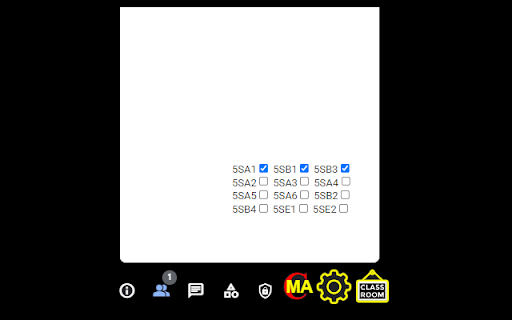
There are 3 new buttons (CMA, Option icon, CLASSROOM icon) created near the buttons of Meeting details, Show everyone, Chat with everyone etc.

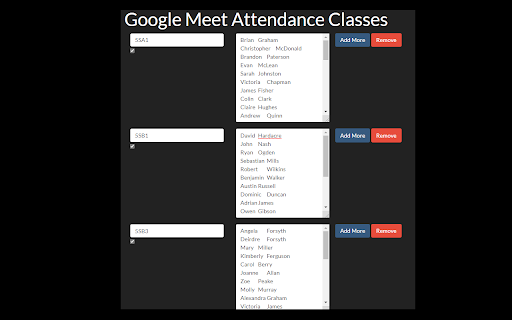
Click the Option icon to setup the classes. Input the name of the class, the names of participants (each name in one line). Click Add More to add one more class below the current class. Click Remove to remove the current class.

Click CMA button will show two textarea. The left textarea will show you the statistics of absentees and their names. Click copy button to copy the content into clipboard so that you can paste it anywhere. Click Download to download the attendance into a csv file. Click hide to hide the 2 textarea. The right textarea show the names of participants who do not open the camera. This feature work based on what we see in Google Meet. For example, if there 100 participants in the room, we can see only 48 participants at maximum, the other will be group as "Other 52" by Google Meet. So the right textarea will assume the other 52 participants do not open their camera. The Pin All button will pin the participants one by one to check who do not open the camera. Every pin take about 3 seconds. After finish pinning, an alert box will appear to show you who do not open camera during pinning. The names in the alert box will not be the same in the right textarea.

The 3rd button (CLASSROOM button) will let you to set the classes to track attendance. Anyone not in the classes will be listed as other in left textarea.

Changelog:
Version 1.13
- Fixed some bugs.

Version 1.11
- Will save the attendance when the user end the meeting.

Version 1.10
- When click copy button, it will ask "Send to chat?". Click ok to send to chat.

Version 1.9
- Fixed some bugs related to total of "other"

Version 1.8
- Fixed some bugs.

Version 1.7
- Improved attendance tracking.

Version 1.6
- Fixed lagging.

Version 1.5
- Fixed some bugs.

Version 1.4
- Fixed some bugs.
- Beautify Interface

Version 1.3
- Beautify Interface

Version 1.2
- Simplify the record of attendance
- Clearly show the multiple ranges of time of the participants in the record of attendance

Version 1.1
- Added duration for each participant in the record of attendance.
Technical
- Version
- 1.13
- Manifest
- V3
- Size
- 372KiB
- Min Chrome
- 88
- Languages
- 1
- Featured
- No
Metadata
- ID
- mcelnacnfkgenjnkkmgmpcphkniehpfe
- Developer ID
- u237dccd25f51d3baa2e534dc75567b6e
- Developer Email
- [email protected]
- Created
- Aug 28, 2021
- Last Updated (Store)
- Nov 6, 2021
- Last Scraped
- May 28, 2026
- Website
- —
- Support URL
- —
- Privacy Policy
- —
Similar extensions
Alternatives to Meet Attendance Classes, ranked by description similarity.

Attendance for Google Meet™
Records Google Meet™ attendance and exports to Google Sheets™.
20.0K
★ 4.0

AttendList: Google Meet Attendance Tracker & Reports
Automatically track attendance in Google Meet (even if you join late!)
4.0K
★ 4.9

Meet Attendance Tracker – for Google Meet
The most accurate and reliable chrome extension to track attendance in Google Meet with just a single click !
100.0K
★ 4.2

Meet Plus for Google Meet
Breakout rooms,attendance,dark mode,chat,emojis,reward points,quiz,poll,file sharing,stickies,many more features for Google Meet
100.0K
★ 3.8

Meet Attendance
Collect attendance in a Google Sheet from a Google Meet.
500.0K
★ 2.8

Google Meet Attendance Tracker (new)
Attendance sheet from a Google Meet meeting.
3.0K
★ 5.0

Meet Attendance Tracker - Your Smart Meeting Attendance Assistant
Automatically save and manage your Google Meet attendance. Easily view history, analyze data, and export to CSV/JSON with a single…
266

MeetMate - Google Meet tookit
Live Meet Countdown, Speaker Checker, Chat Saver & Exporter
35
★ 5.0
Data sourced from the Chrome Web Store · last verified May 28, 2026.