
MeetMate - Google Meet tookit
Live Meet Countdown, Speaker Checker, Chat Saver & Exporter
As of May 2026, MeetMate - Google Meet tookit has 35 users and a 5.00/5 rating from 1 reviews in the Workflow & Planning category.
Usersdown 7.9 percent−7.9%
35
35
Ratingno change0%
5.00
1 reviews
Reviewsno change0%
1
Version
2.1.2
Manifest V3
History
2 snapshotsTracking since Apr 24, 2026.
View as table
| Date | Users | Rating | Reviews | Version |
|---|---|---|---|---|
| Apr 24, 2026 | 38 | 5.00 | 1 | 2.1.2 |
| May 21, 2026 | 37 | 5.00 | 1 | 2.1.2 |
| Now | 35 | 5.00 | 1 | 2.1.2 |
Permissions & access
- Permissions
- identitystorage
- Host access
- https://meet.google.com/*
Screenshots

About
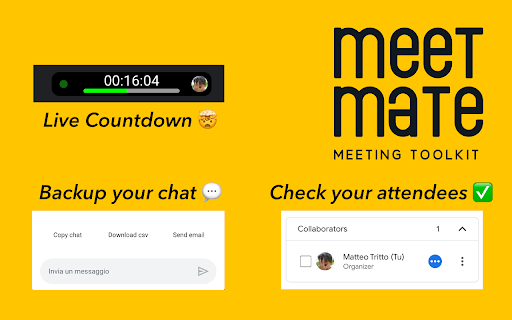
MeetMate is the ultimate Chrome extension for remote meetings that enhances your Google Meet experience with useful features. With MeetMate, you can easily keep track of who has spoken during a meeting, save your chat history to access later, and export your chat for easy sharing.

The speaker tracker feature in MeetMate adds a checkbox next to each participant's name, allowing you to keep track of who has spoken during the meeting. The chat history saver automatically saves your chat history, so you can access it even if you leave the meeting. You can also export your chat history to an email, CSV file, or copy it to your clipboard, making it easy to share important information from the meeting with others.

In the MeetMate's new version we're thrilled to introduce a powerful new feature – the integrated timer. Now, alongside existing functionalities, you can effortlessly keep track of the meeting duration. The timer is prominently displayed in the meeting interface, providing a countdown for precise time management. Whether you're calculating the total duration of a meet or counting down to its scheduled end, this feature is designed to enhance your overall meeting experience.

MeetMate is incredibly easy to use. Simply install the extension from the Chrome Web Store:
When you join a meeting on Google Meet, click the user on new dynamic island on meeting page to give access to your calendar and transform timer in countdown.
For security reason you need to click user button every some hours if you still want to use countdown instead timer.
If you click dynamic island again you can have some more information about your time.
Chats, on the other hand, will be saved every 30 seconds automatically without you having to click anything, but if necessary you can also use the buttons to copy, save to scv or send the script by e-mail

MeetMate is a must-have extension for anyone who frequently attends remote meetings on Google Meet. Whether you're a student, a professional, or anyone in between, MeetMate will help you get the most out of your meetings by providing you with valuable tools to stay organized and productive. Download MeetMate today and take your Google Meet experience to the next level!

We want to assure you that your privacy is important to us, and we do not collect any personal information or send your data to any server. All data saved by MeetMate is stored exclusively on your browser.
Technical
- Version
- 2.1.2
- Manifest
- V3
- Size
- 22.52KiB
- Min Chrome
- 88
- Languages
- 1
- Featured
- No
Metadata
- ID
- keogokidepigdncilipepmfiignpdoen
- Developer ID
- u1d2c5facc1d03718e78d88106704669b
- Developer Email
- [email protected]
- Created
- Feb 18, 2023
- Last Updated (Store)
- Dec 9, 2023
- Last Scraped
- May 21, 2026
- Website
- —
- Support URL
- —
- Privacy Policy
- —
Similar extensions
Alternatives to MeetMate - Google Meet tookit, ranked by description similarity.

Call Timer for Meet Clone
Simple timer for Google Meet calls.
23

Meet Time Out
This extension add a timer in your Google Meet calls.
12
★ 5.0

Google Meet Manager
Extension to launch Google Meet and show Calendar events
8

Google Meet Enhancement Suite
40 new features for Google Meet such as mute all, remove all, auto admit, emojis, mirror videos, background color, and push to talk!
100.0K
★ 4.0

MeetingMate for Google Calendar
Your all-in-one sidebar extension for Google Calendar, providing enhanced notifications and meeting management.
19
★ 5.0

AutoMeet
Never miss a meeting!
14

Meet Attendance Tracker - Your Smart Meeting Attendance Assistant
Automatically save and manage your Google Meet attendance. Easily view history, analyze data, and export to CSV/JSON with a single…
266
Timer for Google Meet
Show Time for google meet
10.0K
★ 3.7
Data sourced from the Chrome Web Store · last verified May 21, 2026.