markClipper - obsidian web clipper
markClipper insert clipped web contents directly into obsidian local vault. No config required. Highlighter. Open source
As of May 2026, markClipper - obsidian web clipper has 5,000 users and a 4.13/5 rating from 32 reviews in the Productivity category.
Usersup 25.0 percent+25.0%
5.0K
5,000
Ratingno change0%
4.13
32 reviews
Reviewsno change0%
32
Version
1.0.16
Manifest V3
90-day change · In the last 90 days this extension gained 1.0K users.
History
2 snapshotsTracking since Apr 30, 2026.
View as table
| Date | Users | Rating | Reviews | Version |
|---|---|---|---|---|
| Apr 30, 2026 | 4.0K | 4.13 | 32 | 1.0.16 |
| May 28, 2026 | 4.0K | 4.13 | 32 | 1.0.16 |
| Now | 5.0K | 4.13 | 32 | 1.0.16 |
Permissions & access
- Permissions
- sidePanelcontextMenusdeclarativeNetRequestWithHostAccessactiveTabscriptingstorage
- Host access
- None declared
Screenshots



About
📢 markClipper saves clipped web contents directly to your obsidian vault without any config. Al summary. Open source.

📌 Why you should consider this:
✪ Save web contents directly to obsidian's vault
✪ Clip web contents into markdown format
✪ Al summary, Mindmap and Highlight powered by ChatGPT
✪ Capture screenshot and insert it into vault in two clicks.
✪ Insert image into your obsidian's vault
✪ Insert current tab or all tabs' articles
✪ Drag-n-drop images and selected text
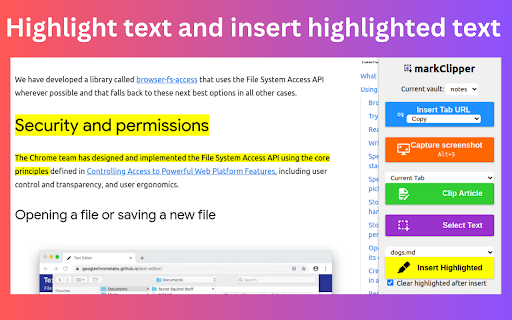
✪ Highlighter and insert highlighted text into notes
✪ Zero config and no separate obsidian plugins are required
✪ No need to keep obsidian app open.
✪ No signup required
✪ Free and Open source:https://github.com/anilkumarum/mark-clipper
✪ You can also insert clipped contents into Joplin or Logseq
✪ Lightweight & 75KB only
✪ Themes
✪ no tracking, no Ads
✪ dark mode

⌨️ keyboard shortcuts
Ctrl+Shift+X ⇒ Open markClipper popup window
Alt + S ⇒ Capture Screenshot
Alt+M ⇒ enable multi select text (no need to open popup window)
Alt + A ⇒  Clip article (Need to open popup window)
Alt + T ⇒ Open side panel (Need to open popup window)
Esc ⇒ Close all open notes in side panel
Ctrl +  Shift + E ⇒ export all open notes in side panel
Ctrl +  E ⇒ export focused note in side panel
Alt +  C ⇒ Copy focused note's content in side panel
Alt + D ⇒ Open note files drawer in side panel
Ctrl+ Z ⇒ undo ctrl+c copy (work only when copy listener on)
Ctrl+ Y ⇒ redo ctrl+c copy (work only when copy listener on)
Ctrl+Shift +Z ⇒ undo highlight
Ctrl+Shift +Y ⇒ redo highlight
Alt + H ⇒ highlight (work only when copy listener on)
Ctrl+ Shift + H ⇒ remove highlight
Shift + Space ⇒ extend selection

...more keyboard shortcuts on extension's options page

Note: This is unofficial markdown web clipper extension for Obsidian.

📌 == FEATURES ==

✅ Save content directly to Obsidian's vault
Give file permission and your work is done.
Extension convert web content into markdown format and directly insert formatted web contents into your vault

✅ Clip article in one click
If you want summarize current webpage or create mindmap then change clip content type.
 keyboard shortcut: Alt +A (works when popup window open)
Clip article from current tab or all open tabs in one click.
you can add frontmatter and download articles' images into "images" folder.

✅ Persistent  text Highlighter
Highlight text and save highlighted text into selected notes.
Highlighted text will be visible when you re-visit webpage
For remove highlight, Select again highlighted text and press Ctrl + Shift + H.
For disable highlight, Go to options page

Fastest highlighter in Chrome web store.
markClipper highlights text without creating new DOM elements.
Read more: https://web.dev/dom-size-and-interactivity/

✅ Save images with correct file path
This extension insert image file into your vault and adds correct image path as markdown link in selected notes
if you need to save images from clipped articles then you need to enable it from extension's options page.
If you want to change download images folder location, config in options page

✅ Zero configuration
No separate obsidian plugins required. No configuration required

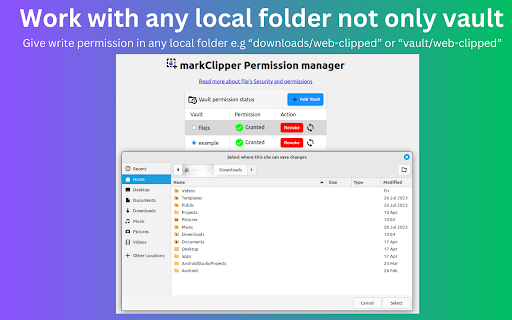
✅ Work with any local folder not only vault
Give write permission in any local folder e.g “downloads/web-clipped” or “vault/web-clipped”
You can use this extension for clip web contents into "Logseq" or "Joplin"

♻️ Permissions
sidePanel:Show side panel
activeTab:Required to read current tab's title and url
scripting:Inject screenshot and markdown converter tools storage:Save extension configurations
contextMenu:Add context menu on images

⌨️ Keyboard shortcuts
Ctrl+Shift+X: Open extension's popup window
Alt + S: Capture screenshot
For config keyboard shortcuts, paste this url in address bar:
chrome://extensions/shortcuts
Alt+I ⇒ Insert frontmatter in open notes (focus require on notes or window)
Alt + Z ⇒toggle word wrap in open notes (focus require on notes or window
Alt+A ⇒ Clip article (work when popup window open)
Alt+T ⇒ Open side panel (work when popup window open)
Alt+M ⇒ Multi select text
Ctrl + B , Ctrl + I ⇒ format bold, italic
Delete ⇒ delete line in note in side panel

Read more about file security
https://developer.chrome.com/articles/file-system-access/#security-considerations

For Brave browser
 File API is disabled by default.
You need to enable this flag "brave://flags/#file-system-access-api" to work in brave browser.

Till chromium 117:Vivaldi doesn't support side panel API

Edge browser
I don't test this extension in Edge browser. Maybe work

Opera browser
I don't test this extension in Opera browser

Arc browser
I cann't  test this extension in Arc browser because arc browser is not available on linux and arc browser doesn't provide extension developer docs

ℹ️ Support
Please report issues on github issues https://github.com/anilkumarum/mark-clipper/issues
For detail guide, visit:https://markclipper.noterail.site/guide
For contact, Please mail us on 📧 [email protected]
Join markClipper on google Groups: https://groups.google.com/g/markclipper

You can change side panel position from settings -> appearance

Obsidian logo is owned by https://obsidian.md

🚀 Version 1.0.16
⇒  FIXED: Can't summarize webpage when chatGPT logged in
⇒  FIXED: Cross-origin clip image
⇒  FIXED: Highlighted text don't show on page reload
⇒  FIXED: Note/Image don't save in user defined folder

🚀 Version 1.0.13
⇒  FIXED: whitespace between texts
⇒  FIXED: metadata not show in obsidian bug fixed
⇒  IMPROVED: Rich bookmark with thumbnail & description
⇒  ADDED: Description added in frontmatter
⇒  ADDED: Frontmatter auto-added when clip article

🚀 Version 1.0.12
⇒  FIXED: multi select text bug fixed
⇒ FIXED: website-specific clip article issue fixed
⇒ ADDED: Extract youtube transcript in clip article option
⇒ ADDED: Summarize youtube video

 1.0.11
⇒ ADDED: ChatGPT AI summary, MindMap and Highlight added
⇒ ADDED: Now you can change Download images folder location
⇒ ADDED: Now you can change new note  filename format
⇒ ADDED: Now you can change new note  folder path
⇒ ADDED: Press Alt + C to copy current focused note

🚀 1.0.10
⇒ 🐛 FIXED: Fix paste issue in side panel note
⇒ 🐛 FIXED: cannot auto clip article from some websites bug fixed
⇒ 🐛 FIXED: Copy listener ui bug fixed
⇒ IMPROVED: Clip article improved
⇒ ADDED: Press Alt + T to close side panel
⇒ ADDED: Press Alt + A to auto clip article from other webpages when side panel open

🚀 Version 1.0.2
⇒ FIXED: Add note in note selectlist(maulti-select,screenshot,right click) when new note created
⇒ FIXED: Note selectlist is empty when extension updated
⇒ FIXED: Nested note now available in popup bookmark note list
⇒ FIXED: 2 layer Nested note path issue fixed in right click context menu
⇒ ADDED: notify via toast when clip images, multi select text
⇒ ADDED: cancel select button added in multi select text
⇒ ADDED: Insert pdf file button show when pdf file open in tab
⇒ markClipper now available in 16+ languages

🚀 1.0.1
🐛 Create new note in side panel issue fixed

🚀 1.0.0
- Minimum chrome version 123
- ADDED: Open notes popup move to left file drawer
- ADDED: Restore opened notes options added
- ADDED: keyboard shortcut added
- ADDED: Create new note inside vault added in file drawer
- FIXED: Give access button in vault permission dialog issue fixed

🚀 0.0.94
🐛 Bug Fixed
- Switch vault checkbox now working
- Highlight switch now working
- Download images issue fixed
- Frontmatter date format issue fixed
- Clip article data improved

✅ Added
- Create new note option in screenshot, multi select text, context menu
- show dialog when vault permission required
- add permission manager page link in options and popup page
⌨️ Shift + Space for extend selection (when copy-listener active)
⌨️ Alt + H for highlight text (when copy-listener active)
🌈 Theme configuration added

🚀  0.0.90
🌈 Markdown syntax color added
🖼️ Download images options added below "add frontmatter"
📖 Toggle word wrap button on right side of note box
⌨️ Format Keyboard shortcut: Format bold (ctrl+B), Format italic (ctrl+I)
⌨️  Delete line Keyboard shortcut: Delete
html to markdown converter improved
🐛Context menu issue added
🐛 Screenshot top cut issue fix
✅ Note filelist (use in context menu, screenshot,multi_select text) refresh button added in permission manager
✅ YYYY/MM/DD date format added
✅ locale: Russain,Japanese,Portuguese added

🚀  0.0.85
🐛 filename .md.md issue fixed
✅ Notelist (show in context menu,screenshot) updated when chrome start
✅ Add notelist sync icon in vault permission manager

🚀  0.0.8
🐛 Fix screenshot issue
✅ locale: hindi,chinese added

🚀  0.0.8
🖍 Save highlighted text
📍Mutli select text
📝 Basic editing helper added e.g open enter open marker (*([_) then closing marker (*)]_) auto added
🎲 Undo(ctrl+z) & Redo (ctrl+Y) support on ctrl+c copy and drag-n-drop text
Ctrl+Shift+X to open popup window
⌨️ Ctrl + C auto-copy into selected note when side panel open
⌨️ Alt + A keyboard shortcut to clip artice (open popup window open)
⌨️ Alt + M keyboard shortcut to enable multi select text (open popup window open)

🚀 0.0.6 release
📁 file rename issue fixed
📖 Brave file api guide added

🚀 0.0.5 release
🖍 Text Highlighter added
🌅 Saved imaged from clipped articles added
🐛 Medium.com bug fixed
🐛 Duplicate permission page issue fixed
📁 Images now saved in `images` folder
⚠️ Read all data from all sites permission removed
Technical
- Version
- 1.0.16
- Manifest
- V3
- Size
- 205KiB
- Min Chrome
- 123
- Languages
- 26
- Featured
- Yes
Metadata
- ID
- mcbhalpamcihagflkpllacdcfmmnjemn
- Developer ID
- u6bf81225d87b1f09b31997a35b22146d
- Developer Email
- [email protected]
- Created
- Aug 21, 2023
- Last Updated (Store)
- Dec 11, 2024
- Last Scraped
- May 28, 2026
- Website
- noterail.co
- Privacy Policy
- https://noterail.co/privacy/mark-clipper
Similar extensions
Alternatives to markClipper - obsidian web clipper, ranked by description similarity.

oneClipper - ai web clipper for oneNote
Template-based clip web content to OneNote with AI. Screenshots, text & images. Superior to official OneNote clipper. Multi Accounts
2.0K
★ 3.8

keepClipper - web clipper for google keep
keepClipper append clipped web contents in existing Google Keep's notes or create note. Capture screenshot. AI summary. Highlighter
1.0K
★ 3.8

notionClipper - notion web clipper
notionClipper insert clipped web contents directly into existing or new notion pages. Screenshot & Highlighter.
2.0K
★ 5.0

markerNote - web, PDF highlighter & notes
Persistent PDF highlighter. Highlight text & insert into notes in markdown format. Auto-organize notes by date, domain. sync Gdrive
2.0K
★ 4.4

Mark It Down — Markdown Editor & Web Clipper
Clip pages, AI chats, and RSS articles to Markdown. Edit in New Tab & Side Panel. Export PDF, DOCX, PNG. Local-first.
99

MarkClipper for Obsidian
Clip web content and convert it to Obsidian-compatible Markdown notes.
107

Clippy
Automatically saves your clipboard history. Access, search, and manage everything you've copied.
9

Clip'd
Select text/images from web pages and copy it directly for export, to clipboard, or as a text file with AI OCR support!!
12
Data sourced from the Chrome Web Store · last verified May 28, 2026.