
MovieLingo: Learn languages with Netflix
MovieLingo is a Chrome extension designed to learn foreign languages by watching Netflix.
As of June 2026, MovieLingo: Learn languages with Netflix has 1,000 users and a 4.00/5 rating from 8 reviews in the Workflow & Planning category.
Usersno change0%
1.0K
1,000
Ratingno change0%
4.00
8 reviews
Reviewsno change0%
8
Version
1.0.7
Manifest V3
90-day change · In the last 90 days this extension 1 version update.
History
3 snapshotsTracking since Apr 18, 2026.
View as table
| Date | Users | Rating | Reviews | Version |
|---|---|---|---|---|
| Apr 18, 2026 | 1.0K | 4.00 | 8 | 1.0.5 |
| May 3, 2026 | 1.0K | 4.00 | 8 | 1.0.5 |
| May 12, 2026 | 1.0K | 4.00 | 8 | 1.0.5 |
| Now | 1.0K | 4.00 | 8 | 1.0.7 |
Permissions & access
- Permissions
- storagecookies
- Host access
- *://*.amazon.co.jp/*, *://*.amazon.co.uk/*, *://*.amazon.com/*, *://*.amazon.de/*, *://*.apple.com/*, *://*.bamgrid.com/*, *://*.disneyplus.com/*, *://*.hbo.com/*, *://*.hbomax.com/*, *://*.hulu.com/*, *://*.netflix.com/*, *://*.paramountplus.com/*, *://*.peacocktv.com/*, *://*.primevideo.com/*, *://*.tubitv.com/*, *://*.pluto.tv/*, *://*.deepl.com/*, *://*.movielingo.app/*
Screenshots


About
Stop feeling guilty binging a show on Netflix. With MovieLingo, it's learning.

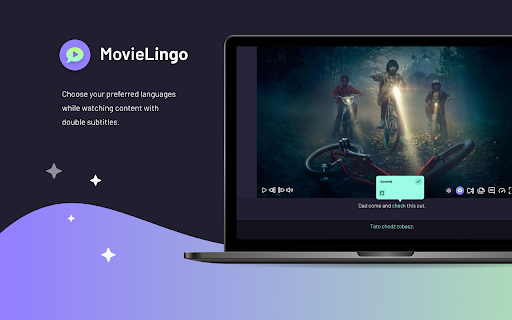
Re-watch your favorite shows for the hundredth time by switching the language. With MovieLingo, you choose what to learn by picking movies and TV series of interest.

How to get started?
1. Add MovieLingo to Chrome.
2. Sign in to your streaming platform.
3. Start a movie or TV Series.
4. Two new icons will appear directly in the player right before the “Next Episode” button (Netflix):
   • The MovieLingo icon works as a switch to enable the extension features. To start learning, make sure the plugin is on.
   • The settings icon allows you to set the languages and customize the dual subtitles.

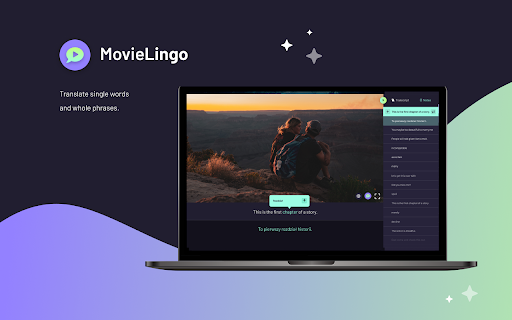
Hit play when you’re ready, and follow the dialogue as you watch. You can save new words and phrases as notes. Your notes will be visible on the collapsible side panel.

There's no better way to study than by entertainment. So pick a show or movie to watch and master Spanish, French, German… or all of them at once!

Note: This extension is not affiliated with, endorsed by, or connected to any of the companies or products mentioned. All trademarks and registered trademarks belong to their respective owners.
Technical
- Version
- 1.0.7
- Manifest
- V3
- Size
- 44.42MiB
- Min Chrome
- 88
- Languages
- 5
- Featured
- No
Metadata
- ID
- mcbfjeiacbbjiaijjhapookfbbmioalj
- Developer ID
- u04d4fee914ab858dccf27dee90ef6729
- Developer Email
- [email protected]
- Created
- Jul 20, 2023
- Last Updated (Store)
- May 7, 2026
- Last Scraped
- Jun 6, 2026
- Website
- —
- Support URL
- —
- Privacy Policy
- https://www.movielingo.app/privacy-policy
Similar extensions
Alternatives to MovieLingo: Learn languages with Netflix, ranked by description similarity.
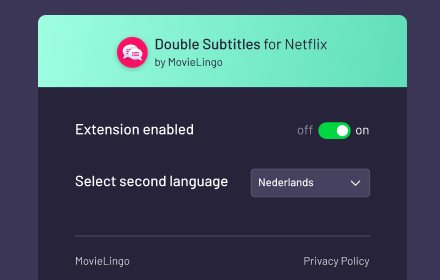
Double Subtitles for Netflix by MovieLingo
Extension allows for displaying additional subtitles above the standard Netflix ones.
991
★ 3.5

DuoTok: watch Netflix to learn languages
Learn languages while watching your favorite TV shows on Netflix
120
★ 5.0

Masterlang - Learn new languages with movies
The chrome extension to expand your vocabulary and master the language expressions. Available on Netflix, Prime Video and Disney+
291
★ 3.0

Iago - Learn Japanese through TV
Immerse in your favorite TV shows and videos with Iago! Starting with Japanese!
10.0K
★ 4.5

SubsGPT
Copy subtitles from Netflix to ChatGPT with one click
7
★ 4.5

DuoSub
Watch streaming video with fully customizable dual subtitles — supports 100+ languages on Netflix, streamimdb.ru and more.
20
★ 5.0

LingoTube Dictionary
Dictionary Lookup, Text Translation, Vocabulary analyzer, Youtube dual caption player
268

Language Binge
Binge-watch your favorite TV shows and learn a new language!
—
Data sourced from the Chrome Web Store · last verified Jun 6, 2026.