
Pivotal Tracker Styler
Pivotal Tracker Styler enhances the look and feel of Pivotal Tracker, making it more enjoyable and visually appealing.
As of May 2026, Pivotal Tracker Styler has 88 users and a 5.00/5 rating from 7 reviews in the Workflow & Planning category.
Usersup 44.3 percent+44.3%
88
88
Ratingno change0%
5.00
7 reviews
Reviewsno change0%
7
Version
1.22
Manifest V3
History
2 snapshotsTracking since Apr 30, 2026.
View as table
| Date | Users | Rating | Reviews | Version |
|---|---|---|---|---|
| Apr 30, 2026 | 61 | 5.00 | 7 | 1.22 |
| May 28, 2026 | 92 | 5.00 | 7 | 1.22 |
| Now | 88 | 5.00 | 7 | 1.22 |
Permissions & access
- Permissions
- storage
- Host access
- None declared
Screenshots

About
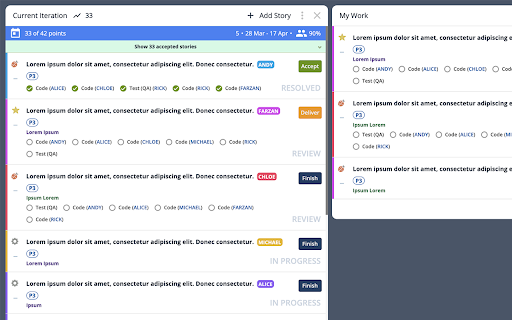
Pivotal Tracker Styler is a user-friendly Chrome extension designed to transform the appearance of Pivotal Tracker, making it more visually appealing and enjoyable to use. Recognizing that a well-designed dashboard can positively impact productivity and overall user experience, this extension offers an array of customizable features that allow users to tailor the look of their Pivotal Tracker projects (and workspaces).

Key features include:

- Enhanced background and text colors for better text readability
- Color-coded ticket-owner labels for easy identification
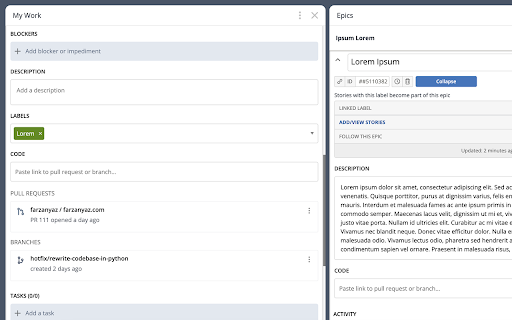
- Expanded ticket details and comments section
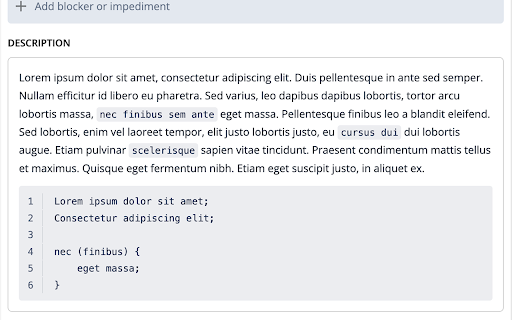
- Better inline code and code block styling with line numbers
- Streamlined ticket actions for efficiency
- Optional SCRUM ticket status displayed as gray text (excluding unstarted tickets)
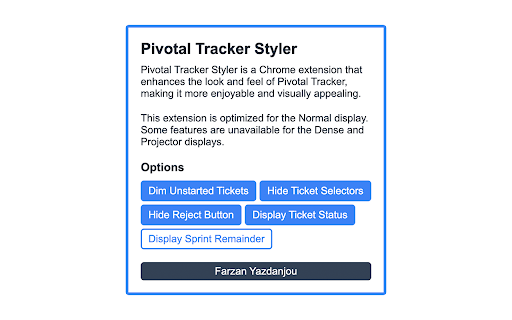
- Optional removal of REJECT button from ticket preview - still available in the expanded view
- Optional removal of ticket selector button for a cleaner interface (re-activatable during ticket organization)
- Optional feature to gray out unstarted tickets, promoting the completion of in-progress tasks
- Optional feature to discretely display how many days remain until the end of each sprint

By installing Pivotal Tracker Styler, users can elevate their project management experience and increase their efficiency while working with Pivotal Tracker. Say goodbye to the monotonous interface and embrace a visually appealing, customized environment that boosts your spirits and improves your workflow.
Technical
- Version
- 1.22
- Manifest
- V3
- Size
- 63.51KiB
- Min Chrome
- 88
- Languages
- 1
- Featured
- No
Metadata
- ID
- mcbdmjomdgjhpefpjocmpfgbabbddlpl
- Developer ID
- uced29f0d83266b331cec19f1a46d74a1
- Developer Email
- [email protected]
- Created
- Apr 15, 2023
- Last Updated (Store)
- Jun 6, 2024
- Last Scraped
- May 28, 2026
- Website
- farzanyaz.com
- Support URL
- —
- Privacy Policy
- https://farzanyaz.com/privacy-policy
Similar extensions
Alternatives to Pivotal Tracker Styler, ranked by description similarity.

Zendesk Ticket Color Coder
Zendesk Ticket Color Coder - reduces mistakes, highlights high priority tickets instantly
23
★ 4.0

Jira Tracker Plus
Monitor and manage Jira issues across multiple instances directly from Chrome with real-time updates.
6

Peanut Gallery
The ultimate tool for seamless ticket creation right from any web page
6
★ 5.0

Task Tracker
A fun way to complete tasks and unlock new themes with points earned!
—

Productivity New Tab
A glassmorphic productivity dashboard with ToDo and Pomodoro timer.
5

Ticketer
Ticket tracking and productivity helper
10

Jira Tracker - Fast Issue Tracking for Developers
Track Jira issues, view updates, and monitor sprint progress directly from any tab - no Jira tab required.
8
★ 5.0

Chrome text to Jira
Select text from any webpage and use ChatGPT to analyze it, then create a Jira ticket
—
Data sourced from the Chrome Web Store · last verified May 28, 2026.